
Vintage Editorial Portrait Collage
A sophisticated prompt for creating a 2x2 collage of a male model in a 1970s corporate aesthetic, featuring forest green suits and moody studio lighting.
Likes
0
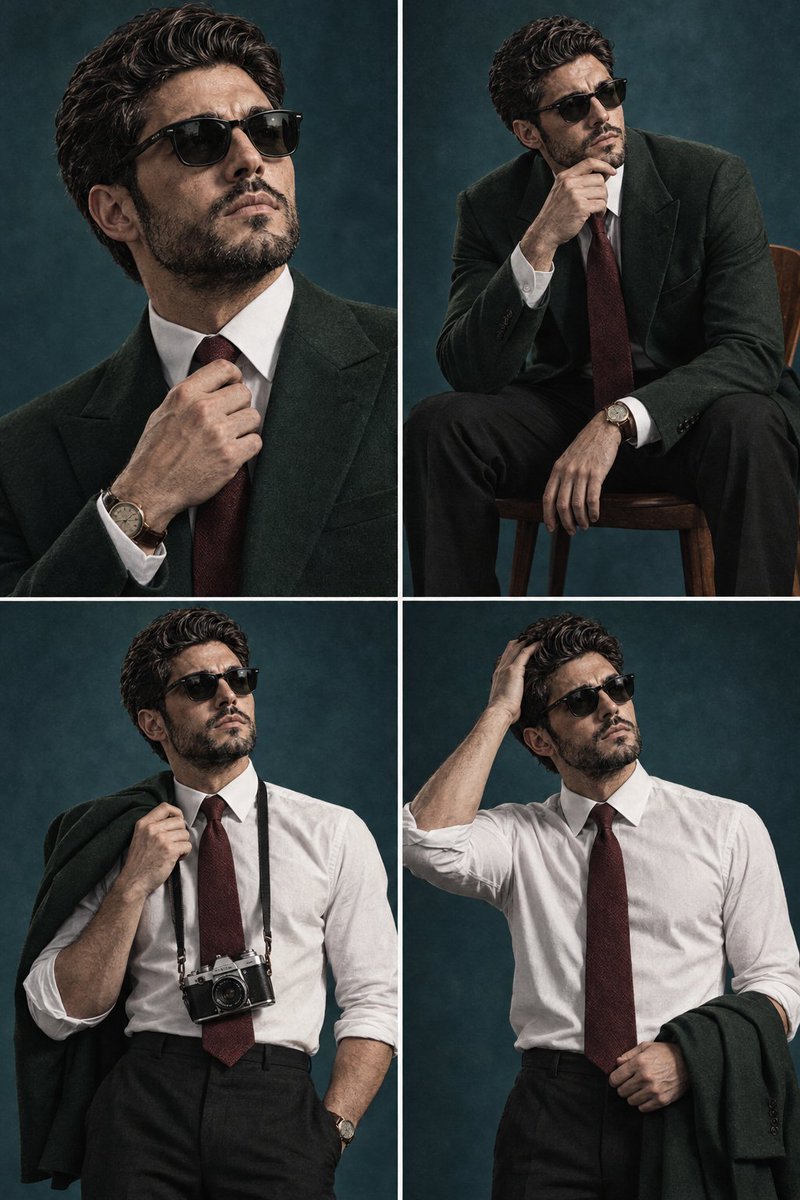
A sophisticated prompt for creating a 2x2 collage of a male model in a 1970s corporate aesthetic, featuring forest green suits and moody studio lighting.
Create a cinematic 2x2 editorial portrait collage of the same fictional young male model, with consistent facial features and hairstyle across all four panels. He has neatly styled dark side-parted hair, sharp masculine features, clean-shaven face, and a serious, thoughtful expression. Moody {argument name="era" default="1970s-inspired"} corporate fashion photography, {argument name="background color" default="teal-blue"} studio background, dramatic directional lighting, subtle film grain, deep shadows, muted colors, realistic skin texture, high-end fashion editorial aesthetic. Top-left: close-up portrait, wearing a {argument name="suit color" default="dark forest-green"} tailored suit, white dress shirt and burgundy tie, adjusting his tie with one hand, vintage wristwatch visible. Top-right: seated on a wooden chair, leaning forward thoughtfully with one hand near his chin, wearing the same green suit, white shirt and burgundy tie, black trousers, wristwatch visible. Bottom-left: standing confidently with the green suit jacket draped over one shoulder, sleeves rolled up, white shirt and burgundy tie, vintage film camera hanging around his neck, black trousers. Bottom-right: standing in the white shirt and burgundy tie with sleeves rolled up, green suit jacket over one arm, one hand running through his hair, contemplative expression. Symmetrical 2x2 grid layout, thin white dividers between panels, consistent character identity, realistic photography, 50mm lens look, shallow depth of field, cinematic lighting, subtle analog film texture, sophisticated vintage atmosphere, ultra-detailed, photorealistic, 4K.
This is a free AI prompt from the Orelon library. Thousands more image prompts here are free to copy and adapt.
Explore more image prompts

Ready to create
Start with this curated direction in Orelon, then shape it into your next visual.