
Commercial Pink Berry Smoothie Photography
A detailed commercial photography prompt for a high-end food scene, showcasing a pink berry smoothie and peanut butter jar with precise product and environmental descriptions.
Likes
0
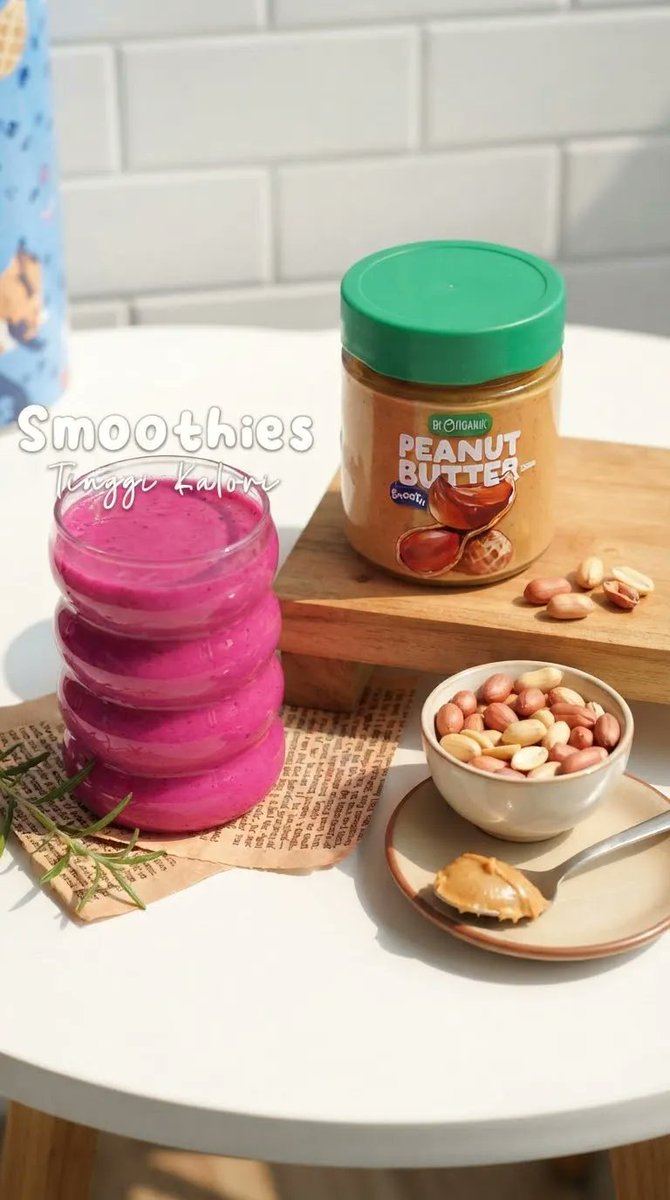
A detailed commercial photography prompt for a high-end food scene, showcasing a pink berry smoothie and peanut butter jar with precise product and environmental descriptions.
Create an ultra-realistic, high-end food photography scene in a bright, cozy modern kitchen. A {argument name="drink type" default="vibrant thick pink berry smoothie"} is served in a {argument name="glassware" default="stack of three small transparent glass jars"}, arranged vertically on the left side of a clean white round table. The smoothie has a rich creamy texture with subtle berry speckles and glossy highlights. On the right, place a clear jar of {argument name="complementary food" default="organic peanut butter"} with a green lid, filled with golden-brown creamy peanut butter. Preserve the product packaging, label placement, colors, and proportions accurately. Scatter a few whole peanuts naturally beside the jar. In the foreground, include a small ceramic bowl filled with mixed roasted peanuts and a beige ceramic plate holding a spoon with a generous scoop of creamy peanut butter. Add a few delicate green herb sprigs near the smoothie. Background: clean white subway-tile kitchen wall, soft natural sunlight coming from the side, subtle shadows, warm cozy atmosphere. Place the food items on a small wooden serving board with a sheet of vintage printed paper underneath. Add elegant handwritten-style white text in the upper-left area reading "Smoothies", with smaller cursive text underneath reading "Tingi Kalori. Vertical 9:16 composition, premium commercial food photography, realistic textures, natural daylight, shallow depth of field, soft bokehcrisp product details, balanced composition, warm lifestyle aesthetic, photorealistic, high resolution, no people
This is a free AI prompt from the Orelon library. Thousands more image prompts here are free to copy and adapt.
Explore more image prompts

Ready to create
Start with this curated direction in Orelon, then shape it into your next visual.