
Sparkling Beverage Ad Banner
Generates a refreshing commercial banner for a sparkling beverage featuring a model, product shot, and promotional Japanese text.
Likes
795
Views
140K
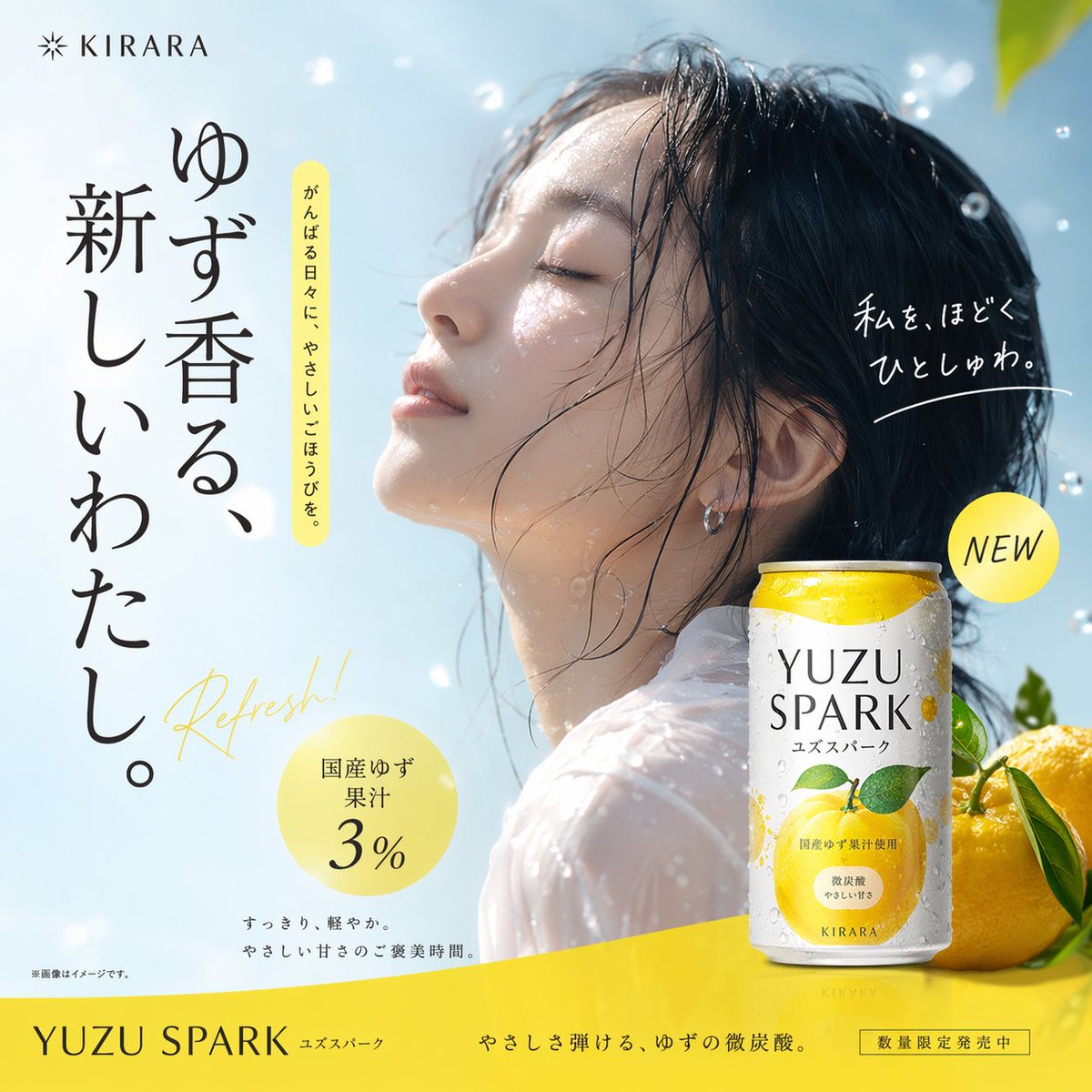
Generates a refreshing commercial banner for a sparkling beverage featuring a model, product shot, and promotional Japanese text.
{ "type": "beverage advertisement banner", "visuals": { "model": "young Asian woman, wet hair clinging to face, water droplets on skin, {argument name=\"model pose\" default=\"eyes closed, face tilted upwards, serene expression\"}, wearing a white top", "product": "white and yellow aluminum can with condensation, featuring a graphic of a {argument name=\"fruit type\" default=\"yuzu\"} fruit and leaves", "props": "2 fresh yuzu fruits with green leaves placed next to the can", "background": "{argument name=\"background scene\" default=\"bright blue sky with floating out-of-focus water droplets and bright sunlight\"}" }, "layout": { "sections": [ { "title": "Top Left Logo", "position": "top-left", "count": 1, "labels": ["KIRARA"] }, { "title": "Main Copy", "position": "left", "count": 3, "labels": [ "{argument name=\"main headline\" default=\"ゆず香る、新しいわたし。\"}", "がんばる日々に、やさしいごほうびを。", "Refresh!" ] }, { "title": "Right Copy", "position": "mid-right", "count": 1, "labels": ["私を、ほどくひとしゅわ。"] }, { "title": "Badges", "position": "various", "count": 2, "labels": [ "NEW", "国産ゆず果汁 3%" ] }, { "title": "Bottom Banner", "position": "bottom", "count": 4, "labels": [ "{argument name=\"product name\" default=\"YUZU SPARK\"}", "ユズスパーク", "やさしさ弾ける、ゆずの微炭酸。", "数量限定発売中" ] } ] } }
This is a free AI prompt from the Orelon library. Thousands more image prompts here are free to copy and adapt.
Explore more image prompts

Ready to create
Start with this curated direction in Orelon, then shape it into your next visual.