
Dance Movement Reference Sheet
A technical prompt to generate a 4x4 character movement sheet in a monochromatic 3D rendered style, ideal for animation and game concept art.
Likes
785
Views
40K
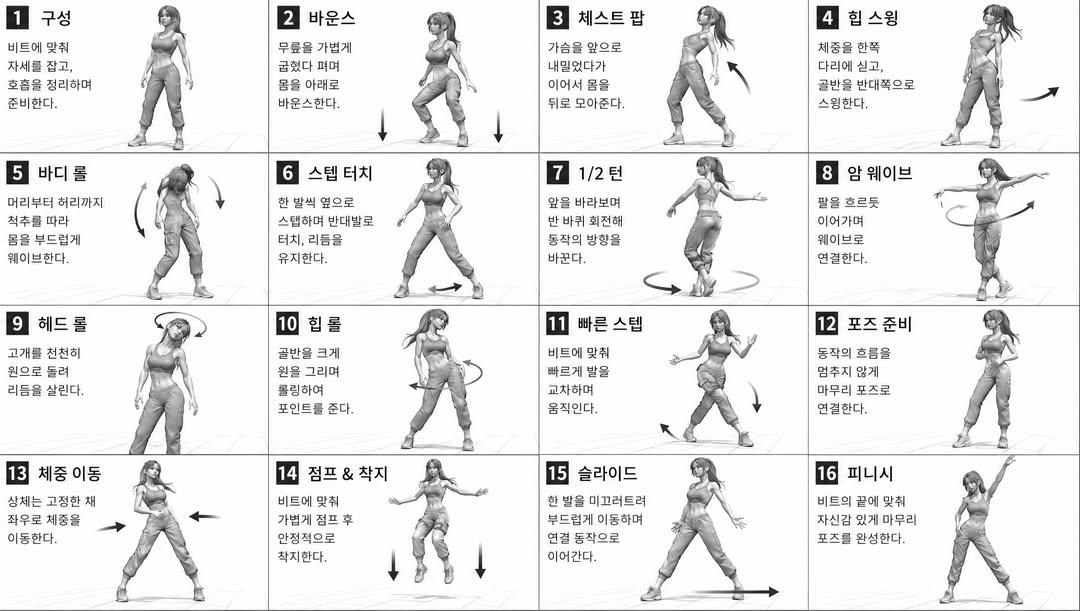
A technical prompt to generate a 4x4 character movement sheet in a monochromatic 3D rendered style, ideal for animation and game concept art.
[STYLE] monochromatic grayscale illustration, 3D rendered character, clean instructional reference sheet, white background, comic-style cell grid layout, technical diagram aesthetic [LAYOUT] 4x4 grid layout, 16 panels total, each panel separated by thin black border lines, numbered cells from 1 to 16, consistent panel size [CHARACTER] {argument name="character" default="young female dancer, athletic build, ponytail hairstyle, crop top and baggy pants, sneakers"}, same character in all panels [PANEL STRUCTURE - per cell] top-left: bold number badge + {argument name="title" default="Korean title text"} center: full-body character pose illustration bottom-left: {argument name="description" default="Korean description text (3-4 lines)"} overlay: directional arrows indicating movement direction [ARROWS / MOTION INDICATORS] curved arrows, straight arrows, circular rotation indicators, placed around the character to show movement flow and direction [RENDERING STYLE] high detail 3D sculpt style, soft studio lighting, subtle shadows, no color, grayscale shading, clean linework, game concept art quality [NEGATIVE] no background scenery, no color tones, no extra characters, no cluttered backgrounds
This is a free AI prompt from the Orelon library. Thousands more image prompts here are free to copy and adapt.
Explore more image prompts



Ready to create
Start with this curated direction in Orelon, then shape it into your next visual.