
Shanghai Night Travel Journal
Generates a dreamy handwritten travel-note style Shanghai skyline image for social media travel posts.
Likes
405
Views
62.1K
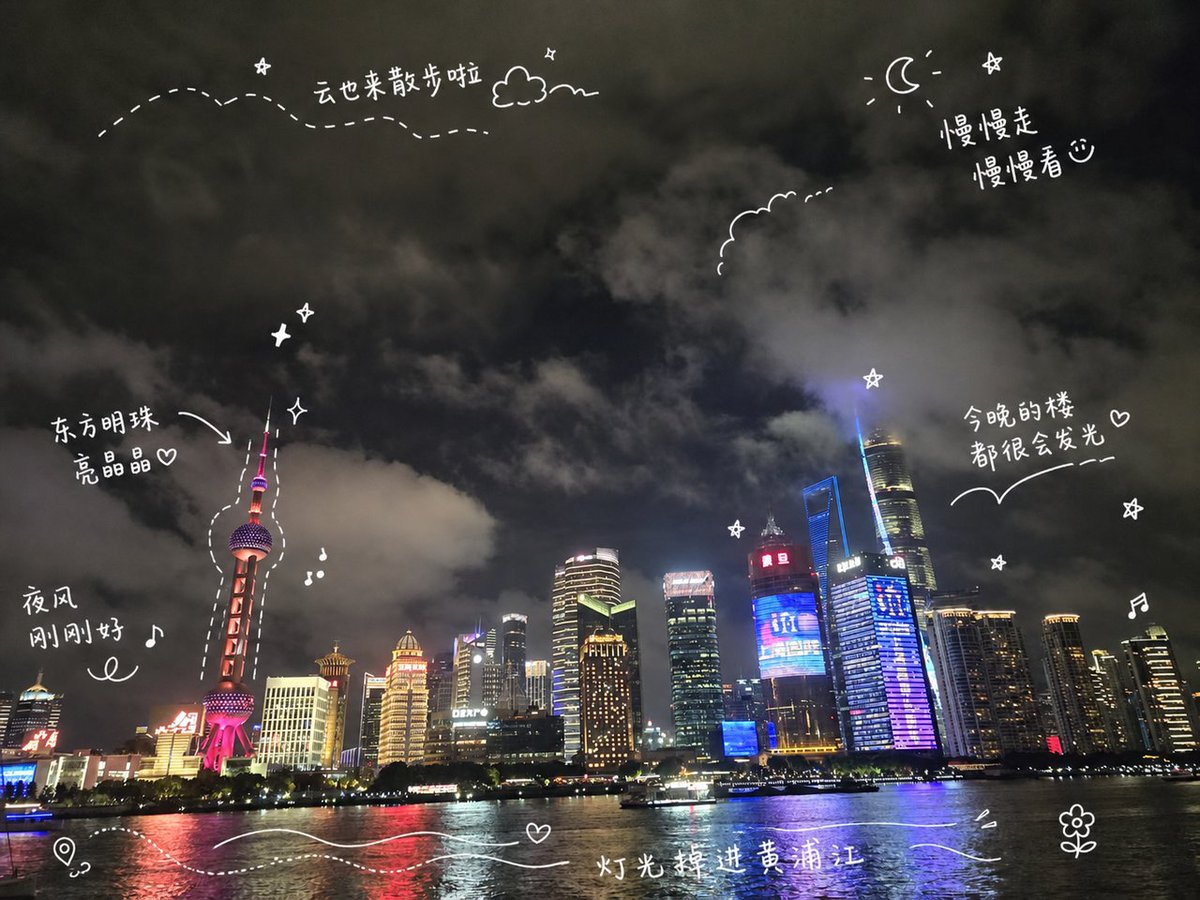
Generates a dreamy handwritten travel-note style Shanghai skyline image for social media travel posts.
Create a travel-journal style night cityscape poster of {argument name="city skyline" default="Shanghai Pudong skyline along the Huangpu River"}. Use a wide 4:3 canvas showing a realistic nighttime waterfront photo look: dark cloudy sky filling the top two thirds, illuminated skyscrapers along the horizon, the Oriental Pearl Tower on the left glowing pink-red, Shanghai Tower and other high-rises on the right with blue, purple, gold, and white lights, and reflective river water across the bottom with a small sightseeing boat. Add playful white hand-drawn diary doodles and handwritten Chinese annotations directly over the scene, like a social media travel note. Include exactly 6 handwritten text notes: “云也来散步啦” near the upper left with a dotted wandering path and small cloud, “慢慢走 慢慢看♡” near the upper right beside a crescent moon and star, “东方明珠 亮晶晶♡” pointing with an arrow to the Oriental Pearl Tower, “夜风 刚刚好♪” on the left above the river, “今晚的楼 都很会发光♡” on the right above the skyline with a curved underline, and “灯光掉进黄浦江” centered near the bottom over the water. Include exactly 15 white doodle elements: a dotted flight path across the upper left, one small outlined cloud near the top, one crescent moon at the upper right, one scalloped cloud outline near the upper center-right, one arrow pointing to the Oriental Pearl Tower, one dashed outline tracing around the Oriental Pearl Tower, three small sparkle/star icons, two music-note icons, one map-pin icon at the bottom left, two flowing wave lines across the bottom water, and one small flower doodle at the bottom right. Keep all doodles thin, casual, hand-drawn, slightly imperfect, and bright white, with no borders or watermark. The mood should be dreamy, cozy, romantic, and spontaneous, like a handwritten travel memory shared on social media.
This is a free AI prompt from the Orelon library. Thousands more image prompts here are free to copy and adapt.
Explore more image prompts


Ready to create
Start with this curated direction in Orelon, then shape it into your next visual.