Effects by Tags
Leaked AI Benchmark Report Photo
Likes
1
Views
387
 Orelon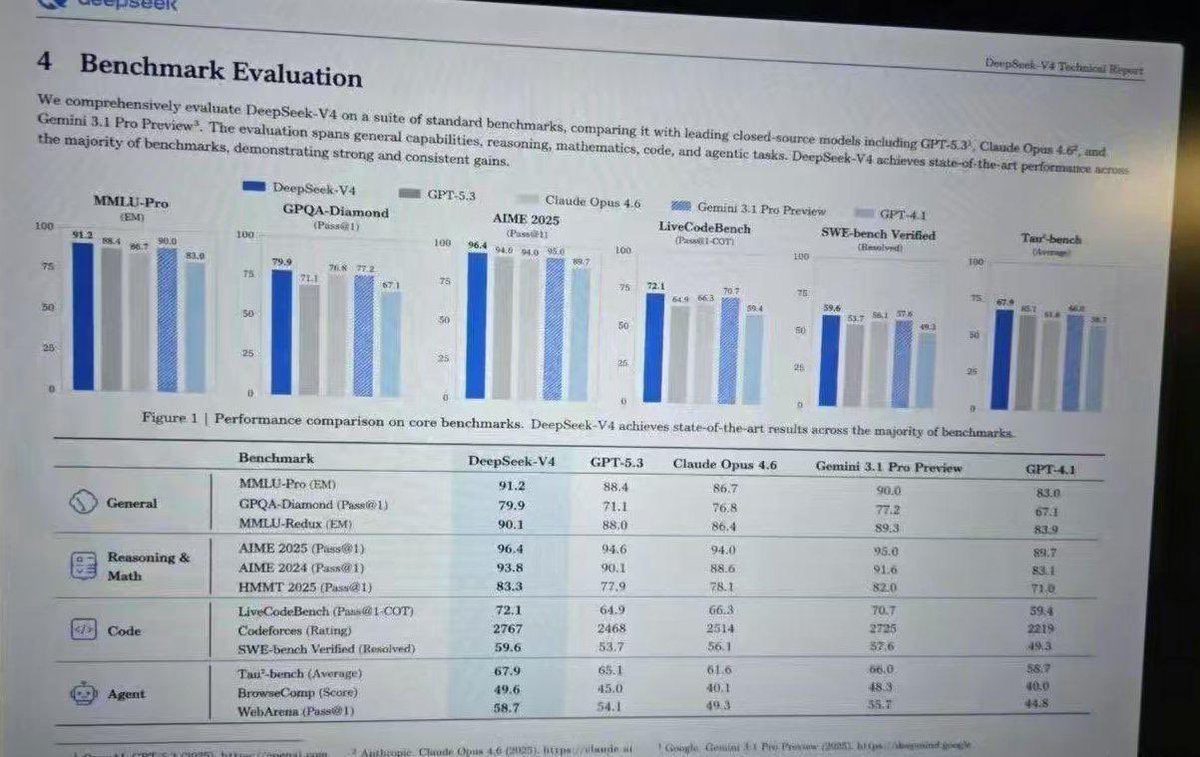
Effects by Tags
{ "type": "photograph of a computer monitor displaying an academic technical report", "style": "slightly angled screen photo, visible moire pattern, LCD pixel grid, slight glare, LaTeX document formatting, serif fonts", "document_header": { "left": "4 Benchmark Evaluation", "right": "{argument name=\"report title\" default=\"DeepSeek-V4 Technical Report\"}" }, "introductory_text": "Paragraph summarizing comprehensive evaluation of {argument name=\"main model name\" default=\"DeepSeek-V4\"} against {argument name=\"competitor model 1\" default=\"GPT-5.3\"}, {argument name=\"competitor model 2\" default=\"Claude Opus 4.6\"}, and {argument name=\"competitor model 3\" default=\"Gemini 3.1 Pro Preview\"}.", "visualizations": { "legend": "5 items with color codes: dark blue, grey, light grey, blue striped, light blue", "bar_charts": { "count": 6, "labels": [ "MMLU-Pro (EM)", "GPQA-Diamond (Pass@1)", "AIME 2025 (Pass@1)", "LiveCodeBench (Pass@1-COT)", "SWE-bench Verified (Resolved)", "Tau-bench (Average)" ] }, "caption": "Figure 1 | Performance comparison on core benchmarks. DeepSeek-V4 achieves state-of-the-art results across the majority of benchmarks." }, "data_table": { "columns": [ "Benchmark", "{argument name=\"main model name\" default=\"DeepSeek-V4\"}", "{argument name=\"competitor model 1\" default=\"GPT-5.3\"}", "{argument name=\"competitor model 2\" default=\"Claude Opus 4.6\"}", "{argument name=\"competitor model 3\" default=\"Gemini 3.1 Pro Preview\"}", "GPT-4.1" ], "categories": { "count": 4, "rows": [ {"label": "General", "icon": "globe/network", "sub_items": 3}, {"label": "Reasoning & Math", "icon": "calculator/clipboard", "sub_items": 3}, {"label": "Code", "icon": "code brackets", "sub_items": 3}, {"label": "Agent", "icon": "robot face", "sub_items": 3} ] } } }
This is a free AI prompt from the Orelon library. Thousands more image prompts here are free to copy and adapt.
Explore more image prompts





Ready to create
Start with this curated direction in Orelon, then shape it into your next visual.