Effects by Tags
Nocturnal New York 3D Archive Map
Likes
3
Views
43
 Orelon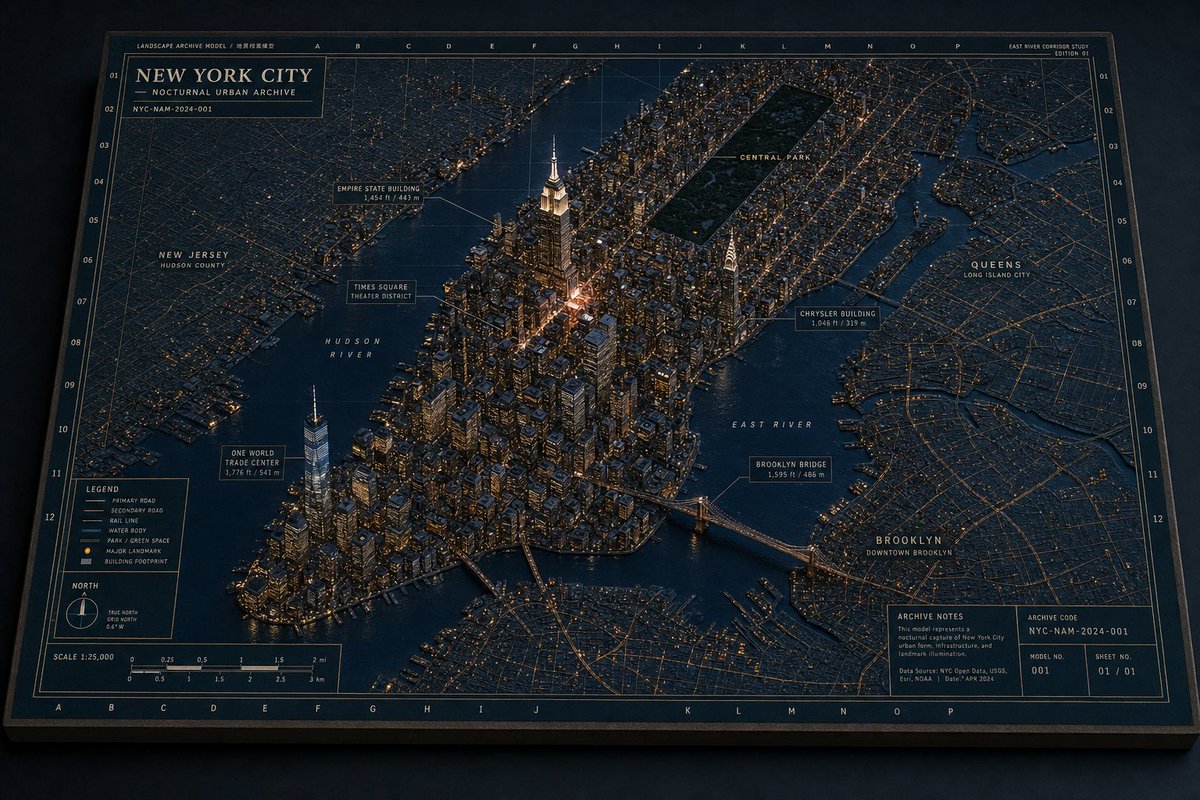
Effects by Tags
Goal: Create a cinematic 3D miniature architectural map of {argument name="city name" default="New York City"}, presented as a nocturnal urban archive board with raised buildings, glowing streets, waterways, landmark callouts, and technical cartographic annotations. Canvas: Landscape 16:9 image, viewed from an elevated oblique angle as if looking down at a physical diorama map on a dark tabletop. Use a deep navy, charcoal, warm brass, and amber-light palette. The board has a thick dark frame, thin gold border lines, grid coordinates along the top/bottom and left/right edges, and a premium museum-archive feel. Main subject: A highly detailed raised-relief 3D map of Manhattan and surrounding boroughs at night. Manhattan is centered and built as a dense miniature city with hundreds of extruded buildings, warm window lights, streetlight networks, bridges, docks, and dark reflective water. The tallest illuminated focal tower is the {argument name="central landmark" default="Empire State Building"} near the center, with a bright warm glow around Midtown. The southern tip includes a tall One World Trade Center tower. A long dark rectangle labeled Central Park sits in upper Manhattan. Surrounding flat map areas show New Jersey to the left, Queens to the right, and Brooklyn at lower right, with street grids drawn as thin golden lines. Top title block: In the upper-left corner, add a boxed archive label reading exactly “NEW YORK CITY” with the subtitle “NOCTURNAL URBAN ARCHIVE” and a small archive code line “NYC-NAM-2024-001.” Add tiny header text along the top edge such as “LANDSCAPE ARCHIVE MODEL / 地景档案模型,” column letters across the top, and a small study label at the upper-right reading “EAST RIVER CORRIDOR STUDY” and “EDITION 01.” Callouts and labels: Include exactly 11 named map labels/callout boxes: 1) “NEW JERSEY / HUDSON COUNTY,” 2) “HUDSON RIVER,” 3) “ONE WORLD TRADE CENTER / 1,776 ft / 541 m,” 4) “TIMES SQUARE / THEATER DISTRICT,” 5) “EMPIRE STATE BUILDING / 1,454 ft / 443 m,” 6) “CENTRAL PARK,” 7) “CHRYSLER BUILDING / 1,046 ft / 319 m,” 8) “EAST RIVER,” 9) “BROOKLYN BRIDGE / 1,595 ft / 486 m,” 10) “QUEENS / LONG ISLAND CITY,” 11) “BROOKLYN / DOWNTOWN BROOKLYN.” Use thin leader lines connecting callout boxes to landmarks. Bottom information panels: Add exactly 4 technical panels along the bottom edge: 1) a legend panel with 6 symbol entries labeled “PRIMARY ROAD,” “SECONDARY ROAD,” “RAIL LINE,” “WATER BODY,” “PARK / GREEN SPACE,” and “MAJOR LANDMARK / BUILDING FOOTPRINT”; 2) a north arrow panel showing true north and grid north; 3) a scale panel labeled “SCALE 1:25,000” with imperial and metric scale bars; 4) an archive notes panel with small text including “ARCHIVE NOTES,” “This model represents a nocturnal capture of New York City urban form, infrastructure, and landmark illumination,” plus boxes for “ARCHIVE CODE NYC-NAM-2024-001,” “MODEL NO. 001,” and “SHEET NO. 01 / 01.” Visual style: Ultra-detailed photorealistic miniature model mixed with technical blueprint/map design, crisp micro typography, precise gold linework, physical paper texture, slight bevels and shadows, moody night lighting, realistic reflections on rivers, and warm amber building illumination. The city should feel like a carefully directed miniature urban world, not a flat map. Constraints: Keep all text in English except the tiny bilingual archive header already specified. Do not add people, vehicles as focal subjects, logos, or watermarks. Maintain consistent architectural-diorama language across the entire image. Use {argument name="lighting mood" default="dark nocturnal amber city lights"} and an archival cartography aesthetic with {argument name="map base color" default="deep navy blue"} background and {argument name="linework color" default="aged brass gold"} annotations.
This is a free AI prompt from the Orelon library. Thousands more image prompts here are free to copy and adapt.
Explore more image prompts





Ready to create
Start with this curated direction in Orelon, then shape it into your next visual.