Camera Control
Social Media App Interface Mockup
Likes
1
Views
351
 Orelon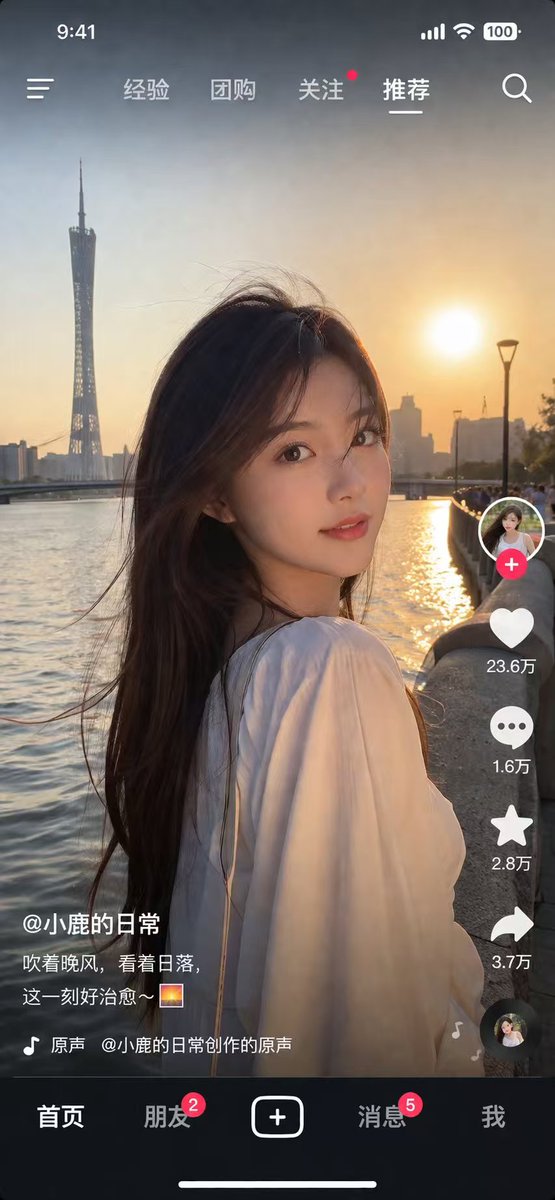
Camera Control
{ "type": "social media video app interface screenshot", "main_visual": { "subject": "young Asian woman, long dark hair blowing in wind, white top, looking over shoulder at camera", "setting": "{argument name=\"background location\" default=\"Guangzhou Canton Tower by the river at sunset\"}", "lighting": "golden hour, warm sunset glow" }, "ui_layout": { "top_status_bar": { "elements": 4, "labels": ["9:41", "signal", "wifi", "100 battery"] }, "top_navigation": { "elements": 6, "labels": ["menu icon", "经验", "团购", "关注", "{argument name=\"active tab\" default=\"推荐\"}", "search icon"] }, "right_interaction_bar": { "elements": 6, "labels": ["profile photo with red plus", "heart icon with {argument name=\"like count\" default=\"23.6万\"}", "comment icon with 1.6万", "star icon with 2.8万", "share icon with 3.7万", "spinning music record"] }, "bottom_left_text": { "elements": 3, "labels": ["{argument name=\"username\" default=\"@小鹿的日常\"}", "{argument name=\"caption\" default=\"吹着晚风,看着日落,这一刻好治愈~ 🌅\"}", "music note icon with 原声 @小鹿的日常创作的原声"] }, "bottom_navigation": { "elements": 5, "labels": ["首页", "朋友 with red badge 2", "square plus button", "消息 with red badge 5", "我"] } } }
This is a free AI prompt from the Orelon library. Thousands more image prompts here are free to copy and adapt.
Explore more image prompts





Ready to create
Start with this curated direction in Orelon, then shape it into your next visual.