Commercial
Airy Reflective Wedding Save the Date
Likes
22
Views
2K
 Orelon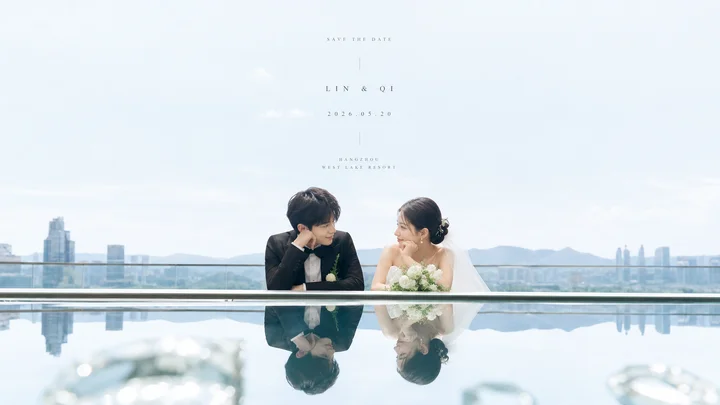
Commercial
Create a bright, airy cinematic wedding save-the-date photograph with a clean mirror-reflection surprise. Use a wide horizontal 16:9 canvas. The upper two-thirds should be pale blue sky and high-key negative space with a soft, slightly hazy city skyline and distant mountains near the horizon. In the lower middle, place an Asian bride and groom leaning on a sleek glass balcony railing beside an infinity pool or highly reflective glass/water surface; the railing forms a crisp horizontal line that divides the real scene above from the inverted reflection below. The groom is on the left in a black suit with a white boutonniere, resting his chin on one hand and smiling toward the bride. The bride is on the right in an elegant white strapless wedding dress with veil, hair in a low bun, holding a rounded white flower bouquet, smiling back at him. Show exactly two people: one groom and one bride. Below the horizontal line, show their clear upside-down reflection in the still reflective surface, with faint blurred glass highlights in the extreme foreground. Center small, delicate, widely spaced serif text in the open sky: top line “SAVE THE DATE”, middle line “LIN & QI”, date line “2026.05.20”, then a tiny vertical divider, then venue lines “SHANGHAI” and “WEST LAKE RESORT”. Allow customization of the couple names as {argument name="couple names" default="LIN & QI"}, the date as {argument name="wedding date" default="2026.05.20"}, the venue city as {argument name="venue city" default="SHANGHAI"}, the venue name as {argument name="venue name" default="WEST LAKE RESORT"}, and the overall subject as {argument name="theme object" default="wedding couple"}. Visual style: luminous editorial wedding photography, soft natural daylight, pastel blue-white palette, minimal composition, shallow depth of field, refined luxury, no borders, no watermark, no extra people or extra text.
This is a free AI prompt from the Orelon library. Thousands more image prompts here are free to copy and adapt.
Explore more image prompts




Ready to create
Start with this curated direction in Orelon, then shape it into your next visual.