Camera Control
Macro Portrait with Impasto Acrylic Paint Texture
Likes
1
Views
126
 Orelon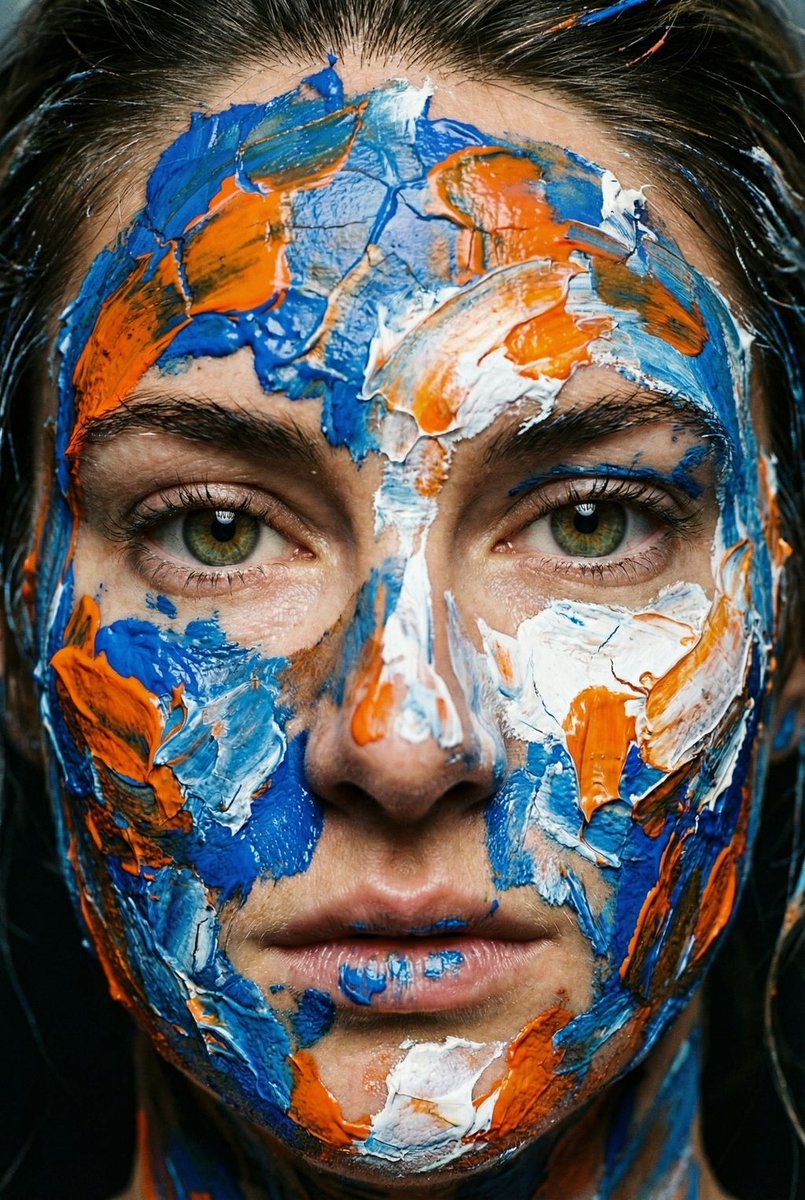
Camera Control
{ "vibe_title_en": "Tactile Abstraction", "master_prompt": "Extreme close-up macro portrait of The Protagonist, transforming the human face into a living avant-garde canvas. The subject's skin is heavily textured with thick, impasto applications of physical acrylic paint in chaotic strokes of {argument name="color 1" default="cobalt blue"}, {argument name="color 2" default="cadmium orange"}, and {argument name="color 3" default="titanium white"}. Crucially, the paint must look physically wet and heavy, with visible cracks and ridges casting micro-shadows on the skin. The eyes remain untouched, sharp, and piercingly clear, creating a hyper-realistic focal point amidst the abstract colors. Shot on a Hasselblad H6D-100c with a 120mm f/4 Macro lens to capture individual skin pores beneath the drying paint. Lighting is a dramatic, high-contrast 'Rembrandt' setup that highlights the 3D topography of the paint strokes. Analog film aesthetic with the fine grain of Kodak Ektar 100. No digital painting effects; this is practical makeup FX photography.", "meta": { "intent": "Editorial Portrait", "priorities": "Texture, Sharpness, Color Contrast", "device_profile": "High-End Medium Format" }, "frame": { "aspect": "2:3", "composition": "Extreme Close-Up / Macro", "layout": "Center Weighted", "camera_angle": "Eye Level", "tilt_roll_degrees": "0" }, "subject": { "gender": "Female", "identity": "The Protagonist", "demographics": "Adult", "face": "Covered in thick artistic face paint, sharp eyes visible", "hair": "Partially visible, messy, integrated with paint", "body": "Neck and shoulders only", "expression": "Intense, direct gaze, stoic", "pose": "Static, facing forward, confronting the lens" }, "wardrobe_accessories": { "garments": [ { "item": "None visible or minimal", "material": "N/A", "color": "N/A", "fit": "N/A" } ], "accessories": [] }, "environment": { "setting": "Abstract Studio Void", "surfaces": "Skin and Paint Texture", "depth": "Shallow Depth of Field", "atmosphere": "Intimate, Artistic, Intense", "lens_interaction": "Macro Focus" }, "lighting": { "key": "Directional Softbox (Side)", "fill": "Negative Fill (Black Flag)", "rim": "Subtle Hair Light", "shadows": "Deep, defining the texture of the paint", "color_temperature": "5600K (Daylight)", "sensor_flare": "None" }, "camera": { "lens_type": "Macro Prime", "focal_length": "120mm", "aperture": "f/5.6", "focus": "Sharp focus on the iris", "sensor_format": "Medium Format (645)", "perspective_distortion": "None (Compression)" }, "post_processing": { "color": "Vibrant, High Saturation (Ektar 100 Style)", "tonality": "High Contrast", "texture": "Enhanced Micro-Contrast (Clarity)", "digital_sharpening": "High", "chromatic_aberration": "Minimal" }, "negative_specifications": [ "digital art", "illustration",
This is a free AI prompt from the Orelon library. Thousands more image prompts here are free to copy and adapt.
Explore more image prompts





Ready to create
Start with this curated direction in Orelon, then shape it into your next visual.