UGC / Ad Templates
Animated Photobooth Grid
Likes
43
Views
2.2K
 Orelon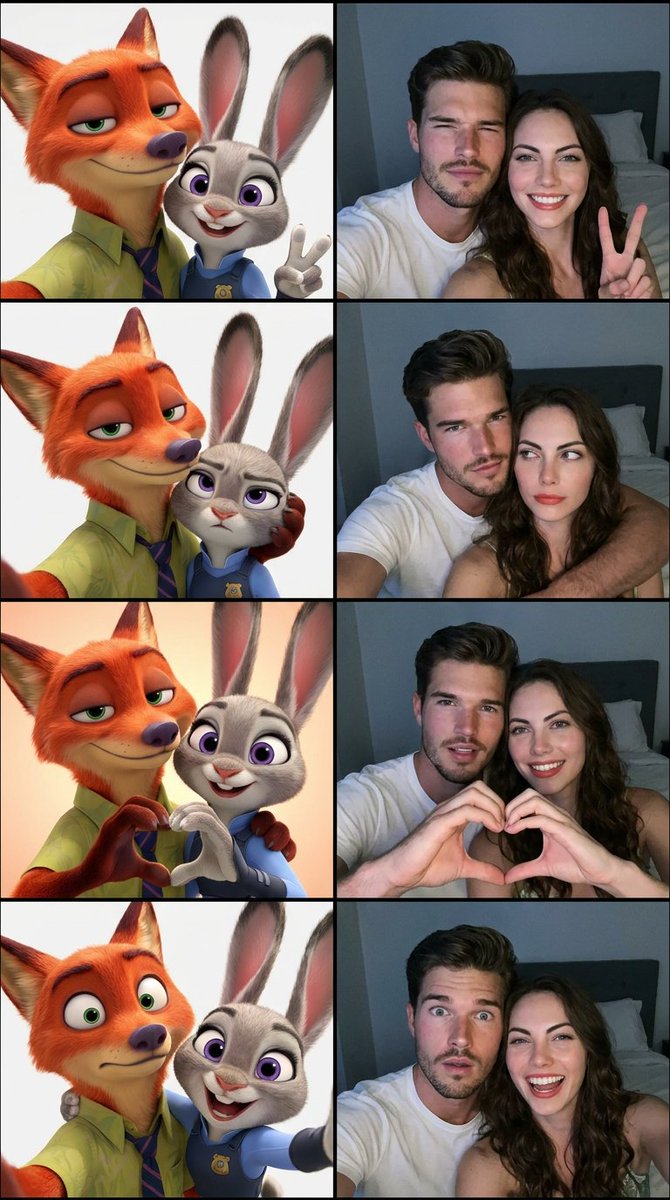
UGC / Ad Templates
Create a vertical 4-frame photobooth grid (2x2 layout). Left side of each frame features {argument name="animation style" default="Zootopia-style animated characters"} ({argument name="character types" default="a fox and a rabbit"} inspired by Nick Wilde and Judy Hopps), while the right side features the {argument name="subjects" default="real human couple"} from the provided reference photos. Use the uploaded couple photos as the main identity reference — do not alter their facial features, proportions, skin tone, or unique characteristics. Their faces must remain 100% recognizable and identical to the reference. Each frame shows the same poses and expressions on both sides (animated and real versions mirrored): Frame 1: Cheerful selfie pose, both subjects close to camera, male slightly squinting confidently, female smiling brightly and making a peace sign. Frame 2: Playful pose, male gently holding female’s head from behind, male looks mischievous but warm, female looks slightly confused or unimpressed looking sideways. Frame 3: Both facing camera closely, forming a heart shape together with their hands, smiling with slightly open mouths, warm and affectionate mood. Frame 4: Surprise/playful expression, male slightly pulling away with widened eyes, female laughing brightly leaning toward camera. Style & Lighting: Real couple side: realistic iPhone front camera selfie style, close framing, natural perspective, slight depth, low-light bedroom environment, soft bluish-white screen glow lighting, subtle grain/noise, minimal background (bed, pillow, dark wall barely visible). Zootopia side: clean 3D animated style, expressive cartoon faces, bright and polished lighting, matching the same pose and composition as the real subjects. Overall composition: Perfectly aligned split composition per frame (left = animated, right = real). Extremely clean layout, high clarity, fun and aesthetic social media photobooth style.
This is a free AI prompt from the Orelon library. Thousands more image prompts here are free to copy and adapt.
Explore more image prompts





Ready to create
Start with this curated direction in Orelon, then shape it into your next visual.