Camera Control
Ancient Chinese RPG Market Screenshot
Likes
1
Views
58
 Orelon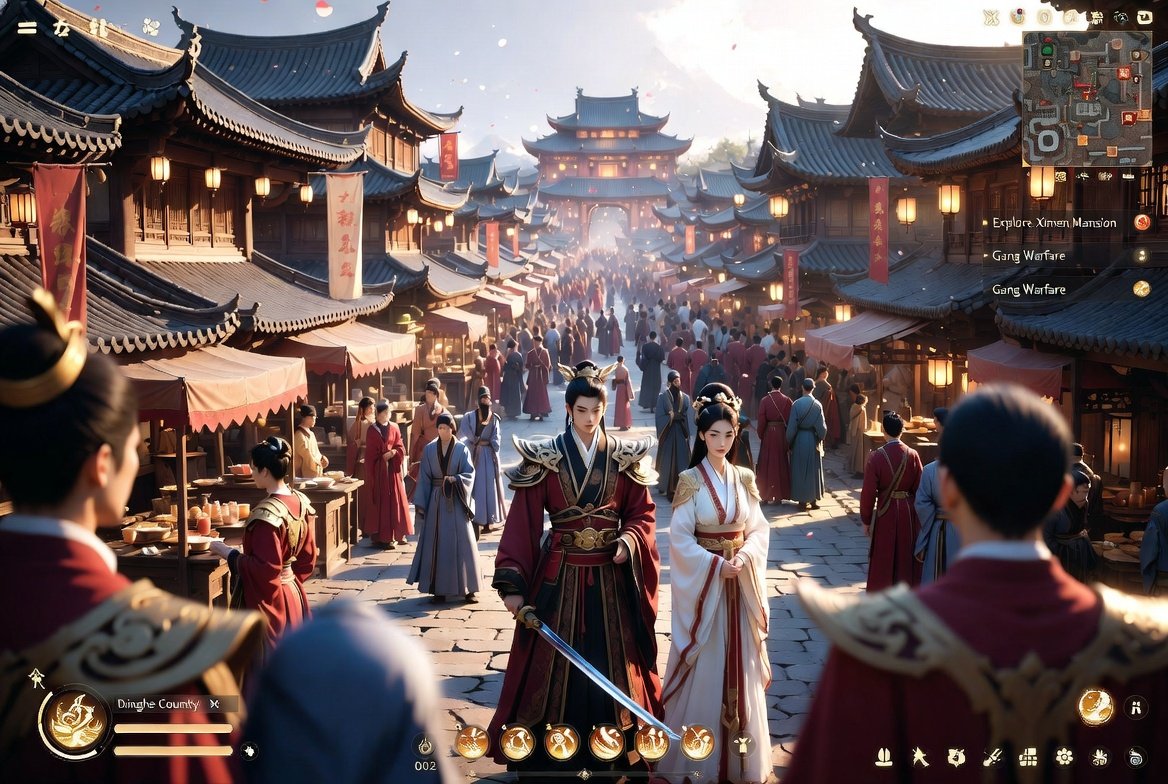
Camera Control
A cinematic third-person fantasy RPG gameplay screenshot set in an ancient Chinese market city at golden hour, viewed from slightly behind a small group of foreground characters and looking down a busy stone-paved street toward a grand multi-tier pagoda in the distance. The scene is dense with exactly 1 central male hero in ornate dark red and black robes with gold armor accents, holding a drawn sword pointed downward, and exactly 1 female companion beside him in elegant flowing white Hanfu with red trim and gold accessories. Around them are exactly 4 blurred foreground onlookers or guards framing the shot, 2 on the left and 2 on the right, plus a large crowd of townspeople in period clothing filling the street. Traditional wooden buildings with curved tiled roofs line both sides, with hanging lanterns, red banners, fabric awnings, market stalls, and warm window lights. Add drifting flower petals or glowing particles in the air, soft atmospheric haze, strong depth, and rich warm sunlight with long shadows. The image should feel like a polished AAA open-world wuxia action game, highly detailed, dramatic, immersive, and realistic with stylized fantasy beauty. Include a full in-game HUD overlay: a top-right square minimap with icons, a right-side quest list with exactly 3 visible entries where 1 reads {argument name="quest objective" default="Explore Ximen Mansion"} and 2 are repeated combat-related quests, a bottom-left circular player status area with health and stamina bars and the location text {argument name="location name" default="Dinghe County"}, a bottom-center action bar with exactly 6 circular skill icons, and a bottom-right row of exactly 8 small menu or system icons. Use a wide 16:9 composition, ultra-detailed environment art, cinematic lighting, shallow foreground blur, and a majestic historical Chinese fantasy atmosphere.
This is a free AI prompt from the Orelon library. Thousands more image prompts here are free to copy and adapt.
Explore more image prompts


Ready to create
Start with this curated direction in Orelon, then shape it into your next visual.