Visual Effects
Japanese Mystery Game Website Mockup
PublishedJul 11, 2026
Original languageZH
Categories
Visual EffectsVfx
Likes
1
Views
121
 Orelon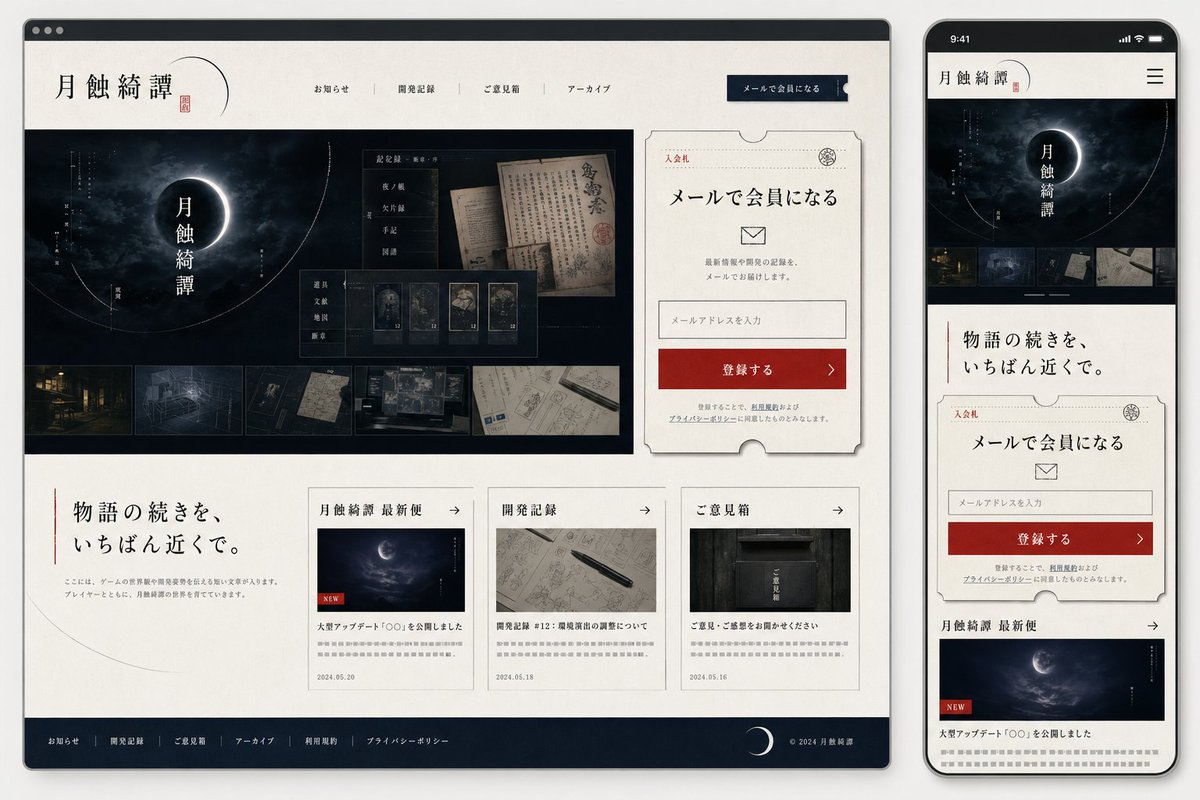
Visual Effects
Goal: Create a polished responsive website mockup for a Japanese mystery / horror game community called {argument name="site title" default="月蝕綺譚"}, shown as both a desktop browser window and a smartphone screen side by side. Canvas: 16:9 presentation image on a light gray background. Place a large desktop browser mockup on the left, occupying about 75% of the width, and a tall smartphone mockup on the right. Use soft shadows, rounded device corners, and realistic UI framing. Visual style: Elegant Japanese gothic mystery aesthetic, off-white washi-paper texture backgrounds, deep navy-black panels, thin gray borders, muted red accents, refined serif Japanese typography, subtle ink-like lines, crescent moon motifs, archival documents, old maps, dark forest/night imagery, and restrained premium web-design spacing. Desktop layout: A browser window with a dark top chrome bar and three small circular window buttons. Header contains the site title logo 「月蝕綺譚」 on the left with a thin crescent arc and red seal mark, 4 centered navigation links labeled 「お知らせ」, 「開発記録」, 「ご意見箱」, 「アーカイブ」, and a dark navy call-to-action button on the right labeled 「メールで会員になる」. Below, create a hero section split into a large dark image area on the left and a signup card on the right. The hero image shows a cloudy night sky with a glowing eclipsed crescent moon and vertical title text 「月蝕綺譚」, with fine circular orbit lines and small vertical annotations. Overlay a translucent archive-style panel containing old Japanese documents and 5 small thumbnail cards; along the bottom of the hero image include exactly 5 horizontal thumbnail images: an old building at night, a blueprint-like room drawing, a dark symbolic detail, handwritten documents, and a desk with maps/screens. Signup card: On the right of the desktop hero, create a cream ticket-shaped card with notched edges, thin border, small red label 「入会札」, headline 「メールで会員になる」, an envelope icon, short explanatory copy, one email input field with placeholder 「メールアドレスを入力」, and a red button labeled 「登録する」 with a right arrow. Add small privacy-policy style text beneath. Desktop lower content: Under the hero, place a large intro message on the left with a vertical red line and headline {argument name="intro headline" default="物語の続きを、いちばん近くで。"}, plus small gray body copy. To the right, place exactly 3 article cards in a row. Card 1 title section 「月蝕綺譚 最新便」 with a moon image, red NEW tag, headline 「大型アップデート『〇〇』を公開しました」, date 2024.05.20. Card 2 title section 「開発記録」 with a notebook and pen image, headline 「開発記録 #12:環境演出の調整について」, date 2024.05.18. Card 3 title section 「ご意見箱」 with a dark mailbox image, headline 「ご意見・ご感想をお聞かせください」, date 2024.05.16. Each card has a small right arrow in the header and gray teaser lines. Footer: Dark navy footer spanning the desktop width with exactly 6 links: 「お知らせ」, 「開発記録」, 「ご意見箱」, 「アーカイブ」, 「利用規約」, 「プライバシーポリシー」. Add a crescent moon icon near the right and copyright text 「© 2024 月蝕綺譚」. Mobile layout: Show a smartphone preview of the same site. Top status bar reads 9:41, followed by a compact header with 「月蝕綺譚」 logo and a hamburger menu icon. The mobile page stacks vertically: hero moon image with title, exactly 5 small thumbnails in a horizontal strip, intro headline 「物語の続きを、いちばん近くで。」, the same ticket-style email signup card, then the first news card 「月蝕綺譚 最新便」 with the moon image and NEW tag. Ensure all elements feel like the mobile-responsive version of the desktop layout. Constraints: Use only Japanese text where specified, keep typography crisp and legible, avoid extra sections beyond those described, preserve the exact counts of 4 desktop nav links, 5 hero thumbnails, 3 desktop article cards, 6 footer links, and 1 mobile hamburger menu.
This is a free AI prompt from the Orelon library. Thousands more image prompts here are free to copy and adapt.
Explore more image prompts



Ready to create
Start with this curated direction in Orelon, then shape it into your next visual.