Visual Effects
Anime Sci-Fi Character Sheet
Likes
1
Views
84
 Orelon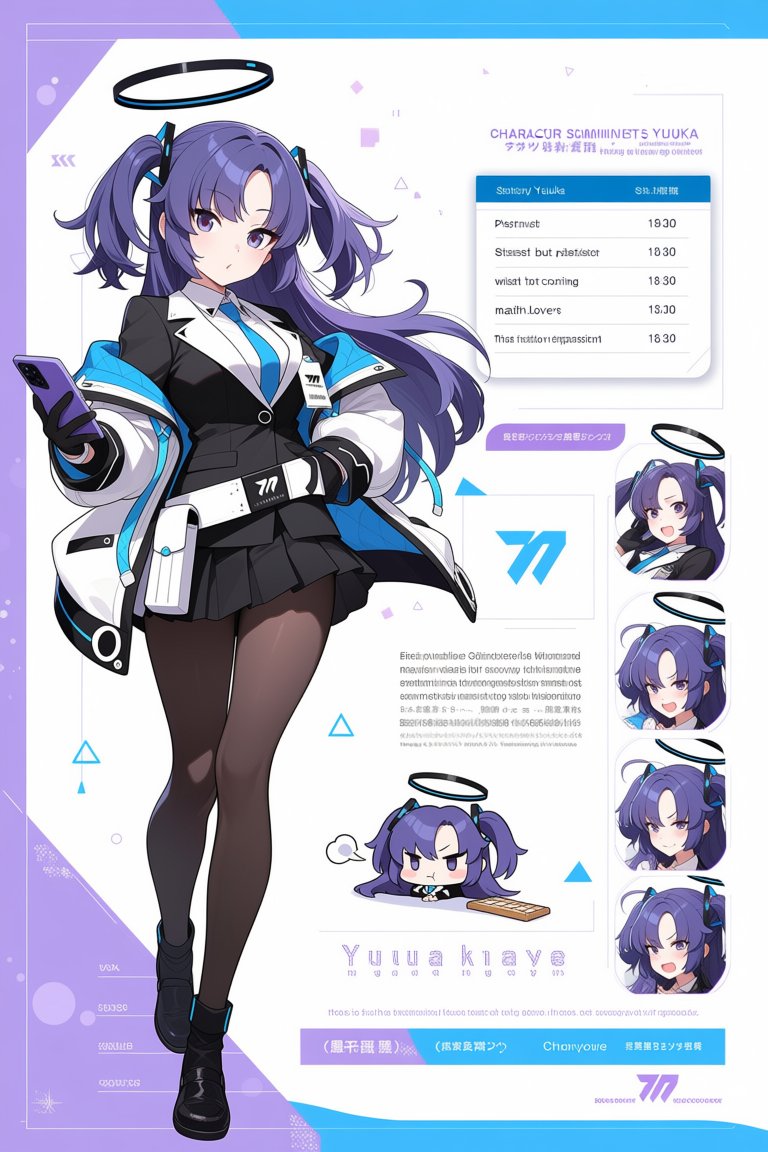
Visual Effects
Goal: Create a polished anime character sheet for a futuristic schoolgirl angel character named {argument name="character name" default="Yuuka Kinaye"}, styled like a mobile game profile/spec sheet with clean UI panels, decorative typography, and intentionally pseudo-Japanese/pseudo-English microtext. Canvas: Vertical poster, 2:3 aspect ratio, high resolution. White central background with a lavender left border and bright cyan geometric accents at the top and bottom. Use thin pale-gray framing lines, small triangles, dots, diamonds, and tech-interface decorations scattered around the page. Main subject: One full-body anime girl dominates the left and center of the poster. She has {argument name="hair color" default="deep violet-purple"} long twin-tail hair with curled ends, side bangs, glossy highlights, and small cyan hair accessories. She has large purple eyes and a calm, slightly serious expression. A black-and-cyan halo floats above her head. She stands in a confident contrapposto pose, holding a purple smartphone in her left hand while her right hand rests near her waist. Outfit: black blazer with white lapels, white shirt, cyan necktie, short black pleated skirt, oversized white-and-cyan futuristic jacket draped around her shoulders, black gloves, black thigh-high tights, chunky black shoes, and a white utility pouch attached at her hip. Include crisp cel-shaded anime rendering, glossy highlights, clean line art, and a premium character-design-sheet finish. Layout and visible elements: Use exactly 1 main full-body character illustration. Add exactly 1 large schedule/profile card in the upper right with a cyan header and exactly 5 horizontal table rows. The card title should resemble a character scanning/status panel and include mostly decorative pseudo-text. Add exactly 4 stacked rounded-rectangle portrait thumbnails down the right side, each showing a close crop of the same character with her halo and purple hair; the face area may be softly obscured or simplified like censored preview tiles. Add exactly 1 square logo panel near the center-right containing a large cyan stylized number-like emblem resembling “77”. Add exactly 1 paragraph block of tiny gray placeholder profile text beneath the logo. Add exactly 1 small chibi version of the character near the lower middle, lying or leaning forward with a grumpy expression, a small speech bubble, halo above, and a small keyboard or rectangular board beside her. Add exactly 1 large name label near the bottom reading {argument name="display name text" default="Yuuka Kinaye"} in widely spaced pale purple letters, with small decorative ID numbers underneath. Add exactly 1 bottom cyan-and-lavender footer bar with short pseudo-Japanese labels and a small purple emblem. Text content: The upper-right heading should read approximately {argument name="header text" default="CHARACUR SCIANNINGT5 YUUKA"} with a smaller decorative line of pseudo-Japanese text below it. The schedule card should have a cyan header containing the character name and a status/date-like field, then 5 rows with left-side pseudo labels and right-side times: 19:30, 18:30, 18:30, 18:30, 18:30. Keep most small text intentionally nonsensical, faint, and UI-like rather than fully readable. Visual style: Modern anime character sheet, Blue Archive-inspired sci-fi school uniform aesthetic, white/lavender/cyan palette, clean vector UI overlays, soft shadows under cards, high-detail polished illustration, sharp cel shading, attractive character design, no photorealism. Constraints: Keep the page uncluttered but information-rich. Preserve the exact counts: 1 full-body character, 1 schedule card with 5 rows, 4 right-side portrait thumbnails, 1 logo panel, 1 chibi illustration, 1 bottom footer bar. Do not add extra characters, weapons, scenery, or readable branding.
This is a free AI prompt from the Orelon library. Thousands more image prompts here are free to copy and adapt.
Explore more image prompts


Ready to create
Start with this curated direction in Orelon, then shape it into your next visual.