Commercial
After Light Moody Fashion Poster
Likes
2
Views
165
 Orelon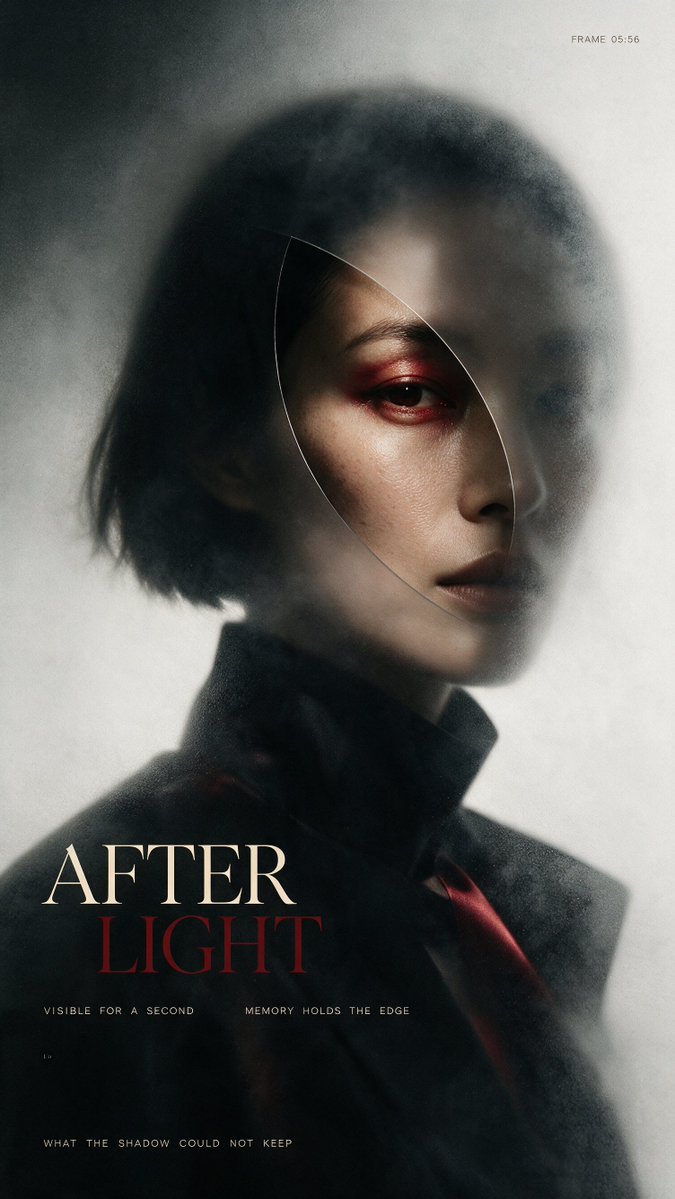
Commercial
Create a vertical cinematic fashion poster portrait of {argument name="character description" default="an androgynous East Asian woman with a short black bob haircut"} in a dark, moody, high-fashion editorial style. The subject is shown from the chest up, turned slightly to the viewer's right, with only the right side of the face sharply visible while the rest dissolves into smoky blur and shadow. Use pale skin, a severe neutral expression, dark lips, and intense red eyeshadow around one visible eye. Add a thin translucent curved oval/leaf-shaped glass outline over the face, like a refracted lens slice cutting from the forehead down past the cheek, subtly distorting the portrait inside it. The outfit is a black high-collared coat or blazer with a hint of deep red fabric near the lower right. Lighting is soft and directional, creating a ghostly halo on a gray-white background, with heavy film grain, mist, motion blur, vignette, and analog print texture. Compose like an avant-garde magazine cover: subject centered slightly high, negative space around the head, dark lower third for typography. Include exactly 5 visible text elements: small top-right text “FRAME 05:56”; large bottom-left title split over two lines with “{argument name="main title first line" default="AFTER"}” in cream serif capitals and “{argument name="main title second line" default="LIGHT"}” in dark red serif capitals; tiny spaced text under the title reading “VISIBLE FOR A SECOND MEMORY HOLDS THE EDGE”; tiny lower-left mark “1.9”; and a bottom caption reading “{argument name="bottom caption" default="WHAT THE SHADOW COULD NOT KEEP"}”. Use elegant Didot/Bodoni-like serif typography for the title and small monospaced tracking for captions. Keep the palette limited to black, charcoal, fog gray, ivory, muted skin tones, and blood red. Avoid extra text, logos, smiles, bright colors, or clean digital sharpness.
This is a free AI prompt from the Orelon library. Thousands more image prompts here are free to copy and adapt.
Explore more image prompts




Ready to create
Start with this curated direction in Orelon, then shape it into your next visual.