Camera Control
Grand Doorway Chiaroscuro Portrait
Likes
44
Views
1K
 Orelon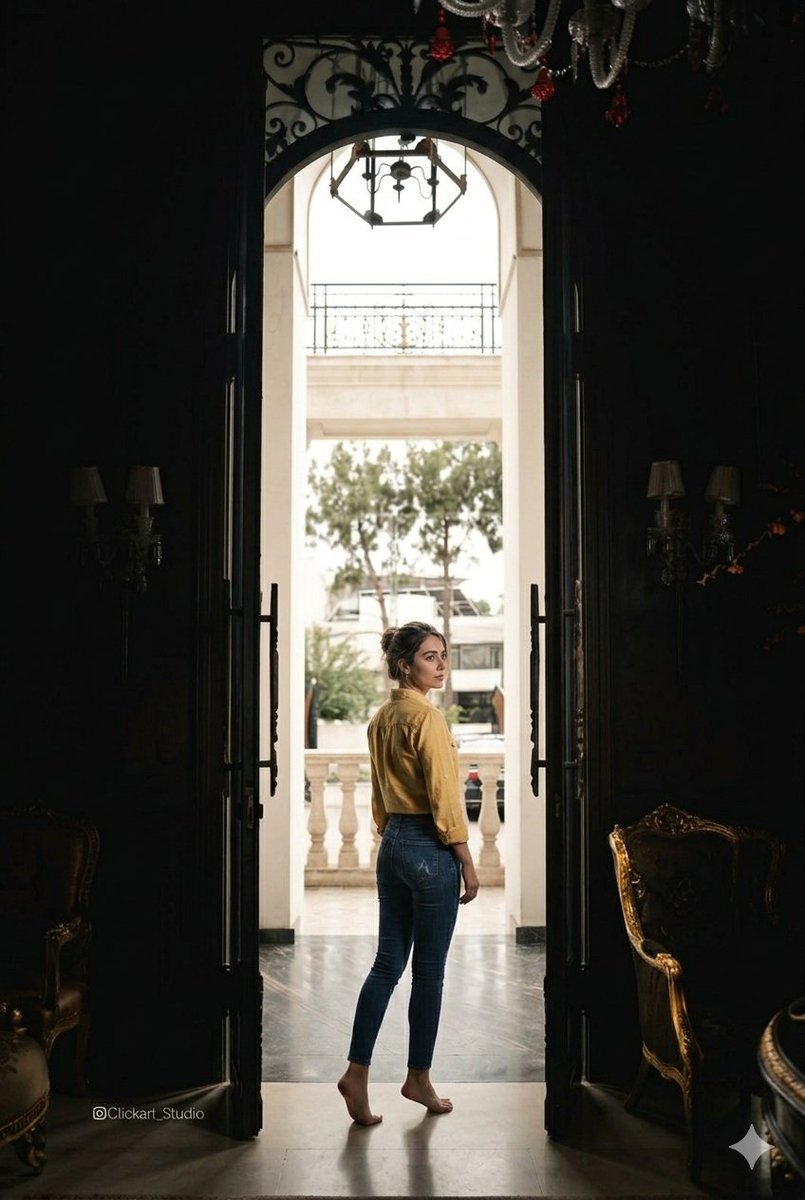
Camera Control
{ "scene": { "subject": "A woman standing in the center of a grand, dark doorway, looking back over her shoulder toward the camera.", "attire": "{argument name="clothing" default="Yellow long-sleeved button-down shirt, dark blue skinny jeans, barefoot"}.", "environment": "{argument name="environment" default="Contrast between a dimly lit, ornate interior with antique gold-trimmed furniture and a bright, sunlit outdoor balcony seen through an archway"}.", "composition": "Symmetrical framing, leading lines through the doorway, full-body shot." }, "technical_settings": { "camera": "{argument name="camera" default="Sony A7R IV, 35mm lens"}", "aperture": "f/2.8 for sharp focus on subject with slight environmental depth", "lighting": "Chiaroscuro effect, silhouette-style interior with strong natural backlight from the archway, volumetric light hitting the subject's profile.", "color_palette": "Deep shadows, moody blacks, ochre yellow, and natural daylight highlights.", "details": "High-resolution, 8K, cinematic film grain, realistic skin textures, intricate wrought iron details above the door." } }
This is a free AI prompt from the Orelon library. Thousands more image prompts here are free to copy and adapt.
Explore more image prompts





Ready to create
Start with this curated direction in Orelon, then shape it into your next visual.