UGC / Ad Templates
Rainy Sci-Fi Infiltration Scene
Likes
1
Views
33
 Orelon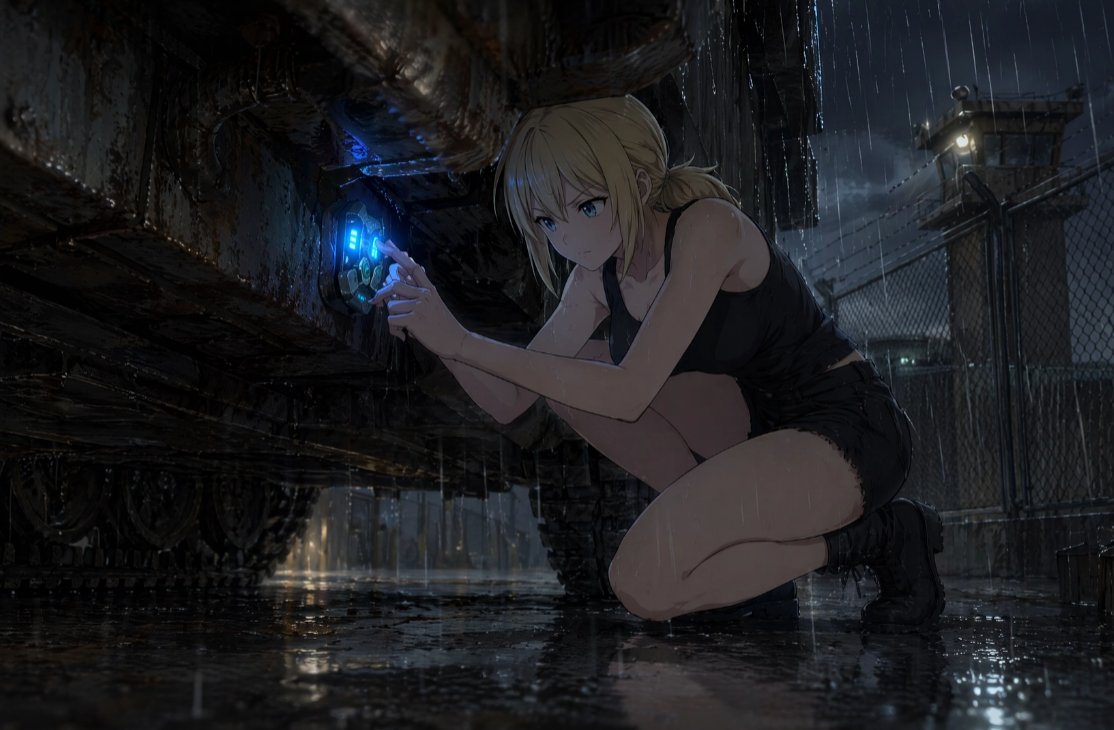
UGC / Ad Templates
Create a cinematic dark sci-fi anime illustration of {argument name="character name" default="a young blonde woman"} crouching on one knee in heavy rain at night, working covertly beneath the rusted undercarriage of a massive armored vehicle or industrial machine. She has {argument name="hair color" default="pale blonde"} hair tied back in a messy low bun with loose wet strands, and her face is intentionally obscured by a flat dark gray square censor block. She wears a soaked black sleeveless crop top, black short shorts, and black tactical ankle boots, with rainwater glistening on her skin. Her hands are pressed to a circular futuristic access port on the machine, which emits a vivid electric {argument name="glowing device color" default="blue"} light with small cyan interface bars and mechanical details, suggesting hacking, repairing, or activating hidden technology. The setting is a grim fenced military-industrial compound with wet asphalt, puddle reflections, chain-link fencing, distant guard tower lights, barbed wire silhouettes, and storm clouds. Use dramatic low-angle composition, the massive corroded vehicle dominating the left side, the crouching figure on the right, strong chiaroscuro lighting, rain streaks, reflective ground, detailed rust, grime, dripping water, moody blue-gray palette, high-detail anime realism, cinematic concept art, widescreen 16:9 framing, tense prologue atmosphere.
This is a free AI prompt from the Orelon library. Thousands more image prompts here are free to copy and adapt.
Explore more image prompts





Ready to create
Start with this curated direction in Orelon, then shape it into your next visual.