Camera Control
Japanese Breaking News Broadcast Generator
Likes
4
Views
384
 Orelon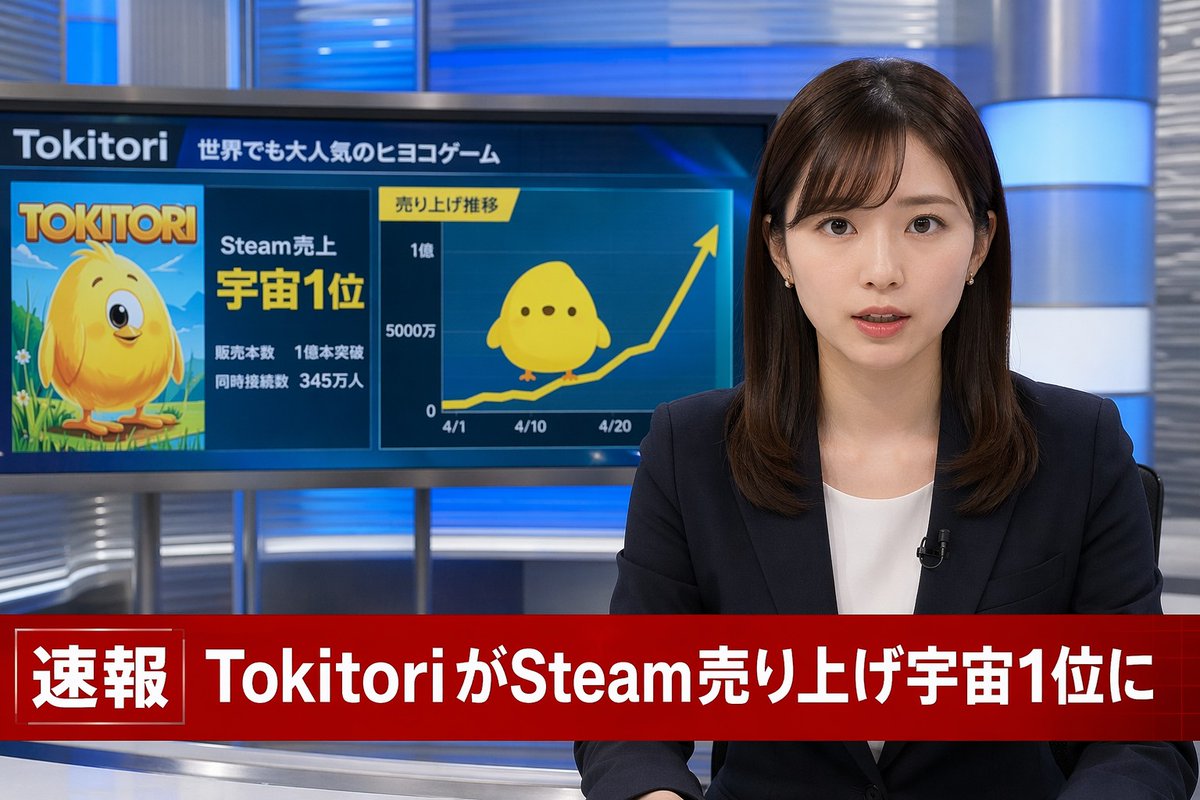
Camera Control
A photorealistic television news broadcast scene. On the right, a young Japanese female news anchor with shoulder-length dark brown hair and bangs looks directly at the camera with a professional expression. She wears a dark navy blazer over a white top, small earrings, and a lavalier microphone. The studio background features modern blue and silver illuminated panels. On the left, a large monitor displays a news graphic. The top of the monitor reads "{argument name="game name" default="Tokitori"}" followed by "{argument name="monitor top text" default="世界でも大人気のヒヨコゲーム"}". The left side of the monitor shows game cover art featuring a {argument name="character description" default="round, yellow chick character with big eyes"} on a green field, with the title "{argument name="game name" default="Tokitori"}" and text reading "{argument name="monitor achievement text" default="Steam売上 宇宙1位"}", "販売本数 1億本突破", and "同時接続数 345万人". The right side of the monitor displays a line graph titled "売り上げ推移" with an upward-trending yellow arrow, y-axis labels "0", "5000万", and "1億", and 3 x-axis dates "4/1", "4/10", and "4/20". A flat 2D version of the yellow chick sits on the graph line. Across the bottom of the screen is a prominent red lower-thirds breaking news banner. The left side of the banner has a box reading "速報" and the main text reads "{argument name="breaking news headline" default="TokitoriがSteam売り上げ宇宙1位に"}".
This is a free AI prompt from the Orelon library. Thousands more image prompts here are free to copy and adapt.
Explore more image prompts


Ready to create
Start with this curated direction in Orelon, then shape it into your next visual.