UGC / Ad Templates
Smartphone Screen Inpainting
Likes
1
Views
28
 Orelon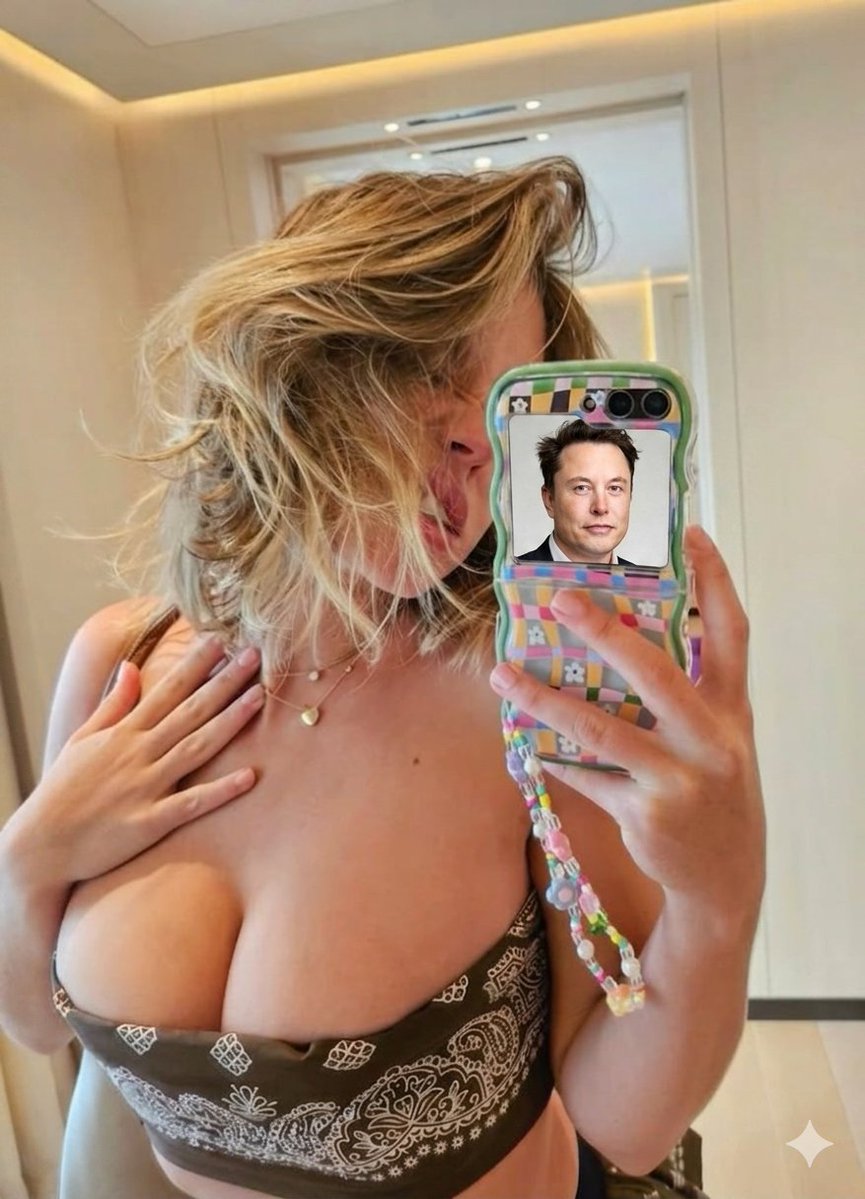
UGC / Ad Templates
{ "image_generation_prompt": { "task_type": "image_editing_inpainting", "base_image_context": { "scene_type": "indoor mirror selfie", "lighting": "bright, natural-looking indoor lighting, soft shadows", "background": "beige or cream-colored walls, modern interior, blurred doorway in the background" }, "subject_description": { "gender": "female", "hair": "blonde, shoulder-length, messy and tousled, falling casually across the face", "clothing": "strapless brown tube top featuring a white paisley bandana pattern", "accessories": "layered delicate gold necklaces, including one with a small heart pendant", "pose": "holding the camera/phone with the right hand, left hand lightly resting on the upper chest, face partially obscured by hair and the phone" }, "object_description": { "primary_object": "foldable smartphone (flip style) held in the folded position", "phone_case": "distinctive wavy green borders, pastel multi-colored checkered pattern featuring small white daisy flowers", "phone_accessories": "long, colorful beaded phone charm strap dangling from the bottom corner", "camera_module": "dual circular camera lenses visible at the top right of the phone's back panel" }, "edit_instructions": { "target_region": "the rectangular black external display screen located below the camera lenses on the folded phone", "action": "replace_content", "insertion_subject": "{argument name="screen content" default="Elon Musk"}", "insertion_details": "{argument name="insertion style" default="A clear, high-resolution portrait of Elon Musk facing forward, wearing a dark suit and white collared shirt."} ", "blending_requirements": "The portrait must perfectly fit the rectangular dimensions of the phone's external screen. The lighting and glare on the screen should make it look like the image is natively displayed on the device." }, "technical_parameters": { "style": "{argument name="overall style" default="photorealistic, candid selfie aesthetic"}", "resolution": "high", "focus": "sharp focus on the phone case and the inserted portrait on the screen", "negative_prompt": "cartoon, animated, low resolution, blurry, warped screen, distorted facial features, poorly blended edges, text, watermarks, unrealistic lighting" } } }
This is a free AI prompt from the Orelon library. Thousands more image prompts here are free to copy and adapt.
Explore more image prompts





Ready to create
Start with this curated direction in Orelon, then shape it into your next visual.