Visual Effects
Vintage China Great Wall Poster
Views
30
 Orelon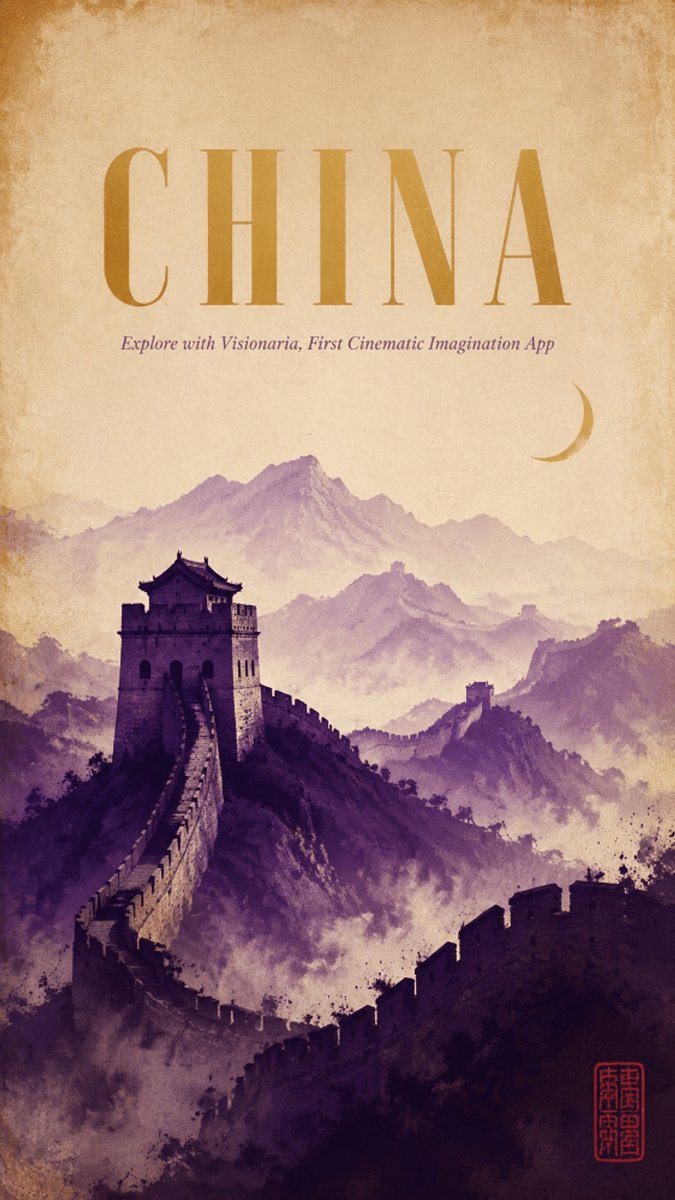
Visual Effects
Create a vertical cinematic travel poster for {argument name="country title" default="CHINA"}, evoking an ancient historical world. The composition shows the Great Wall of China winding dramatically from the lower foreground up toward a large stone watchtower on the left-middle, then continuing across misty mountain ridges into the far distance. Use layered watercolor-like mountains in purple, mauve, and dusty violet, with atmospheric fog filling the valleys and a soft parchment sky above. Add a small golden crescent moon in the upper-right sky. The top half should feel spacious and aged, with a warm beige antique paper texture, darkened weathered edges, subtle stains, and a vintage museum-poster finish. Typography: place one huge centered headline at the top reading {argument name="country title" default="CHINA"} in tall elegant high-contrast serif capitals, colored muted ochre gold. Directly below it, add a small italic subtitle reading {argument name="subtitle" default="Explore with Visionaria, First Cinematic Imagination App"} in muted purple. In the bottom-right corner, include one small red Chinese-style seal stamp as a decorative mark, not a logo. Visual style: cinematic historical fantasy poster, painterly ink-and-watercolor texture, soft grain, sepia parchment, dramatic depth, no modern objects, no people, no extra text. Keep the layout clean and centered, with the Great Wall and mountains occupying the lower two-thirds and the title area occupying the upper third.
This is a free AI prompt from the Orelon library. Thousands more image prompts here are free to copy and adapt.
Explore more image prompts



Ready to create
Start with this curated direction in Orelon, then shape it into your next visual.