Commercial
Red Studio Fashion Editorial with Motion Echo Effect
Likes
41
Views
1.3K
 Orelon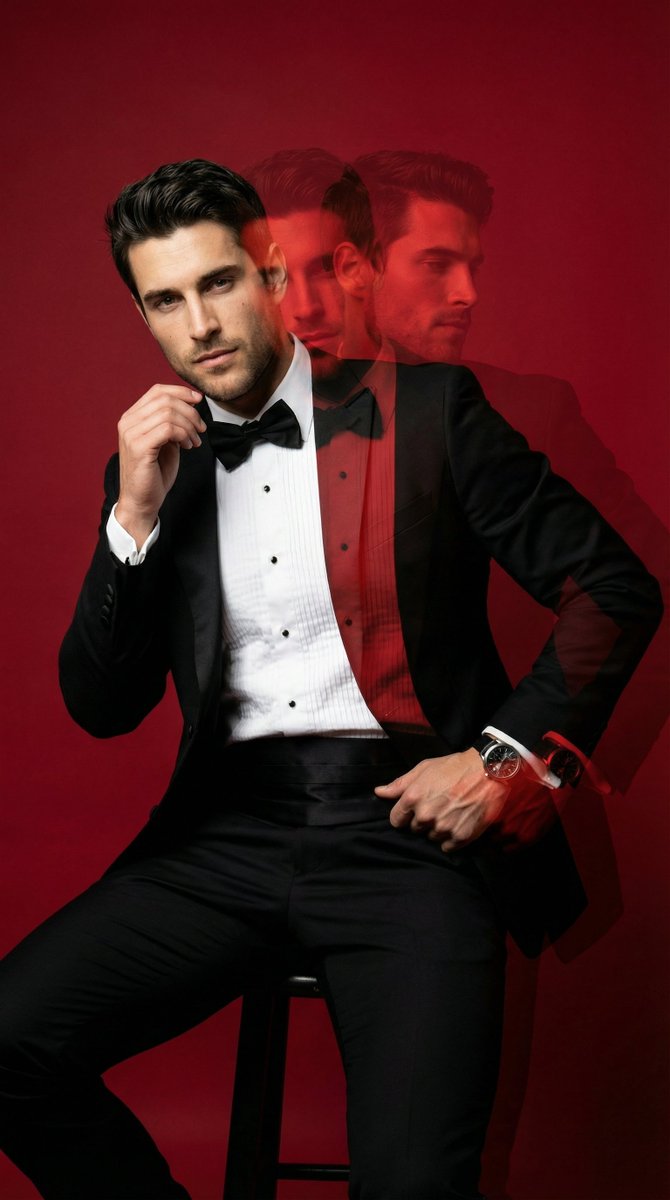
Commercial
{ "generation_request": { "meta_data": { "task_type": "studio_fashion_editorial_motion_echo_portrait", "language": "en", "priority": "highest", "version": "v1.0_RED_STUDIO_TUX_MOTION_ECHO" }, "input": { "mode": "text_to_image", "notes": "Create a high-fashion studio portrait of a stylish adult man in a classic black tuxedo with a bow tie and white pleated shirt. Solid deep-red seamless backdrop and red floor, monochrome red environment. Subject is leaning/sitting in a relaxed pose with one hand slightly raised near the face (fingers softly bent), the other hand resting lower near the waist. Add a strong multi-exposure / motion-echo effect: 2–3 translucent offset duplicates trailing to the right, like a long-exposure movement smear. Keep the main face sharp and dominant, with the echoes softer and semi-transparent. Lux editorial retouching, crisp fabric texture, subtle skin texture, cinematic contrast. Clean image: no text, no logos, no watermark." }, "output": { "aspect_ratio": "4:5", "resolution": "ultra_high", "num_images": 1, "sharpness": "editorial_crisp", "grain": "subtle_analog" }, "scene": { "environment": "studio cyclorama seamless backdrop, fully red, minimal set", "lighting": { "style": "hard studio key + subtle fill", "key_light": "beauty dish or small softbox slightly above eye level, forward-left", "fill": "very light fill to keep shadows readable", "rim": "faint rim to separate tux from red background", "look": "high contrast, glossy editorial finish" }, "camera": { "shot_type": "3/4 portrait", "angle": "slightly above eye level", "lens_look": "85mm portrait compression", "depth_of_field": "medium shallow, face tack sharp" }, "color_grade": { "palette": "dominant deep reds, true blacks, clean whites", "contrast": "high", "highlights": "controlled", "skin_tone": "natural but slightly warm under red bounce" } }, "subject": { "person": "adult man", "appearance": { "hair": "short, styled, slightly tousled", "facial_hair": "short beard/stubble, well-groomed", "expression": "serious, confident gaze to camera" }, "wardrobe": { "tuxedo": "black tuxedo jacket, sharp lapels", "shirt": "white pleated dress shirt", "bow_tie": "black bow tie", "pocket_square": "white pocket square", "accessories": "watch on wrist, subtle ring if desired" }, "pose": { "body": "leaning/sitting with torso angled slightly", "hands": "one hand lifted near face, other hand lower near waist", "motion": "capture implied movement for multi-exposure echo" } }, "effects": { "motion_echo": { "enabled": true, "echo_count": 3, }
This is a free AI prompt from the Orelon library. Thousands more image prompts here are free to copy and adapt.
Explore more image prompts




Ready to create
Start with this curated direction in Orelon, then shape it into your next visual.