Commercial
Mixed-Media Portrait with CGI Mascot in Candy Store
Likes
21
Views
2K
 Orelon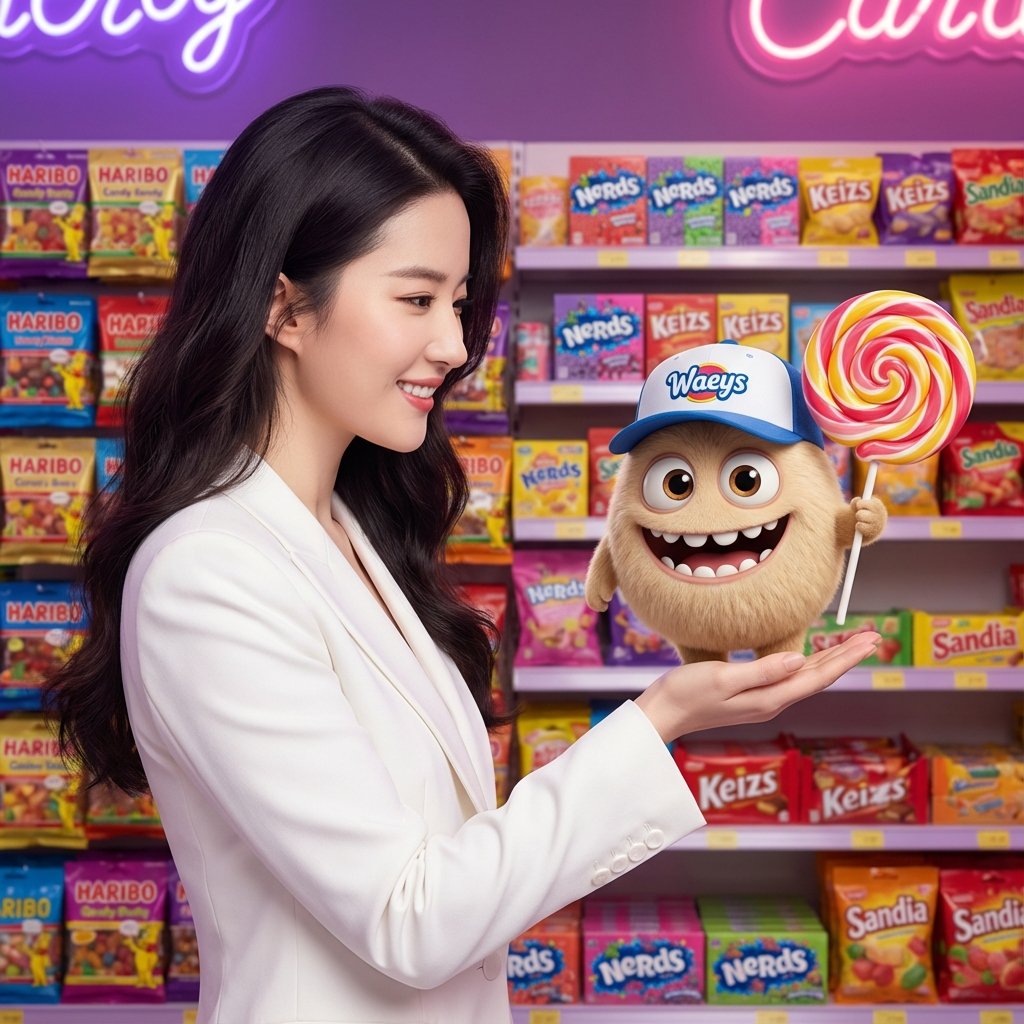
Commercial
**[Style & Medium]:** Cinematic mixed-media photography, blending photorealistic live-action with high-end 3D CGI animation (Pixar/Disney style). Commercial advertising aesthetic, 8k resolution, octane render, highly detailed. **[Subject & IP]:** A beautiful young Asian woman with long dark wavy hair (resembling {argument name="person reference" default="Liu Yifei"}) wearing a tailored crisp white blazer. She is shown in profile, smiling warmly and gently offering her hand. Interacting with her is a cute, small, spherical, furry beige monster character with large expressive eyes, a wide toothy smile, and tiny arms/legs. **[Spatial & Physics]:** Close-up side angle. The furry character appears to be floating or standing near the woman's hand, holding a large, glossy, spherical swirl lollipop. The composition focuses on the emotional connection between the human and the mascot. **[Branding & Text]:** The creature wears a blue and white baseball cap with a logo reading "Waeys". The background features crowded retail shelves with colorful candy packaging. Visible text on bags includes "HARIBO", "Nerds", and generic brands like "Keizs" and "Sandia". **[Material & Texture]:** Realistic human skin texture and fabric details on the blazer contrasted with the soft, fluff-shaded fur of the 3D character. Glossy plastic candy wrappers, glass jars, and the hard sugary sheen of the lollipop. **[Lighting & Atmosphere]:** Vibrant, magical candy store atmosphere. Soft, flattering warm key lighting on the faces mixed with cool purple and pink neon backlighting from the shelves, creating a dreamy and commercial mood. **[Tech Specs]:** Depth of field to blur the background shelves, crisp focus on subjects, --ar 1:1 --stylize 250
This is a free AI prompt from the Orelon library. Thousands more image prompts here are free to copy and adapt.
Explore more image prompts




Ready to create
Start with this curated direction in Orelon, then shape it into your next visual.