Commercial
Anime Mall Jewelry Heist Fight
Likes
1
Views
57
 Orelon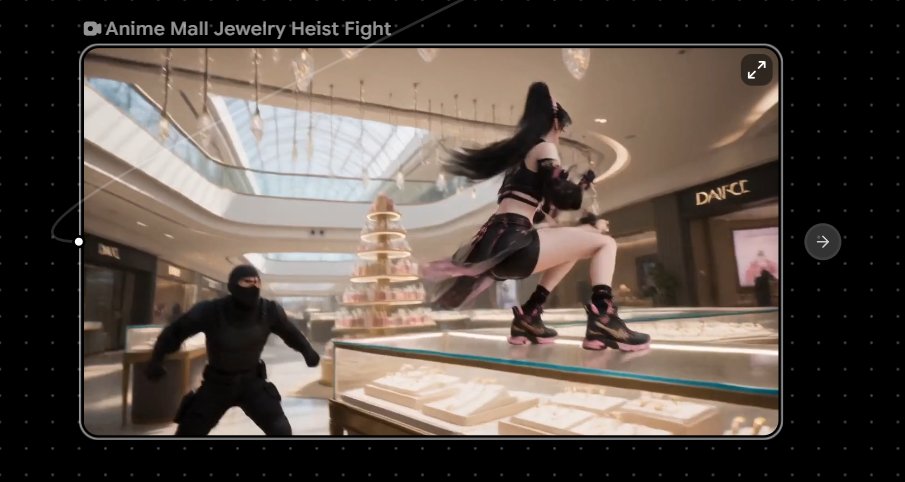
Commercial
Create a cinematic anime short-film still of a dynamic jewelry heist fight inside a luxurious modern shopping mall. The frame is a horizontal 16:9 shot with a slightly wide-angle camera, shallow depth of field, subtle motion blur, and bright afternoon sunlight streaming through a huge glass skylight ceiling. In the foreground, show a sleek illuminated glass jewelry display case filled with white velvet trays, gold necklaces, rings, and sparkling diamonds; the main character is an athletic anime heroine, {argument name="character name" default="Rin"}, wearing a black cyber-ninja streetwear outfit with cropped top, arm straps, short skirt panels, thigh straps, and chunky black sneakers with pink accents. She is mid-leap on top of the glass case, one knee raised, long flowing {argument name="hair color" default="black"} hair whipping dramatically behind her, holding a small black pistol or tactical gadget while twisting away from an attacker. Include exactly 1 masked robber in the left foreground, dressed head-to-toe in matte black tactical clothing and balaclava, crouching and lunging toward her. Background details: a high-end mall atrium with polished floors, curved balconies, warm ceiling lights, glass railings, a tiered crystal perfume display tower at center, elegant jewelry counters, and one visible luxury storefront sign reading {argument name="storefront sign" default="DANCE"}. Mood is fast, glamorous, and tense, like a 15-second anime action clip frozen at the most exciting moment. Color palette: warm champagne mall lighting, creamy whites, reflective glass, black clothing, pink shoe accents, and sparkling highlights. Add a video-player style presentation around the image: black dotted interface background, rounded-rectangle preview frame with thin gray border, small camera icon and title text at top left reading {argument name="video title" default="Anime Mall Jewelry Heist Fight"}, a small expand icon in the top-right corner of the preview, a circular right-arrow button outside the preview on the right, and a thin progress scrubber with a white handle on the left edge. Keep all text crisp and minimal, no extra logos or watermarks.
This is a free AI prompt from the Orelon library. Thousands more image prompts here are free to copy and adapt.
Explore more image prompts




Ready to create
Start with this curated direction in Orelon, then shape it into your next visual.