Camera Control
Lumia Freeze Frame Cover
Views
809
 Orelon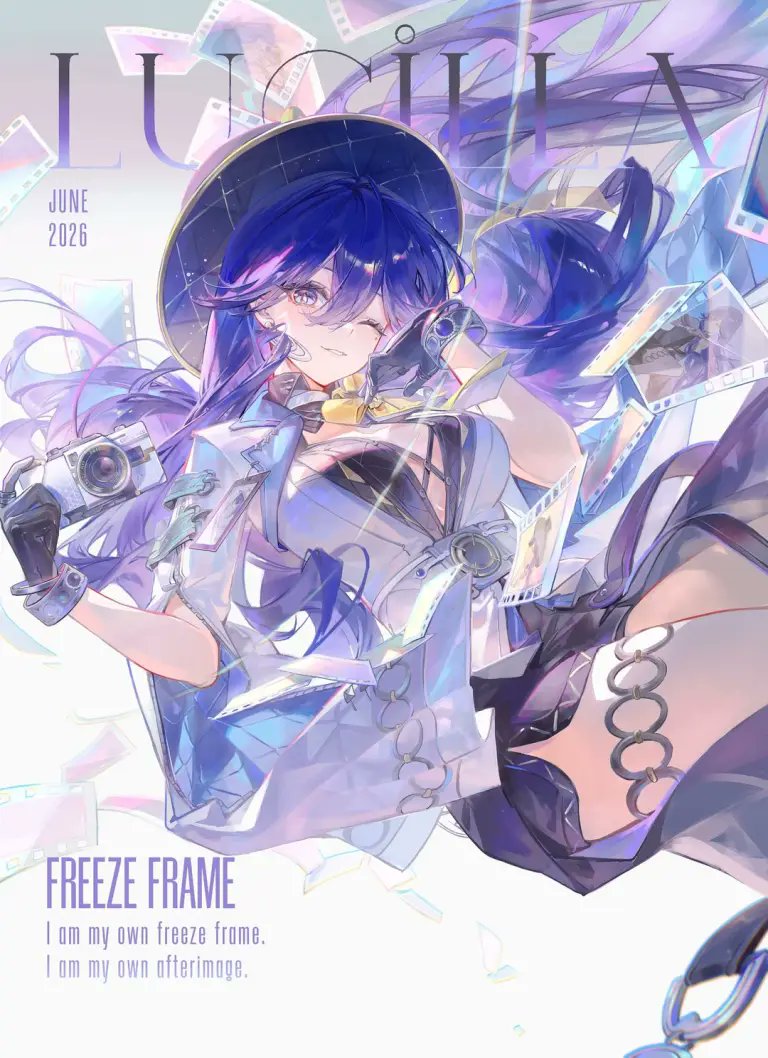
Camera Control
Create a polished anime magazine-cover illustration for Wuthering Waves featuring {argument name="character name" default="Lumia"} as a stylish camera-themed heroine suspended in a dynamic floating pose. Vertical portrait canvas, 3:4 ratio, bright high-key white background with pale lavender, icy blue, and iridescent rainbow accents. Place oversized thin serif title text “LUMIA” across the top behind the character, with small stacked date text “JUNE 2026” on the upper left. At the bottom left add the headline “FREEZE FRAME” in tall condensed purple capitals, followed by two smaller lines: “I am my own freeze frame.” and “I am my own afterimage.” The character has long flowing {argument name="hair color" default="deep indigo-blue with violet highlights"} hair, one visible golden-lavender eye, a confident playful smile, and a black wide-brim hat with subtle starry grid texture. Outfit: futuristic white-and-pale-blue cropped jacket, black cutout bodice, translucent glossy panels, metallic rings and straps, black gloves, thigh-high dark legwear, and silver circular garter rings on the exposed thigh. She holds one compact retro camera in her left hand and one small camcorder-like device near her face in her right hand. Surround her with exactly 12 floating film-related elements: 6 translucent film-strip ribbons curling around her, 4 pastel photo-frame negatives, 1 large iridescent shard near the lower center, and 1 dangling metal chain ring at the bottom right edge. Use a luminous anime key visual style with delicate line art, soft cel shading, pearlescent highlights, lens flares, motion blur in the hair and ribbons, and a dreamy photographic afterimage effect. Keep the composition airy and elegant, with the typography partially obscured by the character but still readable; no extra logos or watermarks.
This is a free AI prompt from the Orelon library. Thousands more image prompts here are free to copy and adapt.
Explore more image prompts





Ready to create
Start with this curated direction in Orelon, then shape it into your next visual.