Camera Control
Cinematic Indoor Portrait with Window Light Prompt
Likes
1
Views
196
 Orelon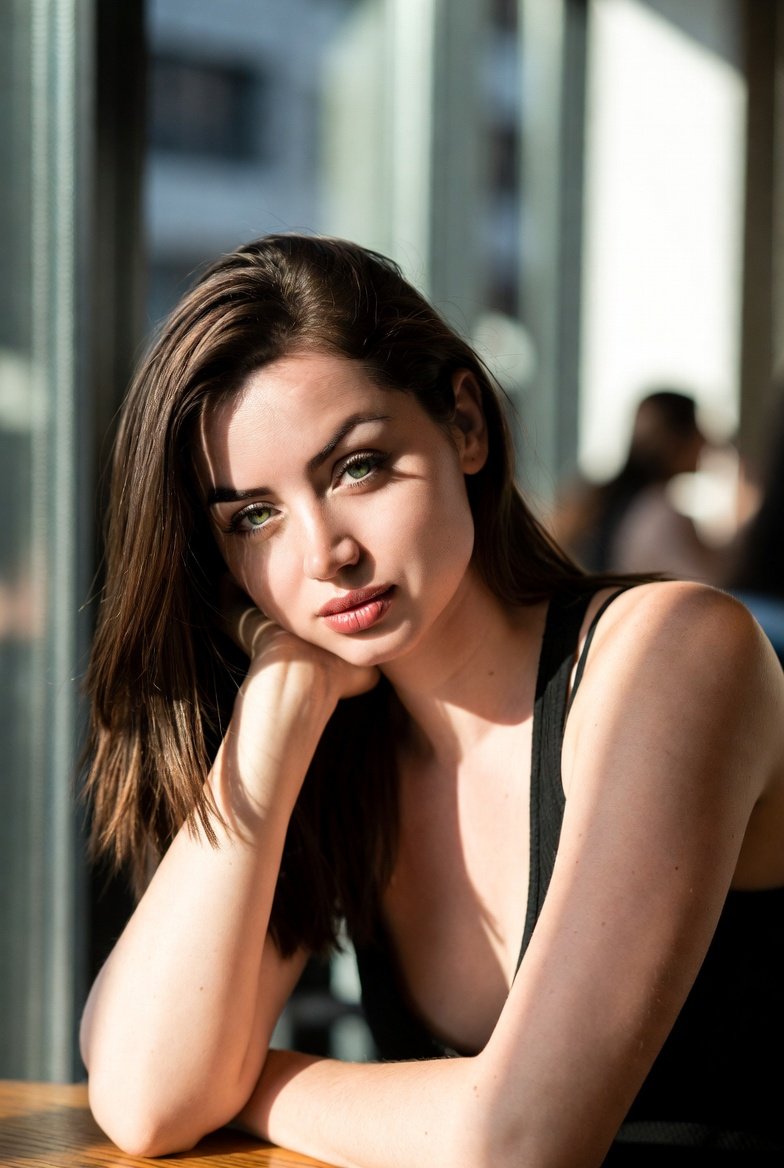
Camera Control
{ "prompt": "photorealistic indoor portrait of a woman sitting at a wooden table next to a large window, modern minimalist cafe interior, soft natural daylight coming from the right side through tall glass windows, strong directional sunlight creating natural highlights and soft shadows on face and arms, shallow depth of field, blurred background with subtle silhouettes of other people, cinematic mood. The woman is leaning forward, resting her head on her left hand, elbow placed on the table, right arm relaxed and bent close to her body. She is looking directly at the camera with a calm, slightly melancholic and thoughtful expression. Head slightly tilted to the left. Long straight brown hair, parted slightly off-center, falling naturally over shoulders and back, smooth and natural texture. Wearing a simple black sleeveless top with thin straps, natural skin texture visible, no patterns. Natural makeup, soft skin highlights, realistic pores. High realism, ultra-detailed skin, cinematic color grading, warm tones, realistic light falloff, professional photography, 85mm lens look, f/1.8, DSLR, eye-level angle, close-up portrait, soft background bokeh", "negative_prompt": "cartoon, anime, illustration, painting, unrealistic lighting, harsh shadows, overexposed, underexposed, distorted face, asymmetrical eyes, extra fingers, extra arms, bad anatomy, low resolution, blurry subject, over-sharpened, plastic skin, beauty filter, heavy makeup, exaggerated pose, smiling, teeth visible, dramatic expression, different pose, different hand position", "camera": { "camera_type": "DSLR", "lens": "85mm", "aperture": "f/1.8", "iso": 100, "shutter_speed": "1/200" }, "composition": { "angle": "eye-level", "framing": "close-up portrait", "depth_of_field": "shallow", "focus": "eyes" }, "lighting": { "type": "natural window light", "direction": "side light from right", "quality": "soft but directional", "contrast": "medium", "shadows": "soft realistic shadows" }, "style": { "photorealism": true, "cinematic": true, "color_palette": "warm natural tones", "post_processing": "minimal, natural" } }
This is a free AI prompt from the Orelon library. Thousands more image prompts here are free to copy and adapt.
Explore more image prompts





Ready to create
Start with this curated direction in Orelon, then shape it into your next visual.