Effects by Tags
Good Morning Singapore Window Poster
Likes
16
Views
3K
 Orelon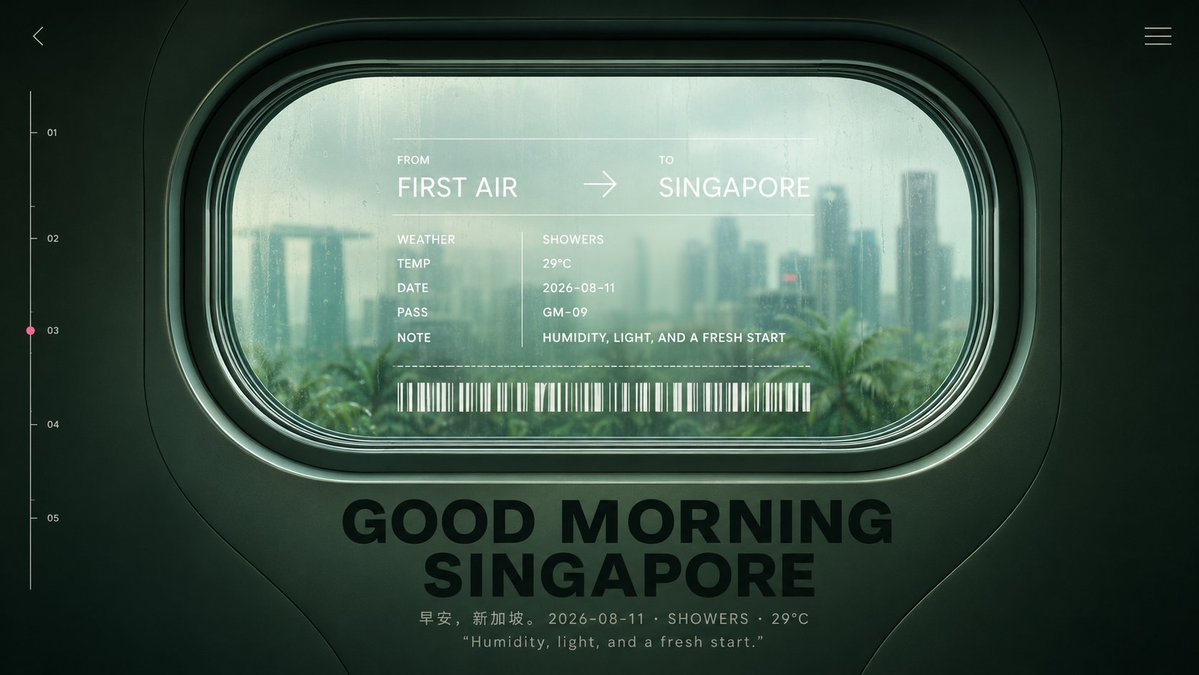
Effects by Tags
Create a cinematic futuristic travel poster viewed from inside an airplane or train cabin, centered on a large rounded-rectangle passenger window with thick dark green molded plastic framing and layered rubber seals. Through the slightly fogged, rain-speckled glass, show a soft-focus morning skyline of {argument name="destination city" default="Singapore"} with the Marina Bay Sands silhouette, high-rise towers, palm trees, humid haze, and muted teal daylight after rain. The overall color grade is dark forest green, seafoam, and pale cyan, with moody low contrast, glossy reflections, subtle film grain, and premium editorial design aesthetics. Overlay a translucent boarding-pass style HUD directly on the window glass. Text must read: FROM {argument name="origin" default="FIRST AIR"} → TO {argument name="destination" default="SINGAPORE"}. Below it, create exactly 5 labeled data rows: WEATHER / SHOWERS, TEMP / 29°C, DATE / 2026-08-11, PASS / GM-09, NOTE / HUMIDITY, LIGHT, AND A FRESH START. Add a thin dotted divider line and a long white barcode beneath the data rows. Below the window, place a large bold black uppercase headline centered on the cabin wall: {argument name="headline text" default="GOOD MORNING SINGAPORE"}. Under the headline, add a small caption line: 早安,新加坡。 2026-08-11 · SHOWERS · 29°C, and a second smaller quoted line: “Humidity, light, and a fresh start.” Add minimalist UI navigation details around the frame: a tiny back chevron in the upper left, a three-line hamburger icon in the upper right, and a vertical progress scale on the left edge with exactly 5 numbered tick labels: 01, 02, 03, 04, 05, with a small pink dot highlighting 03. Keep the composition symmetrical, widescreen 16:9, no people, no extra logos, no watermark, crisp typography, realistic cabin materials, and softly blurred city outside.
This is a free AI prompt from the Orelon library. Thousands more image prompts here are free to copy and adapt.
Explore more image prompts





Ready to create
Start with this curated direction in Orelon, then shape it into your next visual.