Camera Control
Studio Portrait with Space Buns and Glitter Overlay
Likes
42
Views
1.7K
 Orelon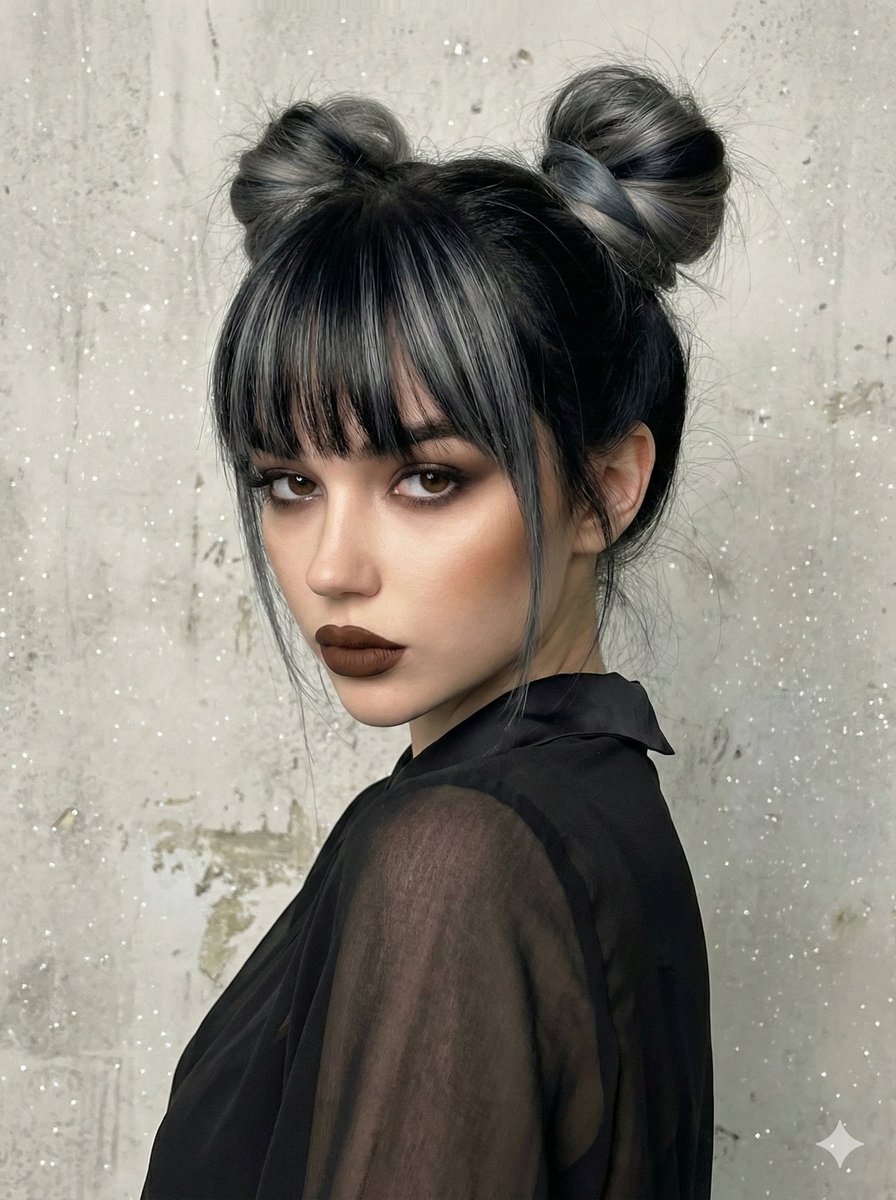
Camera Control
{ "type": "image_generation_prompt", "style": "studio_portrait_creative", "subject": { "gender": "female", "identity_preservation": { "use_reference_image": true, "alter_face": false, "notes": "Maintain facial features exactly as in the reference image, but modify hair and makeup as specified." }, "hair": { "style": "two high voluminous buns (space buns)", "color": "black with grey or blue-grey streaks", "bangs": "straight and dense bangs with grey streaks", "notes": "Add bangs even if not present in reference" }, "makeup": { "style": "sculptural and dramatic", "eyes": "smokey eye in gray/black tones with sharp eyeliner", "lips": "dark brown (chocolate) matte lipstick", "skin": "perfectly smooth, strong facial contouring" }, "expression": "serious and mysterious", "pose": { "type": "close-up portrait (head and shoulders)", "angle": "3/4 angle, looking over the shoulder", "orientation": "body turned sideways, face rotated towards camera" } }, "wardrobe": { "top": "black chiffon blouse", "fabric_details": "transparent and draped fabric with a smooth collar", "accessories": "no glasses" }, "scene": { "background": "light gray textured wall", "texture": "worn cement or stucco effect", "atmosphere": "studio interior" }, "lighting": { "type": "soft, slightly lateral and diffused", "effects": "digitally added glitter/star sparkles", "shadows": "contour-defining shadows" }, "artistic_direction": { "color_palette": "cold and elegant tones (grays, blacks, blue-grey)", "contrast": "brown lipstick providing the only warm touch", "vibe": "elegant, mysterious, creative" }, "output_goal": "Create a high-fidelity portrait of the subject with space buns and bangs, wearing black chiffon against a textured gray wall, featuring a cold color palette with a magical glitter overlay." }
This is a free AI prompt from the Orelon library. Thousands more image prompts here are free to copy and adapt.
Explore more image prompts





Ready to create
Start with this curated direction in Orelon, then shape it into your next visual.