Viral Trends
K-Pop Dance 16-Step Instruction Sheet
Likes
24
Views
2K
 Orelon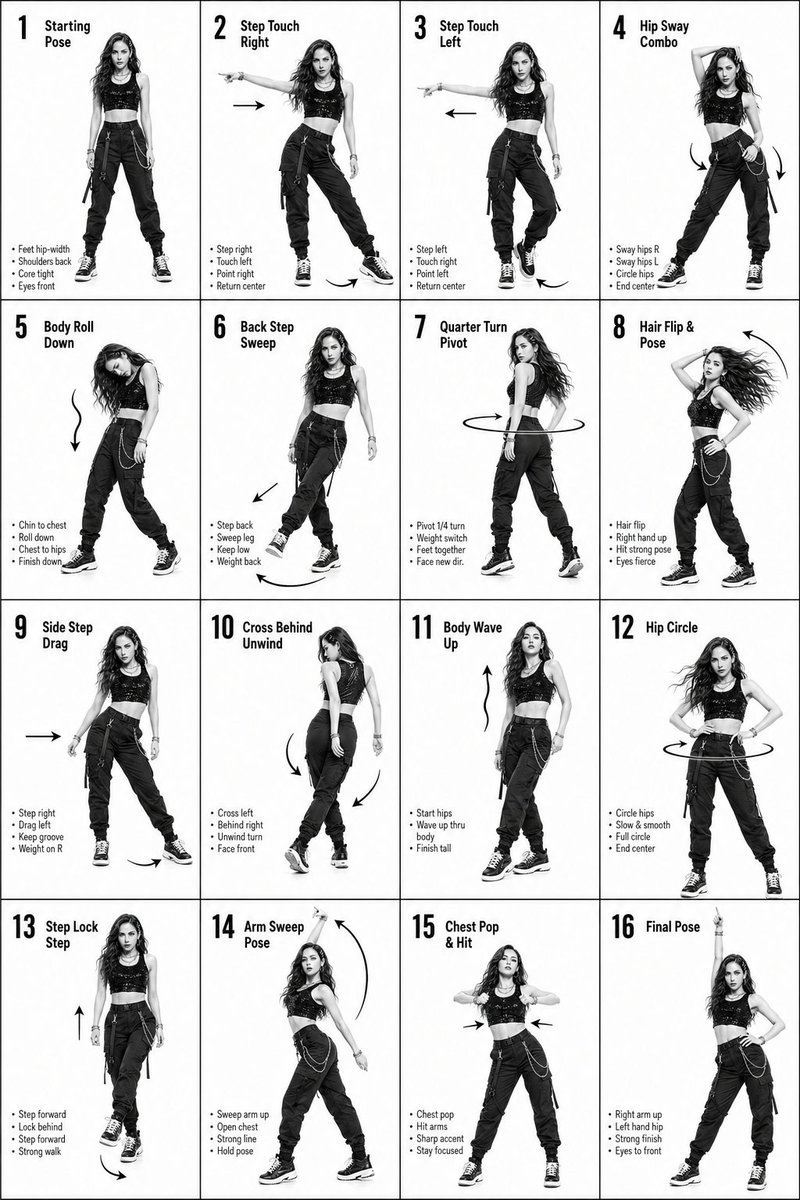
Viral Trends
K-Pop Dance 16-Step Instruction Sheet (4×4 Grid) [VISUAL STYLE] High-end K-pop choreography guide in monochrome grayscale Crisp, studio-lit composition with strong contrast Modern, editorial + performance aesthetic Clean white background, no distractions [GRID LAYOUT, STRICT] 4×4 grid (16 equal panels) Thin black divider lines Each panel clearly numbered 1–16 Top-left: Step number + short title Bottom-left: 3–4 short instruction lines Overlay: arrows + motion guides (curved, straight, circular) [CHARACTER] Korean female dancer (K-pop idol look) Slim, athletic build Long styled hair (soft waves or straight, dynamic movement) Confident, expressive K-pop performance energy Same character across all 16 panels (consistent face and proportions) [WARDROBE K-POP STYLE] Fitted crop top (stylish, performance-ready) High-waisted loose-fit jeans (street dance vibe) Sneakers Outfit should feel trendy, idol-stage inspired Fabric reacts naturally to motion (subtle folds, movement) 🔢 [16 DANCE STEPS, SEQUENCE FLOW] Starting Pose Step Touch Right Step Touch Left Hip Sway Combo Body Roll Down Back Step Sweep Quarter Turn Pivot Hair Flip & Pose Side Step Drag Cross Behind Unwind Body Wave Up Hip Circle Step Lock Step Arm Sweep Pose Chest Pop & Hit Final Pose [PANEL STRUCTURE, EACH FRAME] Center: full-body pose (clear choreography position) Bottom-left: short bullet instructions (clean typography) Motion arrows showing direction, spins, and flow Emphasize rhythm, weight shift, and sharp K-pop accents [MOTION STYLE] Mix of sharp hits + smooth transitions (K-pop signature) Clean isolations (hips, chest, arms) Expressive poses with attitude [RENDER QUALITY] Ultra-detailed, high-resolution Sharp anatomy and pose clarity Smooth grayscale shading No blur, no distortion, no clutter [RESTRICTIONS] No background elements No extra characters No color (strict grayscale) Maintain clean instructional aesthetic
This is a free AI prompt from the Orelon library. Thousands more image prompts here are free to copy and adapt.
Explore more image prompts





Ready to create
Start with this curated direction in Orelon, then shape it into your next visual.