Camera Control
Surreal Sheep Bedtime Story
Likes
13
Views
120
 Orelon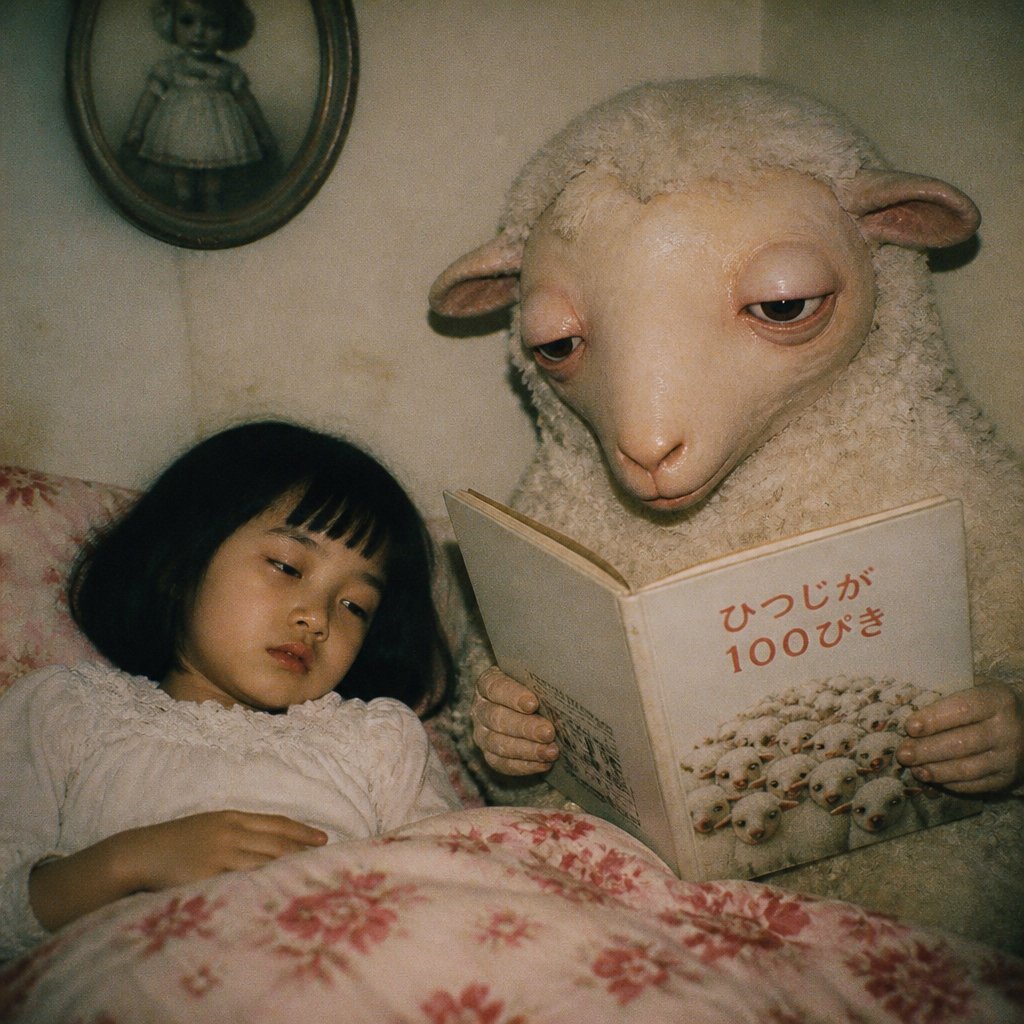
Camera Control
Create a square 1:1 vintage flash-photography bedroom scene at night, styled like a slightly grainy 1990s candid film snapshot with warm beige shadows, soft vignetting, and unsettling storybook surrealism. A small child with {argument name="child hair color" default="black"} hair lies tucked in bed on the left under a white blanket with red floral patterns; the child wears a loose white nightgown and has their face obscured by a plain square censor block. On the right, a large anthropomorphic sheep with realistic curly wool, pale cream skin, long ears, heavy sleepy eyelids, and gentle humanlike hands sits beside the bed reading a bedtime book. The sheep holds exactly 1 open picture book facing the viewer; the book cover shows a cluster of tiny sheep and the Japanese title {argument name="book title text" default="ひつじが100ぴき"} in muted red. Include exactly 4 main visible objects/figures: 1 sleeping child, 1 sheep caregiver, 1 illustrated book, and 1 oval wall mirror in the upper left background reflecting a small doll-like figure in a dress. The room has aged beige wallpaper, an old-fashioned floral pillow, intimate close framing, and a slightly eerie but calm bedtime mood. Use {argument name="lighting style" default="direct on-camera flash with dim ambient room light"}, realistic textures, shallow depth of field, muted colors, and no modern objects, no extra characters, no watermark.
This is a free AI prompt from the Orelon library. Thousands more image prompts here are free to copy and adapt.
Explore more image prompts



Ready to create
Start with this curated direction in Orelon, then shape it into your next visual.