Effects by Tags
Dark Historical Podcast Cover
Views
68
 Orelon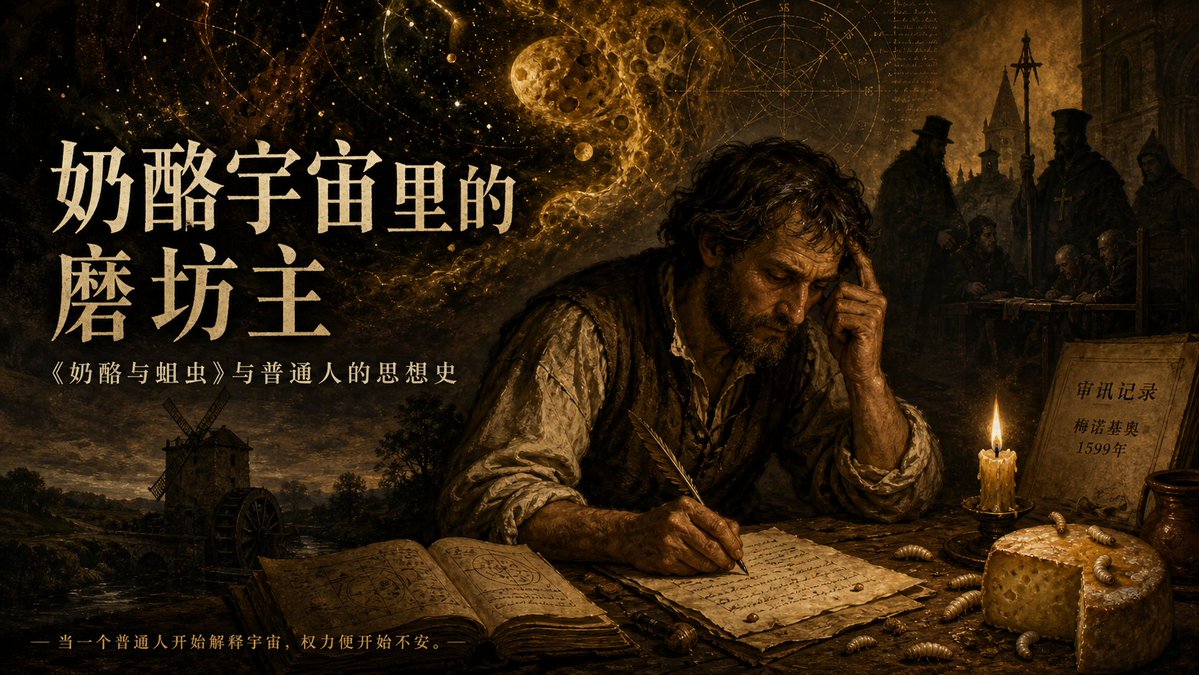
Effects by Tags
Create a dark cinematic podcast cover in a 16:9 horizontal format, painted like a dramatic Baroque oil painting with golden-brown chiaroscuro lighting, aged parchment textures, and a historical mystery atmosphere. The scene shows a weary medieval scholar or miller seated at a rough wooden desk in the right-center foreground, face intentionally obscured by a dark square shadow, one hand pressed to his temple while the other writes with a feather quill on handwritten papers. On the desk include 5 main foreground objects: an open occult notebook filled with diagrams, loose manuscript pages, a burning wax candle, a wedge of hole-filled cheese, and scattered larvae; include exactly 9 clearly visible larvae around the cheese and papers. Behind him, blend a surreal cosmic sky with stars, astrological circles, a cratered moon, golden nebula dust, and faint mathematical manuscript marks, merging into a late-medieval village with a windmill on the lower left and shadowy church officials or inquisitors on the upper right. Add exactly 4 visible text blocks: a large cream-colored Chinese main title on the left reading {argument name="main title" default="奶酪宇宙里的磨坊主"}, a smaller subtitle beneath it reading {argument name="subtitle" default="《奶酪与蛆虫》与普通人的思想史"}, a tiny bottom-left tagline reading {argument name="tagline" default="— 当一个普通人开始解释宇宙,权力便开始不安。"}, and a parchment note on the right reading {argument name="document note" default="审讯记录\n梅诺基奥\n1599年"}. Use elegant traditional Chinese typography, off-white ink for the title, muted gold for the small tagline, high contrast but weathered edges, museum-poster composition, no modern objects, no clean digital gloss, richly detailed, ominous, intellectual, and suitable as a historical philosophy podcast episode cover.
This is a free AI prompt from the Orelon library. Thousands more image prompts here are free to copy and adapt.
Explore more image prompts





Ready to create
Start with this curated direction in Orelon, then shape it into your next visual.