Camera Control
Cinematic Seaside Scene Prompt with Detailed Texture Requirements
Likes
6
Views
79
 Orelon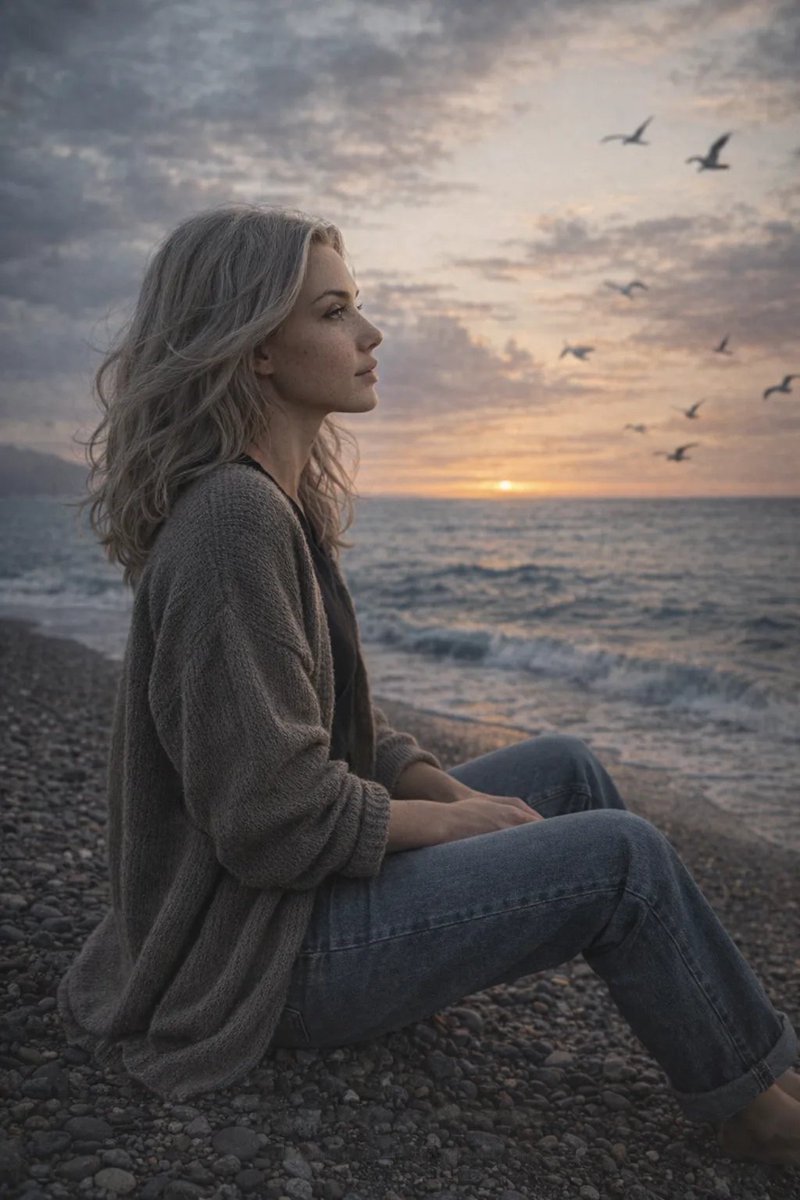
Camera Control
Cinematic seaside scene at sunset with a dramatic, cloud-filled sky. The palette blends cool blue-gray atmospheric tones with a soft peach glow near the horizon. The person sits sideways on a pebbled beach close to the shoreline, body oriented toward the sea, gaze directed over the water. Posture natural and relaxed, anatomically correct, no exaggerated posing. A light coastal breeze creates subtle environmental movement — gentle fabric motion and natural interaction with the surroundings. Seagulls circle in the sky, some with slight motion blur for realistic depth and spatial layering. Wardrobe is minimal and neutral: a dark basic T-shirt layered under a loose knitted cardigan, paired with relaxed straight-leg jeans. Fabrics must show realistic textile behavior — visible knit texture, natural folds, weight, gravity tension at elbows and waist, authentic denim structure and stitching details. Lighting is soft natural sunset light with realistic falloff. Subtle rim light from the horizon, balanced exposure on skin without over-smoothing. Shadows remain matte and dimensional. Shot with a photographer’s mindset — 35mm lens look, natural perspective, shallow but believable depth of field. Vintage film-inspired color science reminiscent of Kodak Portra 400: soft contrast, muted highlights, matte shadows, mild desaturation, organic film grain. Editorial framing, high photorealism, 4K resolution.
This is a free AI prompt from the Orelon library. Thousands more image prompts here are free to copy and adapt.
Explore more image prompts





Ready to create
Start with this curated direction in Orelon, then shape it into your next visual.