Camera Control
Cinematic Fox Fighter Pilot
Views
56
 Orelon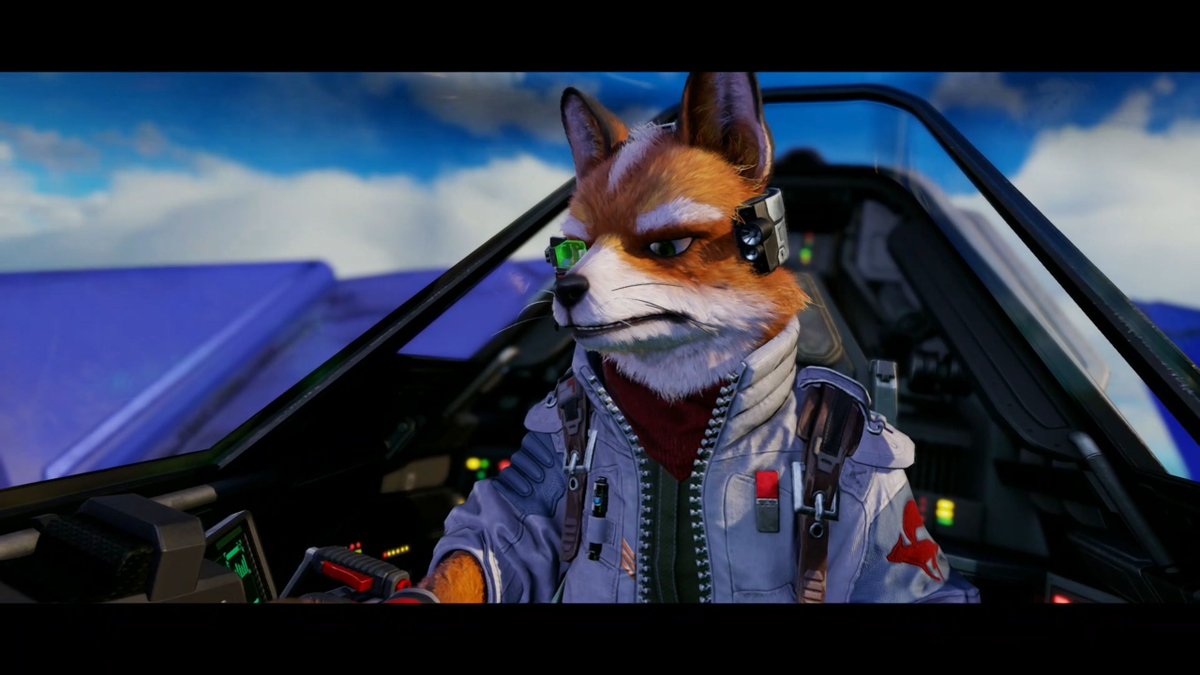
Camera Control
Create a cinematic widescreen 3D animated film still with black letterbox bars, showing a single anthropomorphic {argument name="animal pilot species" default="red fox"} ace pilot seated in the cockpit of a futuristic fighter jet. The character has orange-red and white fur, a pointed muzzle, two tall upright ears, green eyes, a confident narrowed expression, and looks slightly to the viewer’s left while holding the controls. Add one glowing green cybernetic eyepiece over the pilot’s left eye, one gray communications headset module on the right side of the head, one red neck scarf, one light gray flight jacket with zipper details, one red shoulder insignia patch, and two dark shoulder harness straps. The cockpit surrounds the pilot with angular black canopy frames, a deep pilot seat, dark control panels, one prominent control stick in the lower left foreground with red buttons, and multiple small colored instrument lights in green, yellow, and red. Outside the canopy, show sleek blue-purple aircraft wings against a bright blue sky with soft white clouds. Use high-detail stylized realism, expressive fur grooming, glossy cockpit materials, dramatic aviation lighting, shallow depth of field, rich saturated colors, and a polished game-cinematic look inspired by space fighter adventure games. Aspect ratio 16:9, medium close-up composition, dynamic but readable, no on-screen text.
This is a free AI prompt from the Orelon library. Thousands more image prompts here are free to copy and adapt.
Explore more image prompts





Ready to create
Start with this curated direction in Orelon, then shape it into your next visual.