Camera Control
Cinematic Chiaroscuro Portrait Prompt in JSON Format
Likes
2
Views
424
 Orelon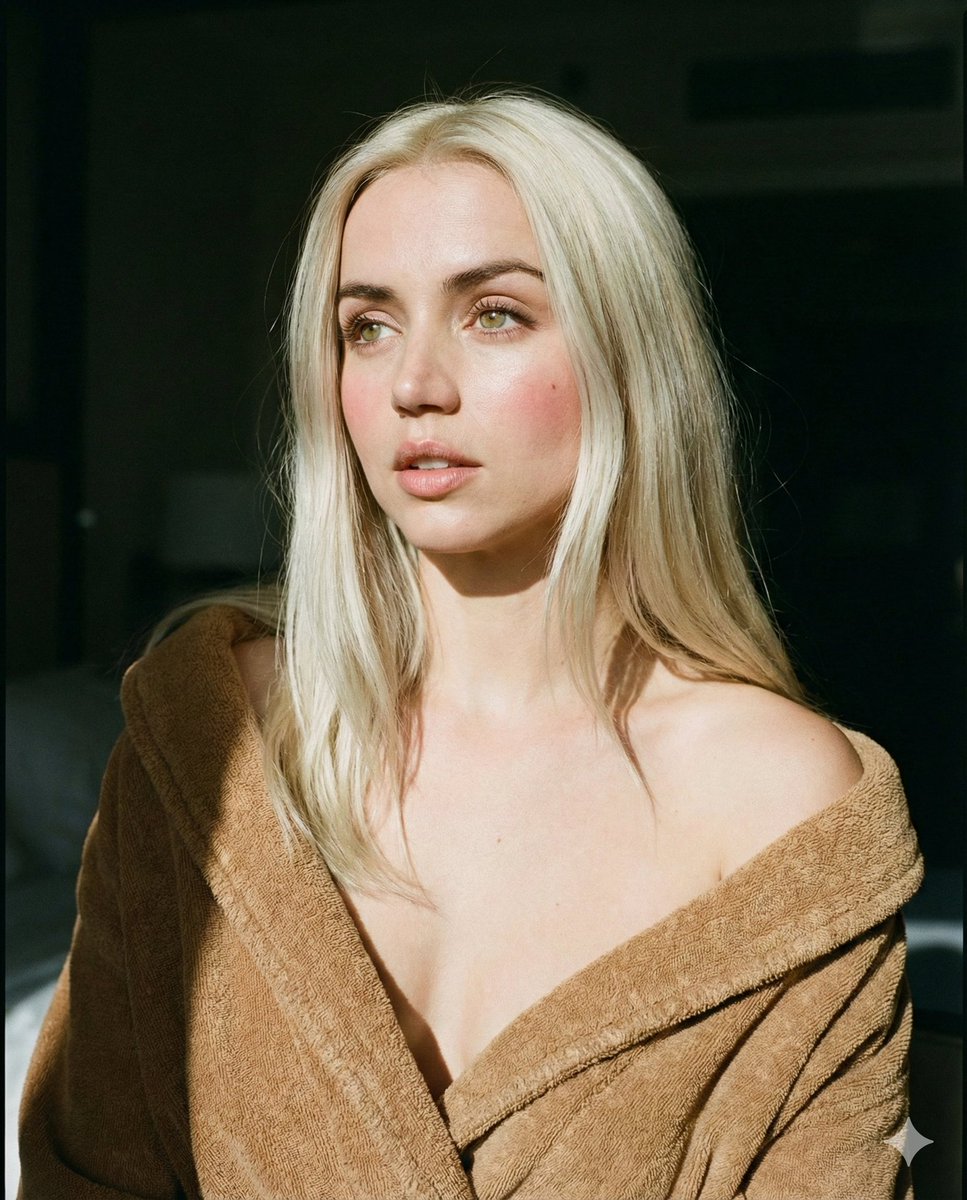
Camera Control
{ "subject": { "description": "Young woman with long, straight platinum blonde hair", "expression": "Neutral, soft gaze looking to the left, lips slightly parted", "features": "Pale skin, light green eyes, natural makeup, rosy cheeks" }, "attire": { "item": "Bathrobe", "color": "{argument name="bathrobe color" default="Camel brown / dark beige"}", "material": "Textured terry cloth or velvet", "styling": " draped loosely, off-the-shoulder, revealing collarbones" }, "lighting": { "type": "Natural directional sunlight", "technique": "Chiaroscuro (high contrast between light and dark)", "details": "Hard light hitting the face and hair, deep shadows in the background and on the right side of the subject, sunbeam effect" }, "composition": { "framing": "Medium close-up portrait", "angle": "Eye level", "background": "Dark, shadowy indoor room, out of focus" }, "style": { "aesthetic": "Cinematic, intimate, morning vibe", "technical": "35mm film photography style, high resolution, sharp focus on eyes, soft fall-off" } }
This is a free AI prompt from the Orelon library. Thousands more image prompts here are free to copy and adapt.
Explore more image prompts





Ready to create
Start with this curated direction in Orelon, then shape it into your next visual.