Camera Control
Ultra Photorealistic Studio Glamour Floor Pose Prompt
Likes
2
Views
44
 Orelon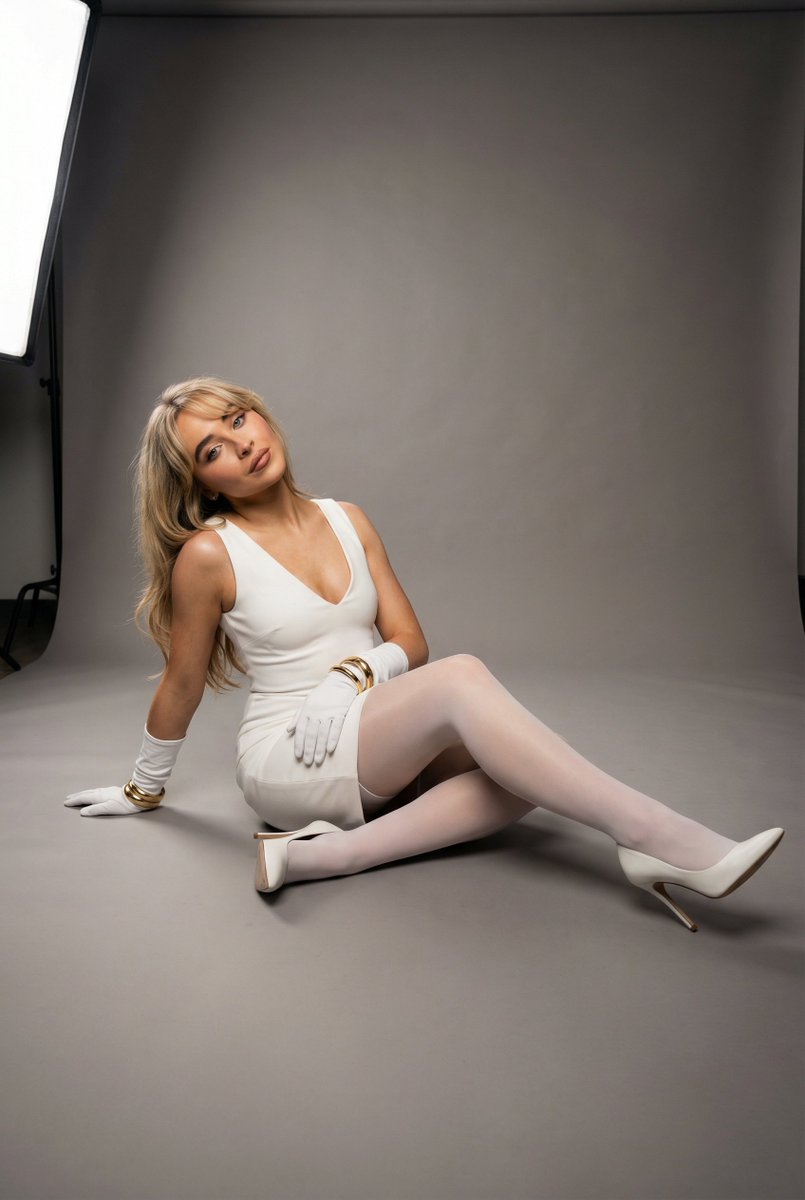
Camera Control
{ "type": "ultra_photorealistic_studio_glamour_floor_pose_full_body_lock", "scene": { "location": "professional photography studio", "floor": { "type": "smooth matte studio floor", "color": "neutral gray", "surface_behavior": "non-reflective with soft micro-texture", "shadow_interaction": "soft contact shadows beneath legs and heels" }, "background": { "type": "seamless studio backdrop", "color": "medium neutral gray", "gradient_behavior": "subtle vertical tonal falloff from top to bottom", "texture": "smooth, uncluttered, minimal" }, "lighting": { "setup": "two-light studio configuration", "key_light": { "position": "front-left at approximately 35° horizontal angle and 25° elevation", "modifier": "large softbox", "effect": "soft sculpting across face and torso with gentle highlight rolloff" }, "fill_light": { "position": "front-right low intensity", "ratio": "approximately 1:2 relative to key", "effect": "controlled shadow softness without flattening contours" }, "rim_light": { "optional_subtle_edge": "low-intensity rear kicker defining hair and shoulder outline" } } }, "subject": { "description": "{argument name="subject name" default="anya taylor joy"}, realistic anatomy, natural proportions", "skin": { "tone": "even natural tone", "texture_detail": "visible fine skin texture without artificial smoothing", "highlight_behavior": "soft specular highlights on cheekbones, collarbones, and knees" }, "face_lock": { "visibility": "fully visible", "expression": "calm, confident, subtly glamorous", "gaze_direction": "toward camera lens", "head_alignment": "neutral vertical axis with slight tilt (~4°)" }, "hair": { "style": "styled smooth with controlled volume", "behavior": "resting naturally along shoulders with slight lift from rim light" } }, "precise_pose_geometry": { "base_position": "seated directly on studio floor", "pelvis": { "tilt": "slight posterior tilt (~8°)", "rotation": "rotated approximately 20° relative to camera plane", "weight_distribution": "primary load through left hip and posterior thigh" }, "torso": { "inclination": "upright with subtle backward lean (~6°)", "spinal_curve": "natural lumbar curve maintained", "shoulder_alignment": "right shoulder slightly forward (~5°)" }, "head": { "tilt": "subtle lateral tilt (~4°)", "rotation": "approximately 10–15° toward key light", "chin_position": "slightly lowered (~3°) for defined jawline" }, "arm_position": { "left_arm": { "elbow_flexion": "approximately 100°", "placement": "forearm resting lightly on bent knee", "hand_pose": "relaxed fingers with gold bang" } } } }
This is a free AI prompt from the Orelon library. Thousands more image prompts here are free to copy and adapt.
Explore more image prompts





Ready to create
Start with this curated direction in Orelon, then shape it into your next visual.