Commercial
Photorealistic Vice City Cover Recreation
Likes
2
Views
61
 Orelon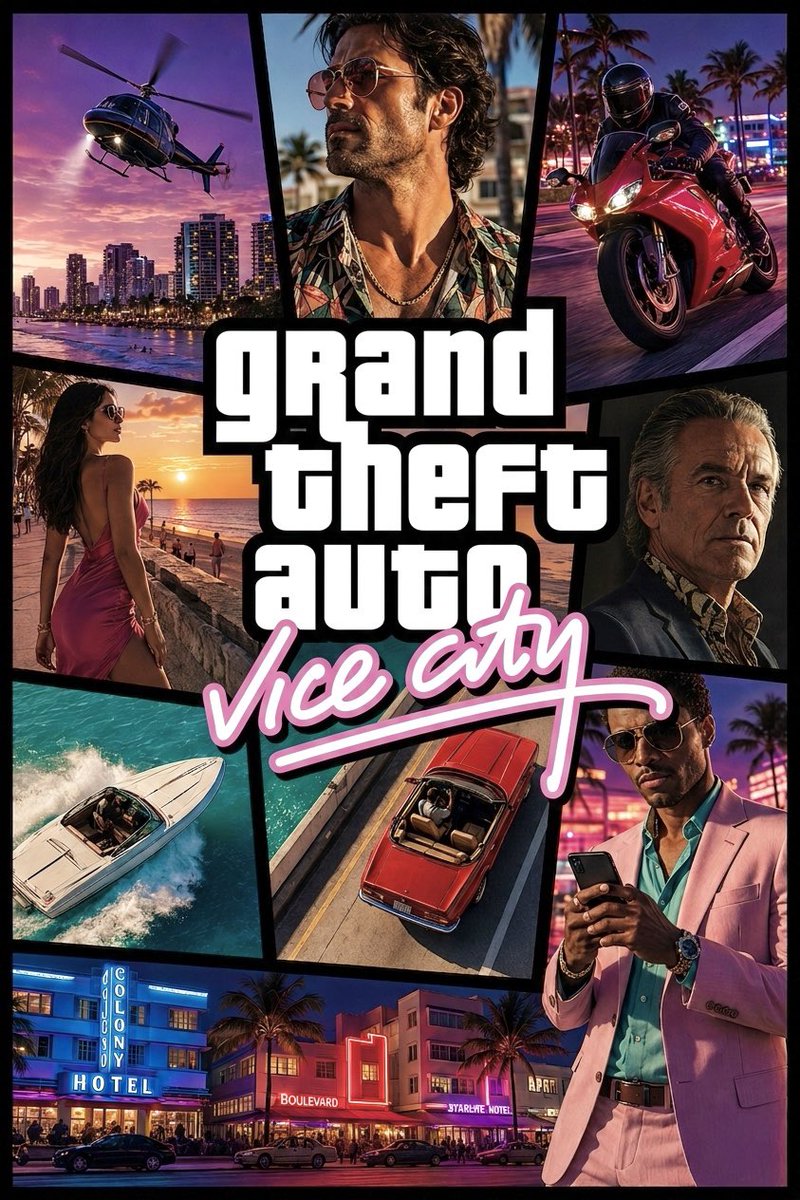
Commercial
Using REFERENCE_0 as the layout and brand-style reference, create a high-definition, realistic cinematic recreation of the GTA Vice City cover rather than the original comic illustration. Preserve the overall collage-panel concept, thick black dividers, central stacked white block logo text, and pink cursive subtitle, but render everything as glossy photorealistic key art with neon Miami/Vice City atmosphere. Goal: Make an HD cover/poster for {argument name="game title" default="grand theft auto"} with the subtitle {argument name="subtitle text" default="vice city"}. Layout: Keep exactly 9 visual panels around the central logo: 1 helicopter over a sunset city waterfront, 2 close-up of a stylish man in sunglasses and tropical shirt, 3 red sport motorcycle speeding through neon streets, 4 woman in a pink dress walking by the beach at sunset, 5 older serious man portrait in a dark suit, 6 white speedboat cutting through turquoise water, 7 overhead red convertible driving on a road, 8 fashionable man in a pink suit looking at a phone, 9 bottom-wide neon Art Deco hotel street scene. Use angular comic-cover panel borders in black, similar to the reference. Style: Photorealistic, high contrast, saturated tropical colors, cinematic lighting, 1980s Miami nightlife, palm trees, neon signs, warm sunsets, glossy vehicles, dramatic portraits, sharp HD detail. Text: Place the central logo in large bold white stacked block letters with a heavy black outline reading {argument name="main logo text" default="grand theft auto"}. Put the subtitle underneath in bright pink handwritten neon script with a long underline, reading {argument name="subtitle text" default="vice city"}. Constraints: Do not copy the original illustration exactly; reinterpret it as a realistic modern homage. Keep the same overall cover composition and energy, with no extra logos, no watermark, and no additional small text beyond visible environmental signage such as {argument name="hotel sign text" default="COLONY HOTEL"}.
This is a free AI prompt from the Orelon library. Thousands more image prompts here are free to copy and adapt.
Explore more image prompts




Ready to create
Start with this curated direction in Orelon, then shape it into your next visual.