Commercial
Three-Panel AI Image Quality Comparison
Views
37
 Orelon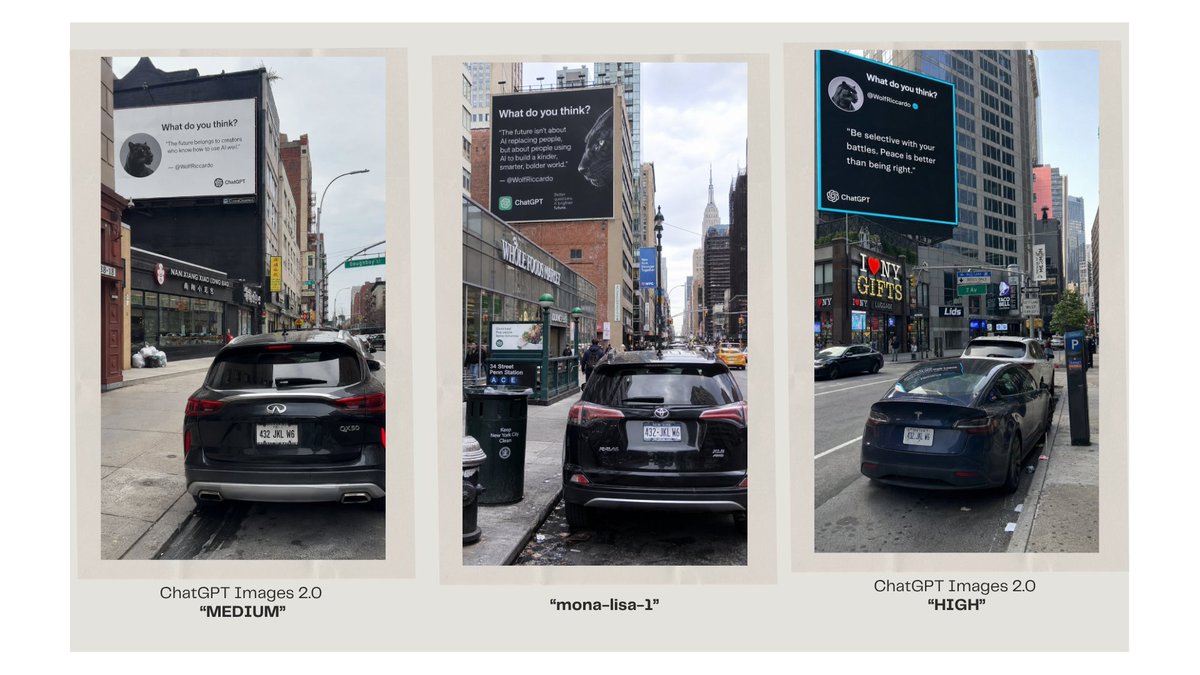
Commercial
Goal: Create a clean side-by-side comparison graphic showing three generated street-photo samples of urban billboard ads, comparing ChatGPT Images 2.0 quality settings with a checkpoint named {argument name="model codename" default="mona-lisa-1"}. Canvas: Wide 16:9 landscape canvas with an off-white/light warm gray background and generous margins. Arrange exactly 3 vertical photo panels in a row, each framed by a pale beige border like printed photographs on a presentation slide. Layout: Use three evenly spaced portrait-oriented image panels. Each panel contains a realistic New York City street scene photographed from sidewalk or curb level, with cloudy daylight, tall buildings, parked cars, traffic, storefront signage, and a large elevated billboard ad near the top of the scene. Beneath each panel, add a centered caption in dark gray/black sans-serif type. Panel count and captions: There are exactly 3 panels. Left caption: “ChatGPT Images 2.0” on the first line and “MEDIUM” in bold quotation marks on the second line. Center caption: “{argument name="model codename" default="mona-lisa-1"}” in bold quotation marks only. Right caption: “ChatGPT Images 2.0” on the first line and “HIGH” in bold quotation marks on the second line. Photo panel details: Left panel shows a black SUV parked in the foreground on a city street, Chinatown-like storefronts on the left, and a large black-and-white billboard above the storefront. Center panel shows a black Toyota RAV4 parked at the curb, a midtown Manhattan avenue with the Empire State Building visible in the distance, and a dark billboard mounted above a brick building. Right panel shows a black sedan parked at the curb, Times Square-style commercial buildings and signs including a bright “I ♥ NY GIFTS” storefront, and a large dark billboard with a cyan glowing border. Billboard content: Each billboard should resemble a ChatGPT social quote card with a circular avatar, the heading “What do you think?”, a short quote, a small handle line, and a ChatGPT logo/wordmark near the bottom. Keep the billboard text mostly legible but natural for a photographed street ad. Use the quote theme {argument name="billboard quote theme" default="opinions about AI and the future"}. The right billboard should have the clearest high-contrast look with a cyan outline, the center should look moderately realistic, and the left should look slightly softer/noisier to imply quality differences. Visual style: Realistic smartphone street photography embedded in a minimal presentation comparison slide. Natural perspective, mild lens distortion, urban clutter, overcast sky, authentic road grime, parked vehicles, and realistic shadows. The overall slide should look like a model evaluation screenshot rather than a polished advertisement. Constraints: Use exactly 3 image panels and exactly 3 captions. Do not add extra panels, charts, icons, watermarks, or explanatory paragraphs. Keep the captions clean and centered under the photos.
This is a free AI prompt from the Orelon library. Thousands more image prompts here are free to copy and adapt.
Explore more image prompts



Ready to create
Start with this curated direction in Orelon, then shape it into your next visual.