Effects by Tags
Office Transfer Announcement Poster
Views
34
 Orelon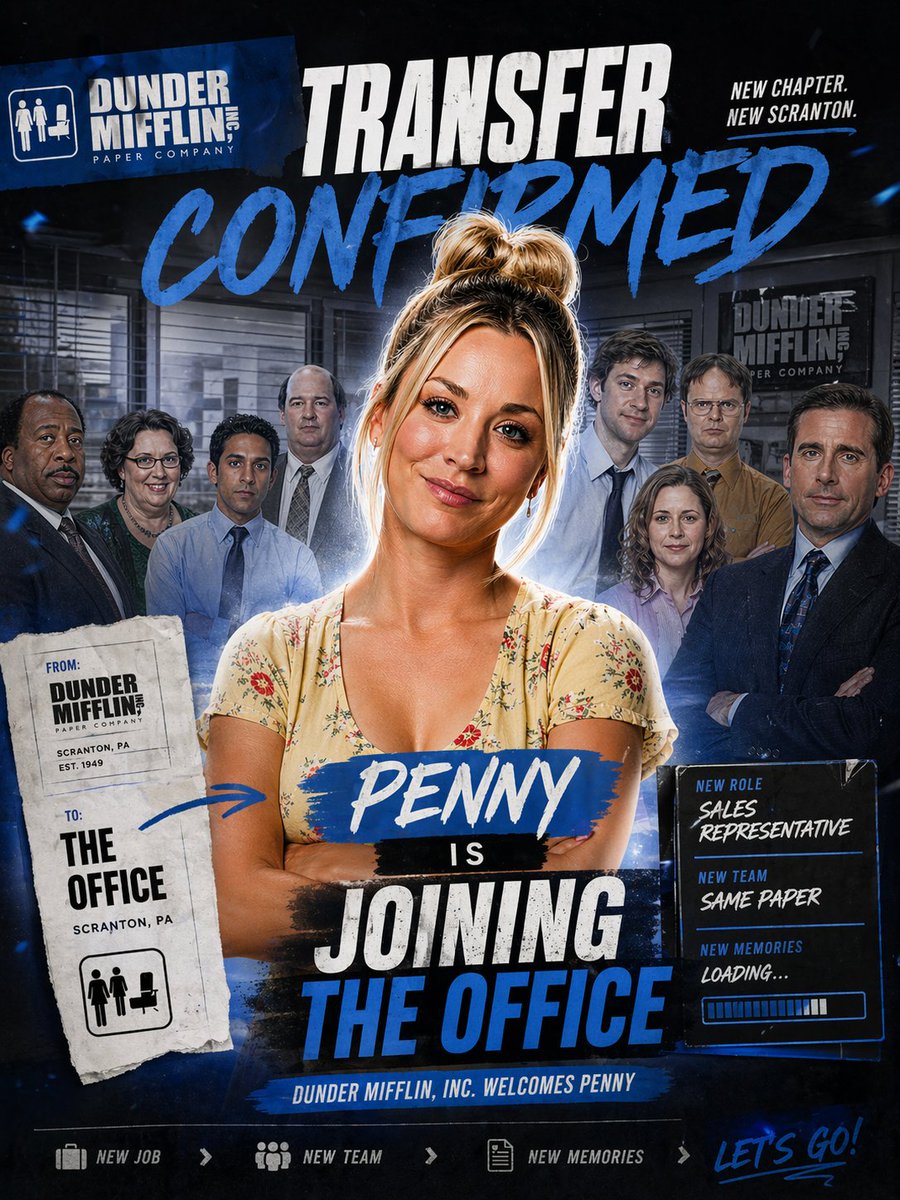
Effects by Tags
Design a dramatic square promotional poster in the style of a TV sitcom cast transfer announcement, with a dark navy and black office-themed background, gritty sports-poster energy, bold blue paint strokes, white distressed typography, and layered collage composition. At the center, place a confident woman named {argument name="character name" default="Penny"} standing from the waist up with arms crossed, wearing a light cream floral V-neck dress, messy blonde hair in a high bun, softly rim-lit with a subtle glow around her silhouette. Behind her, show exactly 8 office coworkers arranged as a blurred ensemble cast in staggered rows inside a corporate office interior with blinds, desks, and framed company signage; keep them secondary and slightly shadowed so the central woman dominates the composition. At the top left, include a tilted blue company logo block reading "DUNDER MIFFLIN INC. PAPER COMPANY" with a small office icon. Across the top center, add a huge distressed white headline "TRANSFER" and beneath it an even larger blue brush-script word "CONFIRMED". At the top right, add the small stacked slogan "NEW CHAPTER. NEW SCRANTON." On the left side, place a torn-paper transfer slip with a stamped, photocopied look; it should contain exactly 2 labeled sections, "FROM:" with "DUNDER MIFFLIN PAPER COMPANY, SCRANTON, PA, EST. 1949" and "TO:" with "THE OFFICE, SCRANTON, PA", plus a small office icon at the bottom. Add a hand-drawn blue arrow from this slip pointing toward the central woman. Across the woman's torso, place a blue paint-stroke nameplate with "{argument name="character name" default="Penny"}" in white script, followed by a small black strip with "IS", then a large stacked headline in distressed white and blue block text reading "JOINING THE OFFICE". On the right side, add a glowing dark info panel with exactly 3 labeled lines: "NEW ROLE" with "{argument name="job title" default="SALES REPRESENTATIVE"}", "NEW TEAM" with "{argument name="team tagline" default="SAME PAPER"}", and "NEW MEMORIES" with "LOADING...", plus a horizontal progress bar beneath. Along the bottom center, include a narrow blue banner reading "DUNDER MIFFLIN, INC. WELCOMES {argument name="character name" default="Penny"}". At the very bottom, create a footer strip with exactly 4 elements: a briefcase icon and "NEW JOB", a team icon and "NEW TEAM", a document icon and "NEW MEMORIES", and on the far right a handwritten blue script phrase "{argument name="footer text" default="LET'S GO!"}". Use a high-contrast blue-white-black palette, cinematic compositing, subtle dust and texture overlays, energetic paint smears, and a premium fan-edit social media announcement aesthetic.
This is a free AI prompt from the Orelon library. Thousands more image prompts here are free to copy and adapt.
Explore more image prompts





Ready to create
Start with this curated direction in Orelon, then shape it into your next visual.