Effects by Tags
Overwhelmed Anime Productivity Collage
Views
1
 Orelon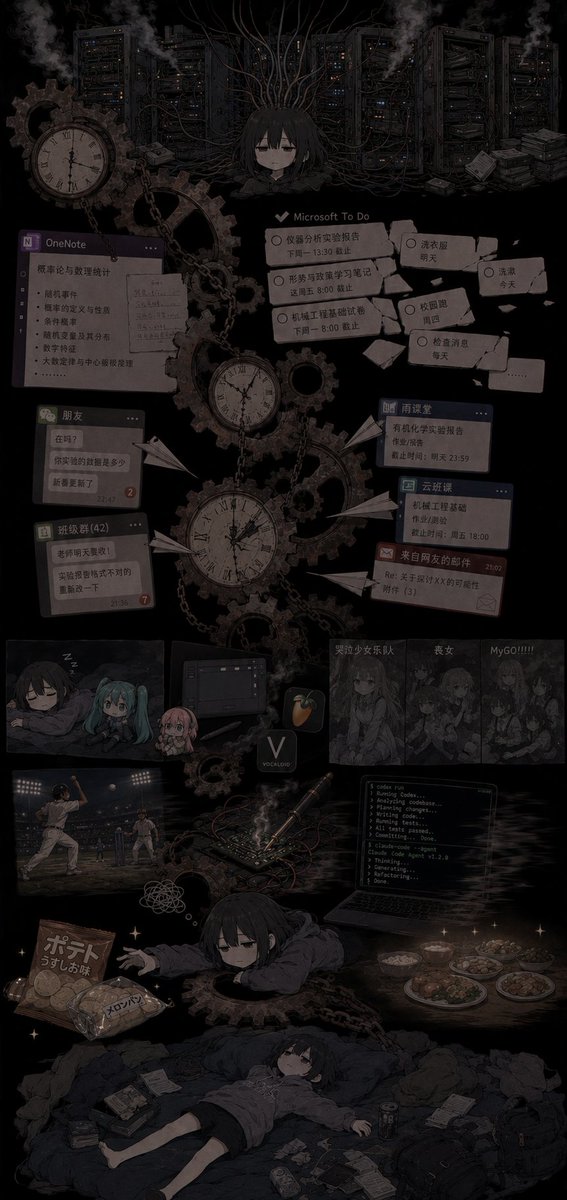
Effects by Tags
Goal: Create a dark, vertical anime collage illustrating {argument name="mood" default="my current incompetent state"}: an overwhelmed student/programmer trapped inside a gloomy machinery-and-productivity nightmare. Canvas: Tall vertical poster, about 9:16 aspect ratio, black background with low-contrast charcoal gray details, muted sepia highlights, desaturated colors, soft film grain, vignette, smoky atmosphere, dense but readable collage composition. Central subject: A tired, emotionless anime girl with {argument name="character appearance" default="short black hair, pale skin, heavy-lidded eyes, oversized dark hoodie"}. Show her multiple times: 1 small bust at the upper center tangled in cables, 1 chibi/sleepy version near the lower middle reaching forward from inside gears, and 1 full-body version at the bottom lying exhausted on a messy bed or blanket surrounded by papers and trash. Her expression should stay flat, drained, and sleep-deprived. Main background and machinery: Fill the upper half with server racks, tangled black cables, smoke vents, and steampunk gears. Include exactly 4 prominent antique clock faces: 1 large clock at upper left, 1 medium pocket-watch clock near center-left, 1 large hanging clock in the vertical center, and 1 smaller clock integrated among gears. Add chains, cogwheels, paper airplanes, scattered notes, and faint sparks. Productivity and school-task UI collage: Place exactly 8 floating interface/task panels across the middle area, all dim and slightly skewed like screenshots pasted into the scene: 1 OneNote window on the left with Chinese class notes and bullet points, 1 Microsoft To Do panel in the upper middle with several overdue tasks, 1 torn sticky-note cluster on the upper right with daily routines, 1 small chat window labeled like friends on the left, 1 class-group chat window below it, 1 small blue homework/deadline card on the right, 1 cloud-classroom/deadline card below it, and 1 red warning or reminder message card below those. The visible text may be mostly Chinese, but keep it tiny, imperfect, and secondary to the mood. Media, fandom, and distraction strip: In the lower-middle area, include exactly 5 distraction panels/items in a row: 1 small anime sleep panel with three chibi characters, 1 dark computer/software panel, 1 music-production app icon resembling FL Studio, 1 grayscale band/anime screenshot panel with Chinese title text, and 1 grayscale panel labeled with an excited phrase like “MyGO!!!!!”. Lower activity scenes and clutter: Add exactly 6 bottom-life vignettes/items around the exhausted character: 1 baseball game scene at lower left, 1 crumpled thought scribble nearby, 1 coding laptop at lower right showing terminal output, 1 electronics/breadboard or soldering setup with smoke and wires near center-right, 1 plate-and-bowl meal scene at far right, and 1 snack pile at lower left with potato chips and melon bread packaging. Scatter additional notebooks, phones, cans, tissues, receipts, and small papers around the final lying figure. Visual style: Melancholic anime illustration, gothic productivity hell, detailed collage, dark academia meets cyberpunk servers and steampunk clocks. Use mostly black, charcoal, dusty brown, faded gray, muted blue, and occasional tiny warm lights. Keep everything intentionally dim, cluttered, and emotionally heavy, with the central character as the only recurring human focal point. Text constraints: Use a few legible UI labels such as {argument name="task app label" default="Microsoft To Do"}, {argument name="note app label" default="OneNote"}, and {argument name="band panel label" default="MyGO!!!!!"}. Do not add a clean infographic layout, bright colors, watermark, or photorealistic style.
This is a free AI prompt from the Orelon library. Thousands more image prompts here are free to copy and adapt.
Explore more image prompts





Ready to create
Start with this curated direction in Orelon, then shape it into your next visual.