Camera Control
1990s Flash Camera Snapshot Portrait
Likes
25
Views
963
 Orelon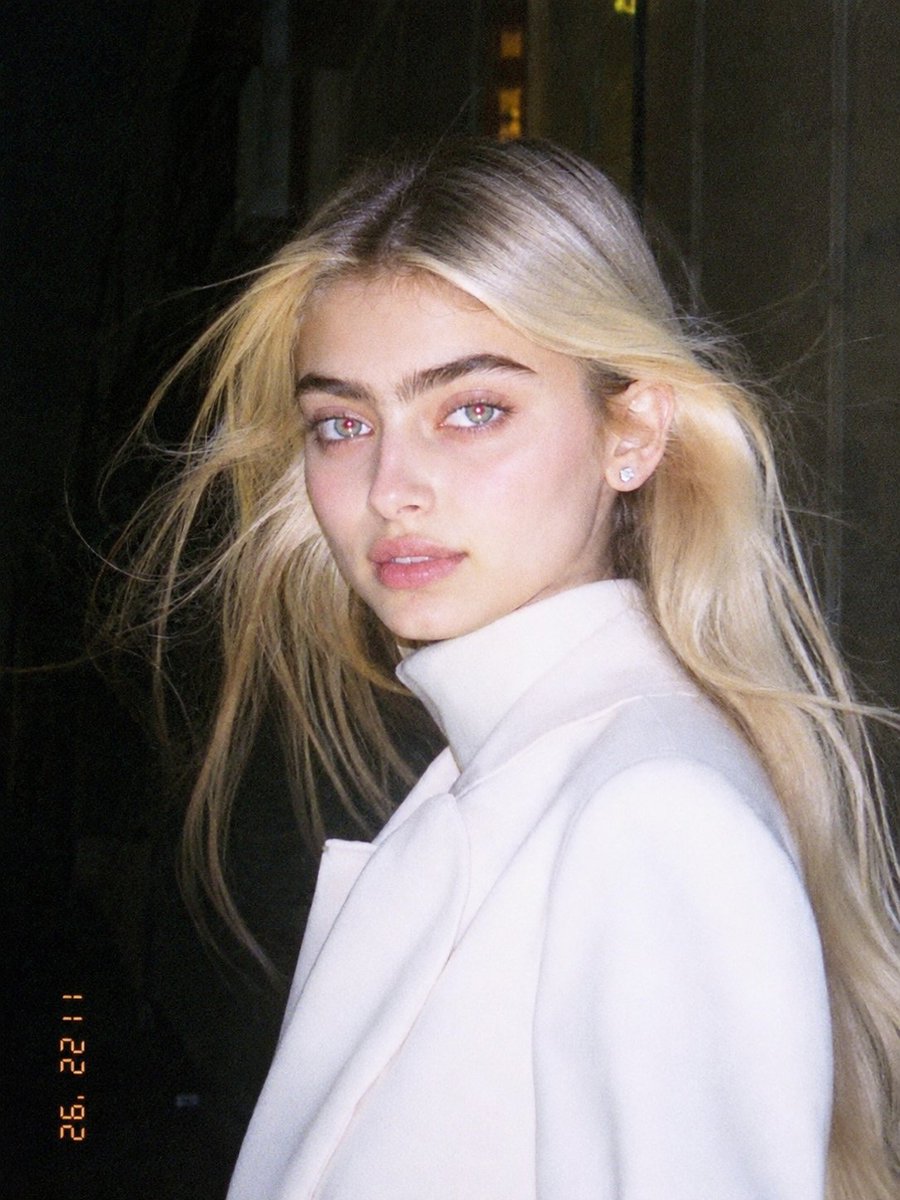
Camera Control
Use the uploaded image as the main reference. Transform the uploaded photo into a realistic candid portrait with an early 1990s digital camera aesthetic. Preserve the subject’s identity, facial features, pose, outfit, and overall composition, but restyle the image with harsh blown-out flash highlights, subtle red-eye effect, low-resolution image quality, raw snapshot imperfections, nostalgic flash-filter styling, and a vintage timestamp look. The final image should feel candid, imperfect, and authentic, like an old retro party or personal snapshot taken with an early consumer digital camera. Keep the background dark or naturally subdued when appropriate, maintain a direct-flash look, and give the image a raw, unpolished, memory-like atmosphere. Include: - harsh direct camera flash - overexposed or blown-out highlights - subtle red-eye effect - low-resolution / soft digital detail - slight grain or noisy texture - authentic retro snapshot feeling - vintage date/timestamp aesthetic in one corner - candid, natural, imperfect energy Avoid: - cartoon or anime style - overly polished beauty retouching - studio lighting - ultra-sharp modern DSLR look - glossy AI skin - text, logos, watermarks, or graphic overlays other than the timestamp aesthetic - distorted anatomy or altered identity Make the aspect ratio 3:4
This is a free AI prompt from the Orelon library. Thousands more image prompts here are free to copy and adapt.
Explore more image prompts





Ready to create
Start with this curated direction in Orelon, then shape it into your next visual.