Camera Control
Cyber-Liminal Dream Sequence Triptych
Likes
2
Views
99
 Orelon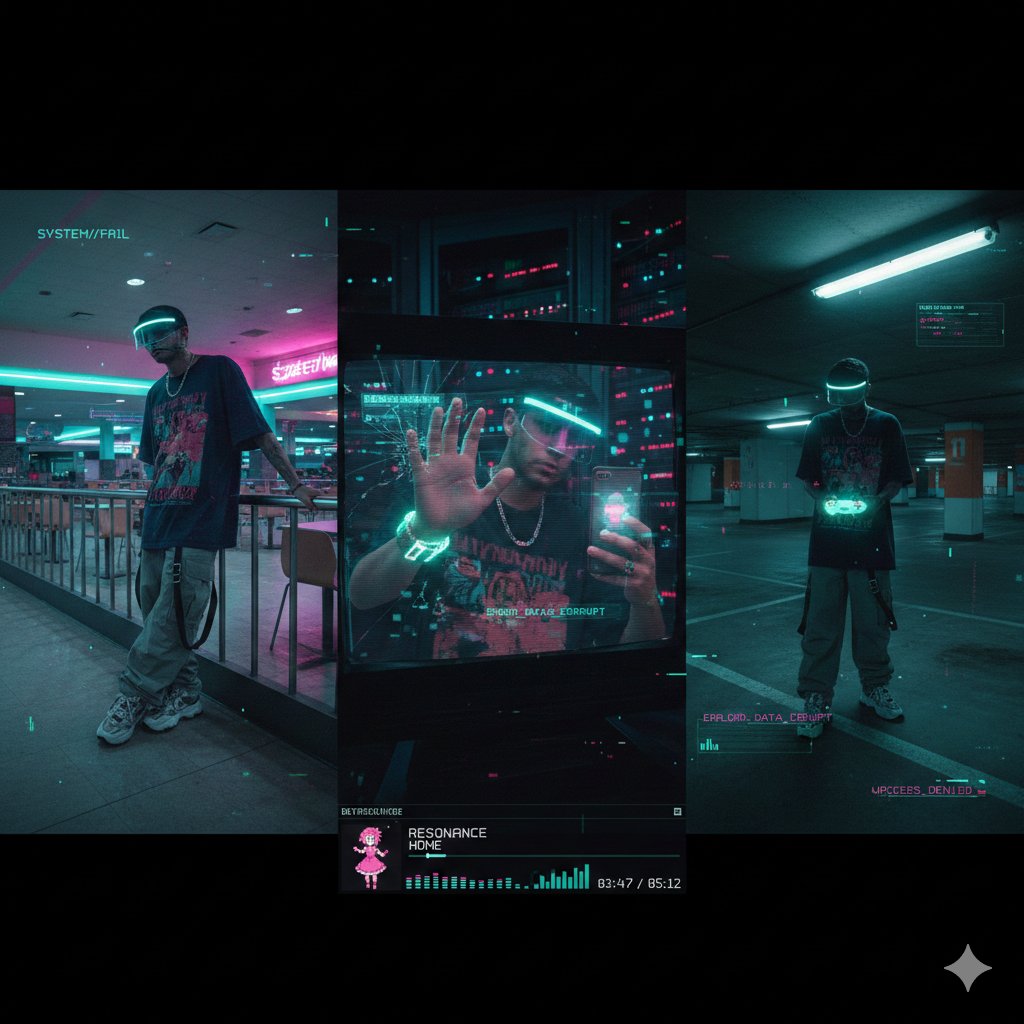
Camera Control
{ "project_title": "Cyber-Liminal Dream Sequence", "aspect_ratio": "2.35:1 (cinematic widescreen)", "aesthetic_theme": { "style": "Glitchcore vaporwave triptych", "mood": "Solitary digital nostalgia", "color_palette": [ "Teal and magenta gradients", "Mint greens", "Off-whites", "Deep indigo shadows" ], "textures": [ "CRT screen static", "Glossy plastic", "Faux marble", "Pixelated dithering" ] }, "subject_outfit": { "core": "Oversized vintage tech tee (obscure anime graphic), baggy cargos with utility straps, chunky sneakers", "accessories": "Transparent visor with LED rim, silver chain necklace", "tech": "Holographic flip phone, coiled wrist gadget" }, "composition_layout": { "frame_1_left": { "type": "Low-angle shot in empty mall food court", "pose": "Leaning on neon-lit railing, looking away", "visual_effects": "Scanlines, VHS bleed, chromatic aberration" }, "frame_2_center": { "type": "Mid-shot reflection in broken monitor screen", "setting": "Dark server room with blinking lights", "pose": "One hand touching screen, distorted reflection", "visual_effects": "Data-moshing, fragmented geometry overlay" }, "frame_3_right": { "type": "Dutch angle in empty parking garage", "lighting": "Flickering fluorescent tubes", "props": "Holding translucent game controller", "overlays": "Floating UI elements, low-poly wireframe grids" } }, "ui_elements": { "player_ui": { "style": "Late-90s multimedia player skin", "content": "“RESONANCE” by HOME", "features": "Virtual dancing anime mascot, equalizer bars, track time in pixel font" }, "graphics": "Glitch transitions between frames, corrupted text fragments, 'ERROR' pop-ups" }, "negative_constraints": [ "Natural landscapes", "Modern UI (flat design)", "Human faces fully visible", "Grunge textures", "Warm lighting", "Organic shapes" ] }
This is a free AI prompt from the Orelon library. Thousands more image prompts here are free to copy and adapt.
Explore more image prompts





Ready to create
Start with this curated direction in Orelon, then shape it into your next visual.