Camera Control
Nighttime City Portrait on a Glass Balcony
Likes
2
Views
96
 Orelon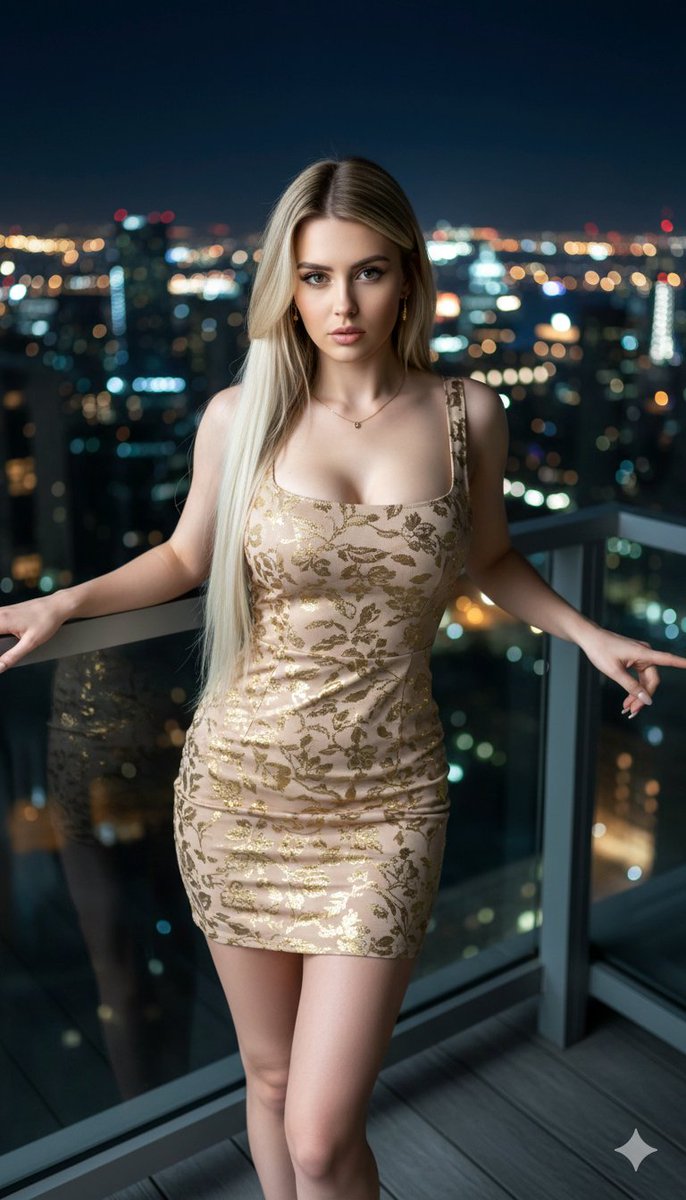
Camera Control
{ "image_metadata": { "style": "Hyper-realistic Cinematic", "resolution_target": "8k", "lighting": "Balanced nighttime cityglow with golden reflections", "composition": { "shot_type": "Medium shot", "perspective": "Side pose", "depth_of_field": "Shallow (bokeh background)" } }, "subject": { "identity": "Same person from reference image", "features": { "eyes": "Green", "lips": "Full", "skin_tone": "Fair", "hair": { "color": "Blonde", "texture": "Silky, long", "style": "Neatly arranged, cascading over shoulders" }, "makeup": "Professional" }, "anatomy_constraints": "Exact same facial features and chest size as provided reference", "pose": "Side profile, leaning slightly forward, hands resting on railing" }, "attire": { "dress": { "length": "Short", "fit": "Fitted", "color": "Beige", "pattern": "Shimmering gold floral print", "neckline": "Square", "straps": "Thin" }, "accessories": [ "Simple earrings", "Delicate necklace" ] }, "environment": { "location": "Glass balcony", "flooring": "Gray wood", "background": "Nighttime city skyline", "elements": [ "Illuminated windows", "Towering skyscrapers", "Reflective glass railing" ] }, "keywords": [ "masterpiece", "photorealistic", "citynight", "elegant", "gold", "silky fabric", "slit" ] }
This is a free AI prompt from the Orelon library. Thousands more image prompts here are free to copy and adapt.
Explore more image prompts





Ready to create
Start with this curated direction in Orelon, then shape it into your next visual.