Visual Effects
Retro RPG Item Grid Prompt
Views
24
 Orelon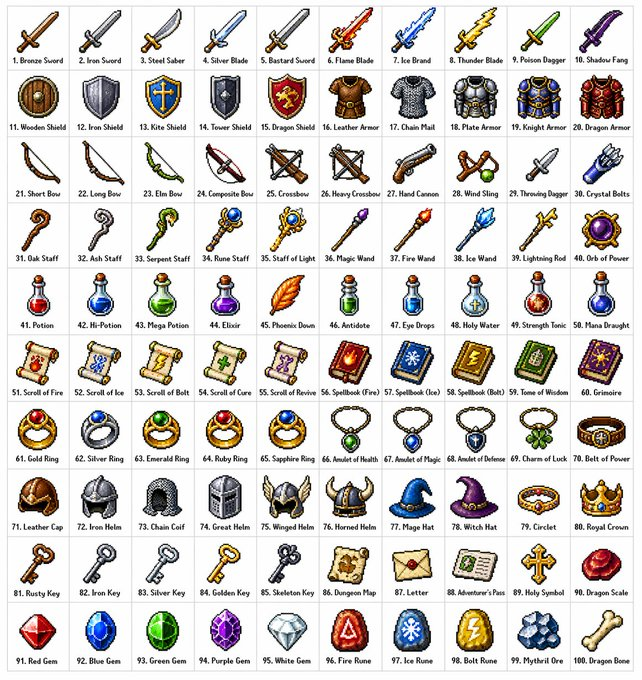
Visual Effects
Create a {argument name="grid size" default="10x10"} grid containing {argument name="item count" default="100"} different fantasy role-playing game (RPG) items in a {argument name="art style" default="classic pixel art style"} (16-bit or 32-bit sprite style, similar to Japanese RPGs from the SNES/GBA era). Each item should occupy a square tile individually with a short, clear label below. The grid should be neatly arranged on a white background. Ensure each item is visually unique and every label is spelled correctly. Use clean pixel edges, a limited palette for each sprite, and subtle dithering for shadows. Use the following row themes: Row 1: Swords and blades; Row 2: Shields and armor; Row 3: Bows, crossbows, and ranged weapons; Row 4: Staves, wands, and magical implements; Row 5: Potions, elixirs, and bottles; Row 6: Scrolls, grimoires, and spellbooks; Row 7: Rings, amulets, and enchanted accessories; Row 8: Helmets, crowns, and headgear; Row 9: Keys, relics, and quest items; Row 10: Gems, runes, and crafting materials. Display each tile as a centered item sprite on a clean background square, presented in the form of classic inventory icons—similar to what you'd see in a fantasy RPG menu. Maintain consistency and coherence in the overall style, reminiscent of beloved retro fantasy RPGs—charming and refined, yet clear even at small sizes.
This is a free AI prompt from the Orelon library. Thousands more image prompts here are free to copy and adapt.
Explore more image prompts


Ready to create
Start with this curated direction in Orelon, then shape it into your next visual.