Camera Control
Kawaii Doll Magical Realism Character Portrait Prompt
Likes
59
Views
1.7K
 Orelon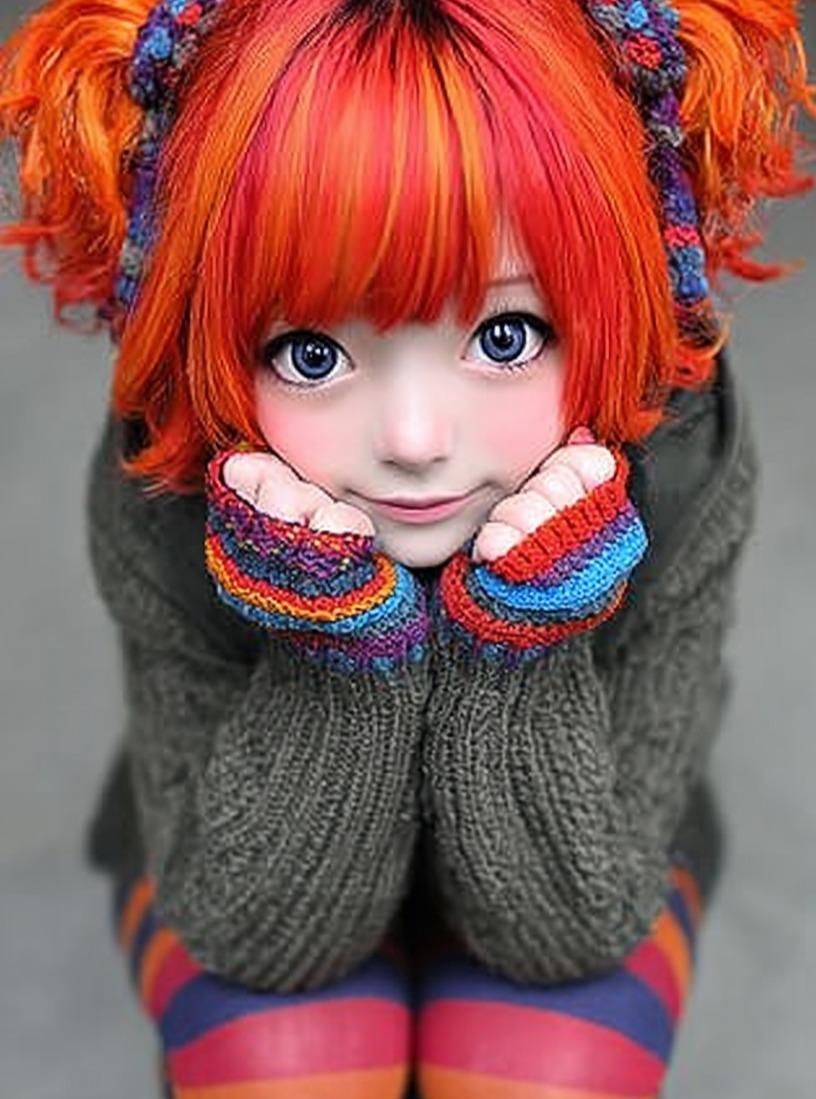
Camera Control
{ "Objective": "Create a highly detailed kawaii doll-like character portrait with a cozy, whimsical, magical realism aesthetic", "PersonaDetails": { "Subject": { "Type": "Doll-like young girl character", "Hair": { "Color": "Vibrant red–orange", "Style": "Soft pigtails with fluffy bangs", "Texture": "Silky strands with gentle volume" }, "Face": { "Eyes": "Oversized glossy anime-style eyes", "Skin": "Porcelain-smooth with soft rosy cheeks", "Expression": "Gentle, innocent smile" }, "Pose": { "Position": "Sitting with knees pulled close", "Hands": "Tucked under chin", "BodyLanguage": "Shy, cozy, endearing" } } }, "WardrobeAndAccessories": { "Clothing": { "Top": "Oversized knitted sweater with colorful patterns", "Legwear": "Striped tights" }, "Accessories": { "Style": "Handmade-looking, whimsical details", "MaterialFeel": "Yarn, fabric, soft craft elements" } }, "SceneDescription": { "Environment": "Studio-style setup", "Background": "Neutral, softly blurred", "Atmosphere": "Quiet, warm, intimate" }, "Composition": { "Framing": "Close-up to mid-shot character portrait", "DepthOfField": "Shallow depth of field", "Focus": "Ultra-sharp focus on face and fabric textures" }, "LightingAndColor": { "Lighting": "Soft studio lighting with gentle falloff", "Highlights": "Subtle highlights enhancing doll-like skin", "ColorPalette": { "Primary": "Soft pastels", "Secondary": "Warm autumn tones" } }, "ArtDirection": { "Style": "Photorealistic doll aesthetic", "Aesthetic": "Kawaii, cozy, magical realism", "TextureEmphasis": [ "Visible yarn fibers", "Knitted fabric detail", "Smooth porcelain skin finish" ], "DetailLevel": "Extremely high detail, handcrafted feel" }, "PhotographyStyle": { "Genre": "Character portrait / collectible doll photography", "RealismLevel": "Stylized photorealism", "Resolution": "8K ultra-high detail" }, "Mood": { "Tone": "Whimsical, cute, comforting", "EmotionalFeel": "Innocence, warmth, gentle charm" }, "NegativePrompt": [ "realistic human proportions", "harsh lighting", "dark horror tone", "rough textures", "plastic toy look", "flat shading", "low detail" ], "ResponseFormat": { "Type": "Single character portrait", "Orientation": "Portrait", "AspectRatio": "2:3" } }
This is a free AI prompt from the Orelon library. Thousands more image prompts here are free to copy and adapt.
Explore more image prompts





Ready to create
Start with this curated direction in Orelon, then shape it into your next visual.