Commercial
Candid Street Fashion Snapshot
Views
21
 Orelon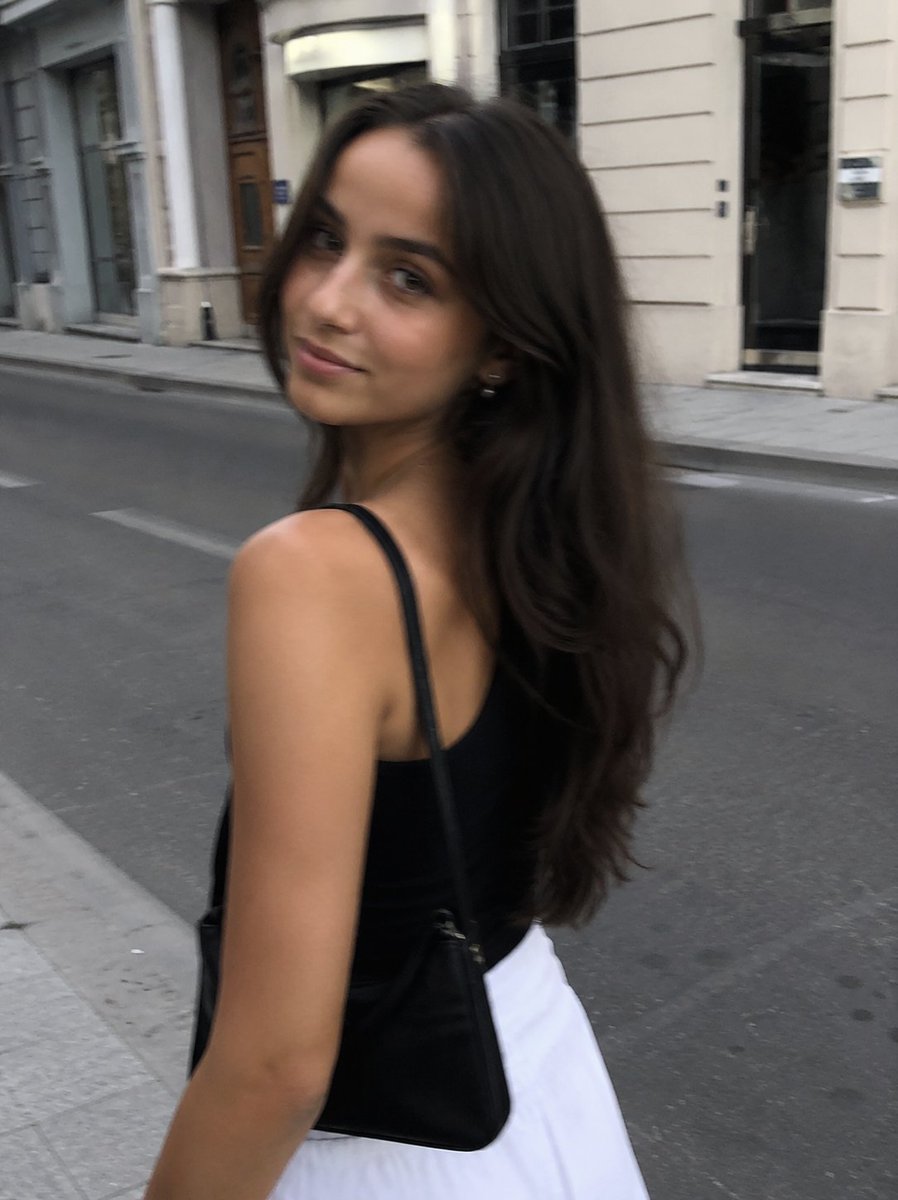
Commercial
Create a candid street-fashion photo in a realistic smartphone snapshot style. Show a young woman from the side/back walking along a quiet European city street in daylight, framed from mid-thigh upward in a vertical 3:4 composition. Her face is intentionally anonymized by a solid square blur/block centered over it, colored medium warm brown. She has long, voluminous, wavy dark brown hair falling over her back and shoulder. She wears a fitted black sleeveless camisole or tank top with thin straps, a high-waisted white skirt, and a small black shoulder bag with a thin strap hanging on her right side. Her skin tone is warm tan, and her posture suggests she is casually walking or turning slightly toward the camera. The background should be softly blurred with motion-like softness: an asphalt road, pale stone sidewalk, classic cream-colored building facades, tall windows, doorways, columns, and subtle street markings. Use natural ambient light, muted urban colors, slight handheld blur, shallow depth of field, and an unposed fashion-blog aesthetic. Customize the subject with {argument name="hair color" default="dark brown"}, {argument name="top color" default="black"}, {argument name="skirt color" default="white"}, {argument name="bag color" default="black"}, and {argument name="face anonymization color" default="medium warm brown"}. Avoid text, logos, watermarks, extra people, or overly polished studio lighting.
This is a free AI prompt from the Orelon library. Thousands more image prompts here are free to copy and adapt.
Explore more image prompts




Ready to create
Start with this curated direction in Orelon, then shape it into your next visual.