Visual Effects
Cinematic Falcon Starfighter Pilot
Views
56
 Orelon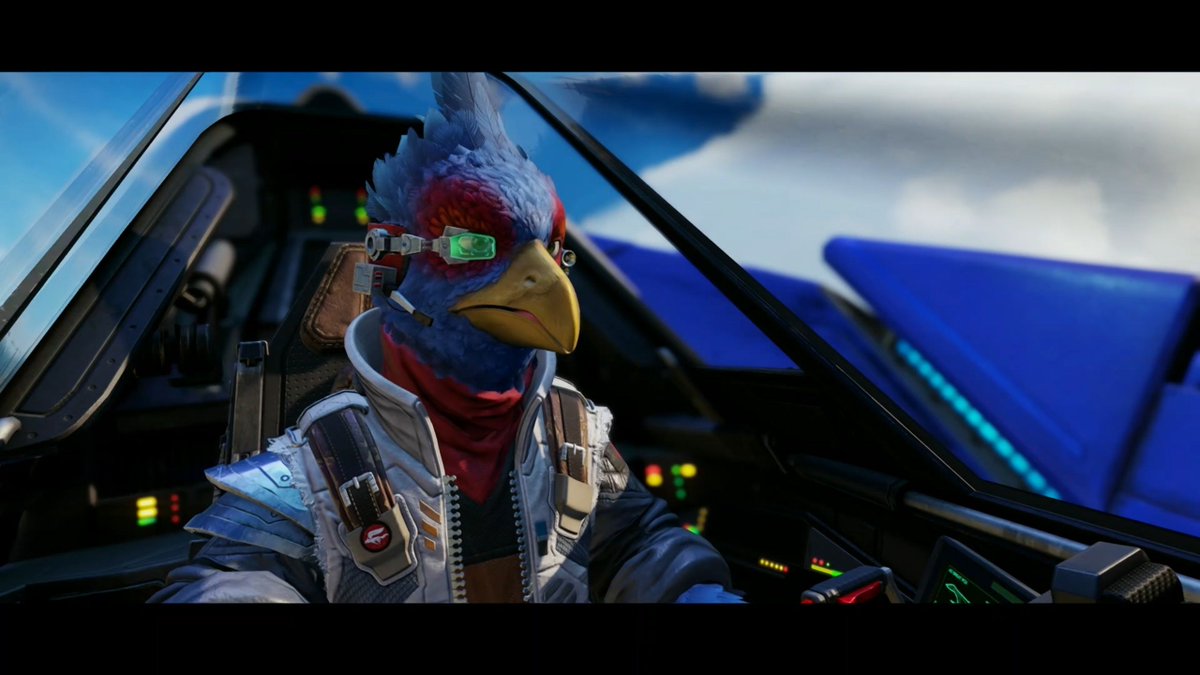
Visual Effects
Create a cinematic widescreen science-fiction scene in a 16:9 frame with black letterbox bars, showing an anthropomorphic {argument name="bird species" default="blue falcon pilot"} seated in the cockpit of a futuristic starfighter. The character is a realistic 3D game-style avian ace with vivid blue feathers, a red crest and red facial plumage, a large yellow hooked beak, and a calm focused expression, looking slightly to the right as if scanning the sky. Give the pilot a compact cybernetic headset with a glowing green monocle lens over one eye, small metal ear pieces, and a microphone boom. Dress the character in a detailed {argument name="pilot outfit" default="silver and white sci-fi flight jacket with shoulder armor, harness straps, patches, zipper details, and a red neck scarf"}. The cockpit surrounds the pilot with dark angular canopy frames, glass reflections, padded seat, control panels, small multicolored indicator lights, and a visible flight stick or console in the lower right. Outside the canopy, show blurred blue aircraft wings and bright sky with soft clouds, implying high-speed flight. Use dramatic natural daylight, shallow depth of field, glossy realistic materials, high-detail feathers, cinematic color grading, sharp foreground focus, and the look of a premium playable browser game cutscene or next-generation space racing asset.
This is a free AI prompt from the Orelon library. Thousands more image prompts here are free to copy and adapt.
Explore more image prompts




Ready to create
Start with this curated direction in Orelon, then shape it into your next visual.