Camera Control
LEGO Miniature Diorama of 'The Nun' Horror Film Set
Likes
2
Views
118
 Orelon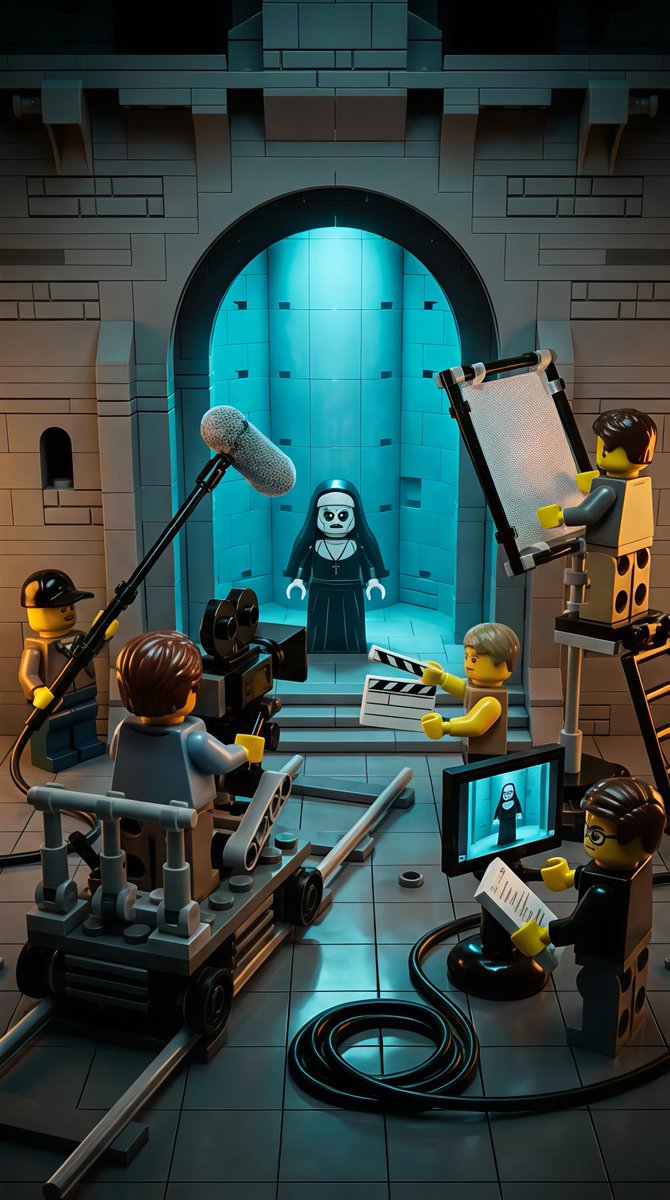
Camera Control
{ "scene_overview": { "setting": "Gothic stone interior resembling a church or cathedral set", "environment_style": "LEGO miniature diorama", "location_type": "Film set / behind-the-scenes movie production", "time_of_day": "Interior, controlled lighting (cinematic night-like mood)", "atmosphere": "Cinematic, eerie, theatrical, controlled", "mood": "Dark humor, spooky, playful, creative", "genre_influence": ["Horror", "Behind-the-scenes filmmaking", "Fantasy"] }, "primary_subject": { "type": "LEGO minifigure character", "role": "Nun / horror character", "appearance": { "outfit": "Black nun habit with white collar", "face": "Pale white face, dark hollow eyes, eerie expression", "accessories": "Cross necklace", "pose": "Standing still, facing forward" }, "positioning": { "location": "Centered within a large stone archway", "background": "Glowing blue-lit alcove or chamber" } }, "supporting_characters": { "crew_members": [ { "role": "Camera operator", "object_interaction": "Operating a large LEGO film camera", "position": "Front-left, seated on a camera dolly" }, { "role": "Boom microphone operator", "object_interaction": "Holding boom mic extended toward subject", "position": "Upper-left foreground" }, { "role": "Lighting technician", "object_interaction": "Holding a rectangular light reflector", "position": "Right side, elevated on a stand" }, { "role": "Clapperboard operator", "object_interaction": "Holding a clapperboard", "position": "Front-center-right" }, { "role": "Director / Script supervisor", "object_interaction": "Holding clipboard and papers", "position": "Bottom-right foreground" } ], "style": "All characters are LEGO minifigures with yellow skin tone and varied hairpieces" }, "props_and_equipment": { "film_equipment": [ "LEGO cinema camera", "Camera dolly on rails", "Boom microphone with fuzzy windscreen", "Lighting reflector panel", "Clapperboard", "Monitor screen displaying the nun character", "Cables coiled on the floor" ], "architectural_elements": [ "Stone brick walls", "Large arched doorway", "Recessed alcove", "Tiled stone floor" ] }, "lighting": { "primary_light": "Strong cyan-blue glow from behind the nun", "secondary_lighting": "Warm neutral studio lighting on crew and foreground", "contrast": "High contrast between cold blue background and warm foreground tones", "style": "Cinematic, dramatic, horror-inspired lighting" }, "color_palette": { "dominant_colors": ["Dark gray", "Black", "Cyan blue"], "accent_colors": ["Warm yellow (
This is a free AI prompt from the Orelon library. Thousands more image prompts here are free to copy and adapt.
Explore more image prompts





Ready to create
Start with this curated direction in Orelon, then shape it into your next visual.