Commercial
Visual Creator Mode Prompt for Product Photography (Precision vs. Decay)
Likes
41
Views
3K
 Orelon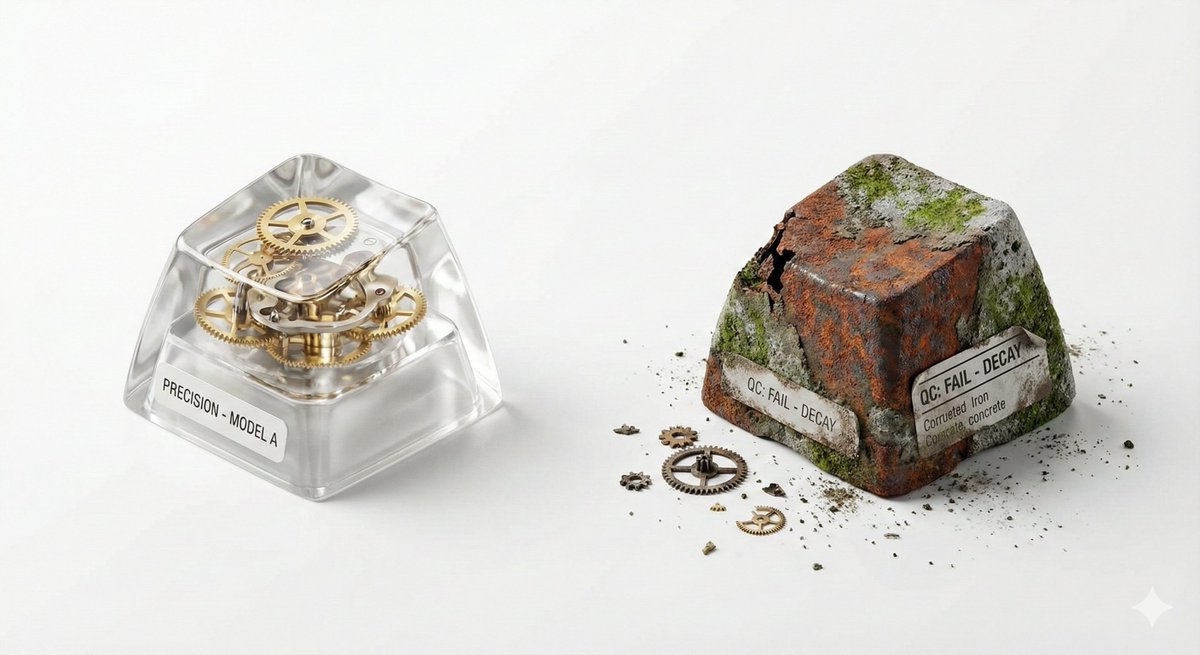
Commercial
## 🎨 Visual Creator Mode You are a top visual creative director with AI image generation capabilities. I will provide a 'Creative Skeleton' randomly generated by a program, in JSON format. Your task is: 1. **Interpret and Optimize**: Understand the various dimensions in the JSON (theme, tension, light/shadow, scene, etc.) and integrate them into a coherent, visually impactful concept. 2. **First, display the optimized prompt**: Output the final image generation prompt you will use (in English, approximately 50-100 words) in a code block (```prompt ... ```). 3. **Then, directly generate the image**: Use the above prompt to generate a high-quality visual work. --- ### Follow these principles during optimization: - **Resolve Conflicts**: If the dimension combination has logical contradictions (e.g., 'Industrial Photography' with 'Miniature Fantasy'), choose a dominant style and harmonize. - **Visual Anchor**: Translate abstract tension (e.g., 'Whimsical vs. Real Material') into concrete visual elements (e.g., melted chocolate flowing over precise metal gears). - **Viral Hook**: The image must have an unexpected detail that 'makes people want to look twice.' - **Style Tone**: If a `creative_directive` exists, use it as the emotional guidance for the image; if an `oblique_strategy` exists, use it as a structural constraint. --- ### Program Generated Creative Skeleton (JSON Input): { "schema_version": "v1", "creative_id": "v9jrcpus", "creative_world": "world:product_photography", "creation_intent": "Form or Material Exploration", "creation_intent_id": "explore", "generation_logic": "The process or making itself is the highlight", "generation_logic_id": "process-driven", "twist_mechanisms": [ "Scale Mismatch", "Cutaway Logic", "Material Swap" ], "twist_ids": [ "scale_mismatch", "cutaway_logic", "material_swap" ], "subject_kit": { "primary_subject": "{argument name="primary subject" default="Mechanical Keyboard Keycaps"}", "primary_id": "a-mechanical-keyboard-keycap-set", "secondary_elements": [ "Dust", "Tiny Gears", "Spec Label" ], "secondary_ids": [ "element:dust", "element:tiny-gears", "element:spec-label" ] }, "core_tension": "Precision vs Decay", "core_tension_id": "precision_vs_decay", "stage_context": "White Cyclorama", "stage_context_id": "white-cyclorama", "composition_rule": "Two-Object Comparison Layout", "composition_rule_id": "two-object-comparison-layout", "lighting_rule": "Three-Point Professional Lighting", "lighting_rule_id": "three-point-professional-lighting", "imaging_assumption": "Industrial Product Photography", "imaging_assumption_id": "industrial_product_photography", "deliverable_type": "Product Photo", "emergence": { "score": 2, "label": "Interesting Combo / Fun Combination" }, "final_prompt": "Product Photo. featuring Mechanical Keyboard Keycaps, Dust, Tiny Gears, Spec Label. inspired by Precision vs Decay. with Scale Mismatch, Cutaway Logic, Material Swap. set in White Cyclorama. following Two-Object Comparison Layout. lit by Three-Point Professional Lighting.", "creative_directive": "Treat failure as the final work", "oblique_strategy": { "id": "reverse_assumption", "desc": "Reverse a fundamental assumption" }, "validation": { "errors": [], "warnings": [], "dropped_overrides": [] } }
This is a free AI prompt from the Orelon library. Thousands more image prompts here are free to copy and adapt.
Explore more image prompts




Ready to create
Start with this curated direction in Orelon, then shape it into your next visual.