Effects by Tags
Photorealistic Calligraphy Scholar Scene
Views
1.1K
 Orelon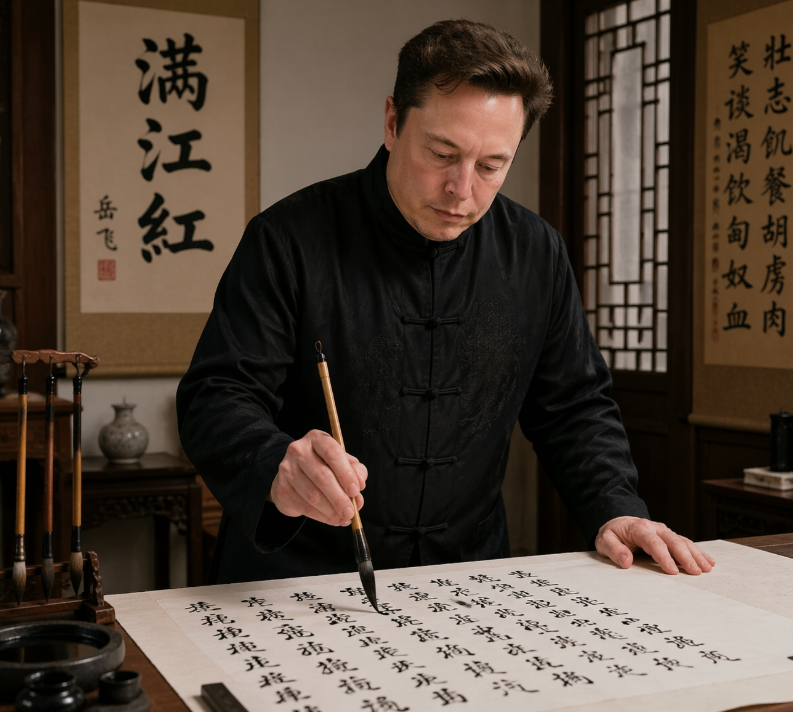
Effects by Tags
A realistic indoor portrait of {argument name="subject" default="Elon Musk"} standing at a traditional Chinese writing desk, practicing brush calligraphy on a large sheet of rice paper. He wears a black Tang-style Chinese jacket with frog-button closures and subtle embroidered texture, leaning slightly forward with one hand resting on the table and the other holding a calligraphy brush vertically over the paper. The scene is a warm, elegant scholar's studio with dark wooden furniture, a carved brush stand holding exactly 4 hanging calligraphy brushes on the left, an ink stone and small ink containers in the lower-left foreground, and a small ceramic vase on a side table in the back. Behind him are exactly 2 vertical hanging scrolls: the left scroll prominently displays the large characters {argument name="left scroll text" default="满江红"}, and the right scroll contains a longer column of Chinese calligraphy. A wooden lattice window appears on the right side, letting in soft ambient light. The paper on the desk is filled with many lines of black Chinese calligraphy in flowing semi-cursive script, suggesting he is writing {argument name="written poem" default="《满江红》"}. Use a documentary-style, photorealistic aesthetic with cinematic warm lighting, rich wood tones, authentic calligraphy tools, shallow depth of field, waist-up composition, and a serious, focused atmosphere.
This is a free AI prompt from the Orelon library. Thousands more image prompts here are free to copy and adapt.
Explore more image prompts





Ready to create
Start with this curated direction in Orelon, then shape it into your next visual.