Camera Control
Cinematic Portrait Through Rain-Streaked Window Prompt
Likes
53
Views
1.2K
 Orelon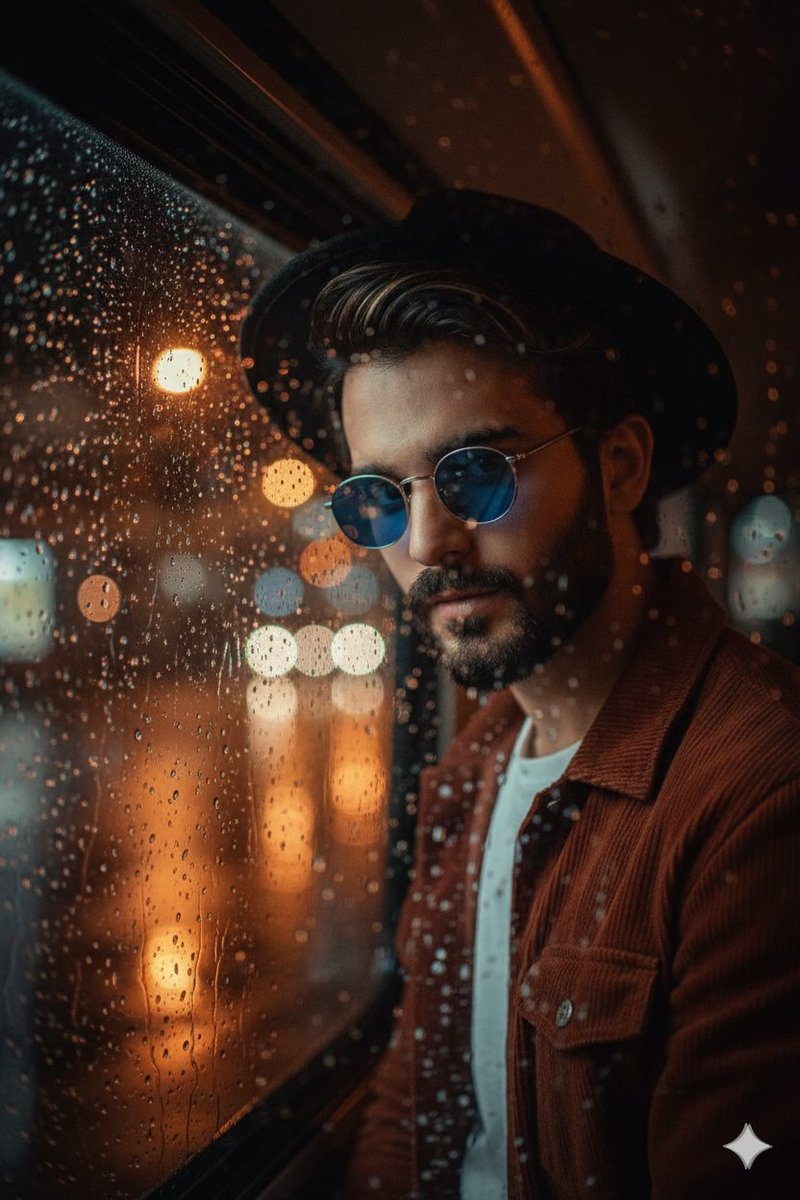
Camera Control
{ "Objective": "Generate a hyper-realistic 8K cinematic portrait of a young man viewed through a rain-streaked bus window at night.", "Identity_Safety": "Maintain facial features, hairstyle, and appearance consistent with any provided reference image if used.", "Subject": { "Description": "Handsome young man with dark wavy hair and a well-groomed beard", "Accessories": { "Hat": "Black fedora hat", "Glasses": "Round blue-tinted vintage sunglasses" }, "Expression": "Intense stare, emotional and cinematic" }, "Camera_and_Tech": { "Lens": "35mm", "Aperture": "f/1.8", "Style": "Cinematic close portrait with shallow depth of field", "Resolution": "8K hyper-realistic" }, "Scene": { "Setting": "Inside a bus at night", "Perspective": "Viewer is outside the bus, looking through rain-streaked glass toward the subject", "Glass_Texture": [ "Raindrops", "Condensation", "Smudged reflections" ], "Background": { "Lighting": "Warm city street lights", "Effects": "Soft cinematic bokeh and diffused glow" } }, "Atmosphere": { "Mood": "Moody, emotional, high contrast", "Lighting": { "Type": "Nighttime cinematic lighting", "Characteristics": [ "High contrast facial highlights", "Soft shadows", "Reflected light from city streets" ] } }, "Visual_Style": { "Aesthetic": "Hyper-realistic film-style portrait", "Texture_Details": [ "Raindrop clarity on glass", "Realistic condensation and streak patterns", "Sharp facial details despite glass obstruction", "Film-like color grading with warm bokeh and cool reflections" ], "Color_Profile": "Warm city tones + cool blue tint from sunglasses", "Depth_of_Field": "Strong background blur, focused subject behind glass" }, "Output_Requirements": { "Format": "Image", "Quality": "Ultra-detailed cinema-grade portrait", "Orientation": "Portrait or tight medium shot" } }
This is a free AI prompt from the Orelon library. Thousands more image prompts here are free to copy and adapt.
Explore more image prompts





Ready to create
Start with this curated direction in Orelon, then shape it into your next visual.