Visual Effects
LLMFIT Model Loadout Dashboard
Likes
1
Views
240
 Orelon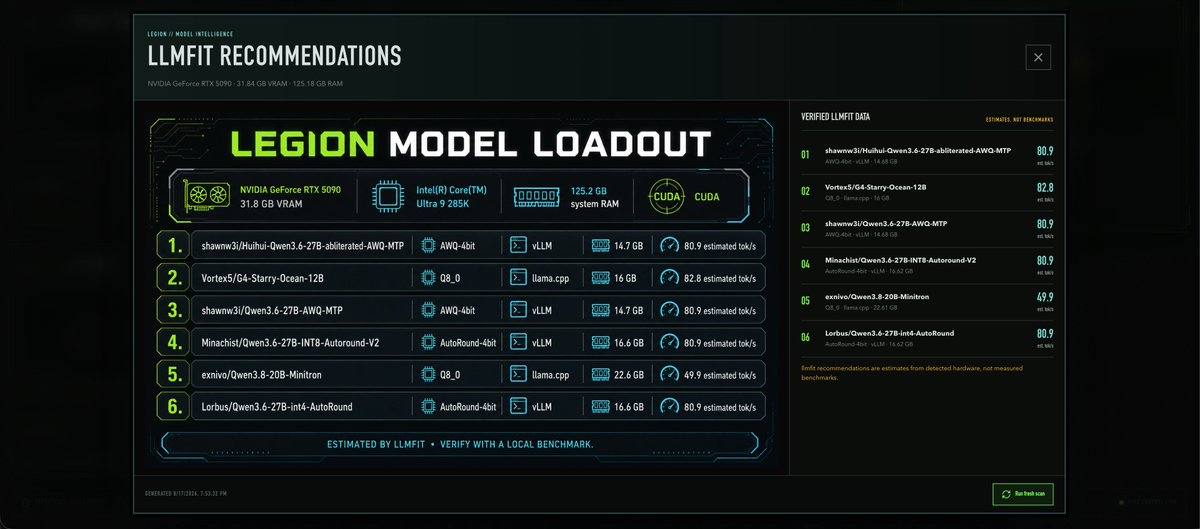
Visual Effects
Goal: Create a dark futuristic dashboard infographic for {argument name="dashboard title" default="LLMFIT RECOMMENDATIONS"}, showing local AI model recommendations for a workstation. Canvas: Wide 21:9 desktop-panel image, black and deep teal background with subtle glow, thin neon cyan border, faint scanline/grid texture, compact technical UI styling. Layout: Top header bar with small label “LEGION / MODEL INTELLIGENCE”, large title “LLMFIT RECOMMENDATIONS”, subtitle “NVIDIA GeForce RTX 5090 · 31.84 GB VRAM · 125.18 GB RAM”, and a small outlined close-box icon at the top right. Main content is split into two panels: a large left recommendation module occupying about two thirds of the width, and a narrower right verification panel. Left panel: Add a large cyberpunk card titled “LEGION MODEL LOADOUT”, with “LEGION” in neon lime and the rest in white blocky techno typography. Under the title, show exactly 4 hardware/status tiles with icons: 1) NVIDIA GeForce RTX 5090, 31.8 GB VRAM with a GPU fan icon, 2) Intel(R) Core(TM) Ultra 9 285K with a CPU chip icon, 3) 125.2 GB system RAM with a memory module icon, 4) CUDA with a circular CUDA emblem. Beneath the tiles, show exactly 6 ranked model rows, each with a large lime outlined rank number, model name, quantization, runtime, RAM amount, and estimated tok/s speed. The 6 rows are: 1) shawnw3j/Huihui-Qwen3.6-27B-abliterated-AWQ-MTP — AWQ-4bit — vLLM — 14.7 GB — 80.9 estimated tok/s; 2) Vortex5/G4-Starry-Ocean-12B — Q8_0 — llama.cpp — 16 GB — 82.8 estimated tok/s; 3) shawnw3j/Qwen3.6-27B-AWQ-MTP — AWQ-4bit — vLLM — 14.7 GB — 80.9 estimated tok/s; 4) Minachist/Qwen3.6-27B-INT8-Autoround-V2 — AutoRound-4bit — vLLM — 16.6 GB — 80.9 estimated tok/s; 5) exnivo/Qwen3.8-20B-Minitron — Q8_0 — llama.cpp — 22.6 GB — 49.9 estimated tok/s; 6) Lorbus/Qwen3.6-27B-int4-AutoRound — AutoRound-4bit — vLLM — 16.6 GB — 80.9 estimated tok/s. Use small cyan icons for chip/runtime/RAM/speed columns. Footer inside left card: Center a slim neon divider with the text “ESTIMATED BY LLMFIT · VERIFY WITH A LOCAL BENCHMARK.” Right panel: Title it “VERIFIED LLMFIT DATA” with a small note “ESTIMATES, NOT BENCHMARKS”. Show exactly 6 compact verification entries matching the same 6 models, numbered 01 through 06 in lime, each with smaller gray metadata text and a bright cyan score on the far right: 80.9, 82.8, 80.9, 80.9, 49.9, 80.9. Add a small orange warning note at the bottom: “llmfit recommendations are estimates from detected hardware, not measured benchmarks.” Bottom app chrome: Add a tiny timestamp line at bottom left, “GENERATED 8/17/2026, 7:53:32 PM”, and a small green outlined button at bottom right labeled {argument name="button label" default="Refresh scan"} with a refresh icon. Visual style: High-contrast sci-fi terminal UI, angular panel corners, thin glowing cyan circuit traces, lime accents, white condensed techno font, dense but readable technical typography, subtle green monitor glow. Keep the image crisp like a generated dashboard screenshot, not a poster. Constraints: Use exactly 6 model recommendation rows, exactly 4 hardware tiles, and exactly 6 verified-data entries. Do not add people, photos, logos beyond simple hardware-style icons, or extra sections. Keep all visible text in English.
This is a free AI prompt from the Orelon library. Thousands more image prompts here are free to copy and adapt.
Explore more image prompts


Ready to create
Start with this curated direction in Orelon, then shape it into your next visual.